10 Signs Your Factory Needs to Replace Its Legacy CMMS
Right Now
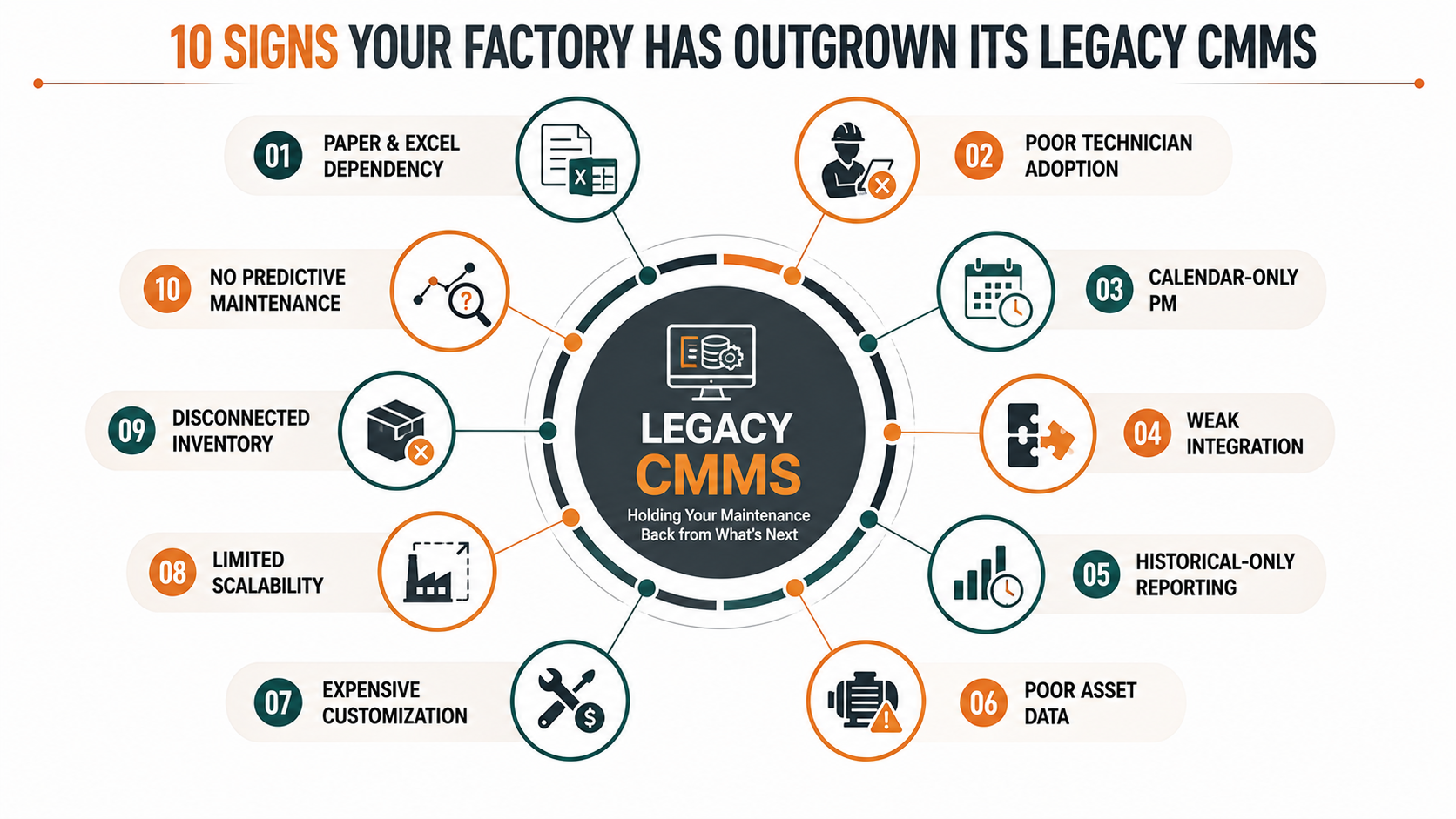
A CMMS should make maintenance more controlled, visible, and proactive. But when the system itself becomes difficult to use, disconnected from plant operations, dependent on spreadsheets, or incapable of supporting modern reliability practices, it can quietly become part of the problem.
Knowing when to replace a legacy CMMS is therefore not simply an IT decision. It is a maintenance-strategy decision.
A factory may still have thousands of historical work orders, preventive-maintenance schedules, asset records, spare-parts data, and technician notes inside an older system. That history creates understandable resistance to change. Yet keeping an outdated maintenance platform simply because “we have always used it” can create hidden costs through delayed work, poor data quality, low technician adoption, weak analytics, manual processes, and missed opportunities for predictive maintenance.
The more important question is not whether your CMMS still technically works.
It is whether your CMMS still supports the way your plant needs to operate.
This guide identifies 10 practical CMMS upgrade signs that indicate your organization may have outgrown its existing platform—and explains how to evaluate the business case for moving toward a modern CMMS.
What Is a Legacy CMMS?
A legacy CMMS is not necessarily an old system based purely on its age. A platform can be relatively recent and still behave like legacy software if it cannot adapt to modern maintenance requirements.
A legacy CMMS typically becomes problematic when it is characterized by:
- Heavy dependence on manual data entry
- Limited mobile functionality
- Poor integration with ERP, IoT, MES, SCADA, or other plant systems
- Static rather than predictive maintenance workflows
- Difficult reporting and analytics
- Fragmented asset information
- Low technician adoption
- Inflexible workflows
- Weak scalability across sites
- High maintenance or customization costs
The defining issue is operational friction.
A modern maintenance organization needs its CMMS to act as a digital operating layer connecting assets, people, work orders, maintenance strategies, condition data, inventory, analytics, and management decisions.
When the system becomes an administrative database rather than an operational platform, replacement should move onto the strategic agenda.
The 10 Signs You Need to Replace Your Legacy CMMS
1. Your Technicians Still Depend on Paper, Excel, or Phone Calls
One of the clearest signs that you need to replace a legacy CMMS is the existence of parallel maintenance systems.
If technicians receive breakdown requests through phone calls or messaging applications, record readings on paper, update Excel sheets later, and only then enter information into the CMMS, your system is not functioning as the operational source of truth.
The problem is larger than inconvenience.
Every manual handoff introduces the possibility of:
- Missing information
- Duplicate entries
- Incorrect timestamps
- Delayed work-order creation
- Incomplete failure histories
- Poor accountability
- Lost technician knowledge
A modern CMMS should move information toward the point of work rather than forcing technicians to return to a desktop terminal after completing the job.
Mobile access changes the workflow fundamentally. A technician should be able to receive an assignment, identify the asset, review previous history, access procedures, record readings, attach photographs, consume spare parts, complete a checklist, and close the work order from the field.
MaintWiz, for example, provides mobile asset information, work-order tracking, inspections, preventive-maintenance activities and IoT-enabled asset insights through its mobile-first approach.
Why this matters
The objective of CMMS modernization is not simply to eliminate paper.
It is to eliminate information latency.
When maintenance information reaches planners and supervisors hours or days after the work occurred, management decisions are inevitably based on yesterday’s reality.
2. Your Preventive Maintenance Program Is Still Mostly Calendar-Based
A second major warning sign is a CMMS that treats preventive maintenance as a collection of static calendar reminders.
Traditional PM logic often looks like this:
Every motor → inspect every 30 days.
But industrial assets do not necessarily fail according to calendar intervals.
Operating hours, load, temperature, vibration, production cycles, environmental conditions, duty cycles, and component history can all influence asset condition.
A modern maintenance system should therefore support a progression:
Time-Based Maintenance → Usage-Based Maintenance → Condition-Based Maintenance → Predictive Maintenance
If your existing system cannot accommodate increasingly intelligent maintenance strategies, you may be operating below the capability of your equipment and data environment.
MaintWiz’s preventive-maintenance capabilities include automated scheduling, customizable maintenance plans, real-time task tracking, mobile access, analytics, resource optimization and risk-based prioritization.
What to ask
Ask your maintenance team:
“Can our current CMMS tell us why this PM exists, whether it is still effective, and whether its frequency should change?”
If the answer is simply “it reminds us when the task is due,” your PM strategy may be ready for modernization.
3. Your CMMS Cannot Integrate with the Systems Already Running Your Factory
Modern plants rarely operate with a single software platform.
The maintenance ecosystem may include:
- ERP
- MES
- SCADA
- PLCs
- IIoT platforms
- condition-monitoring systems
- warehouse systems
- energy-management systems
- production databases
- cloud analytics platforms
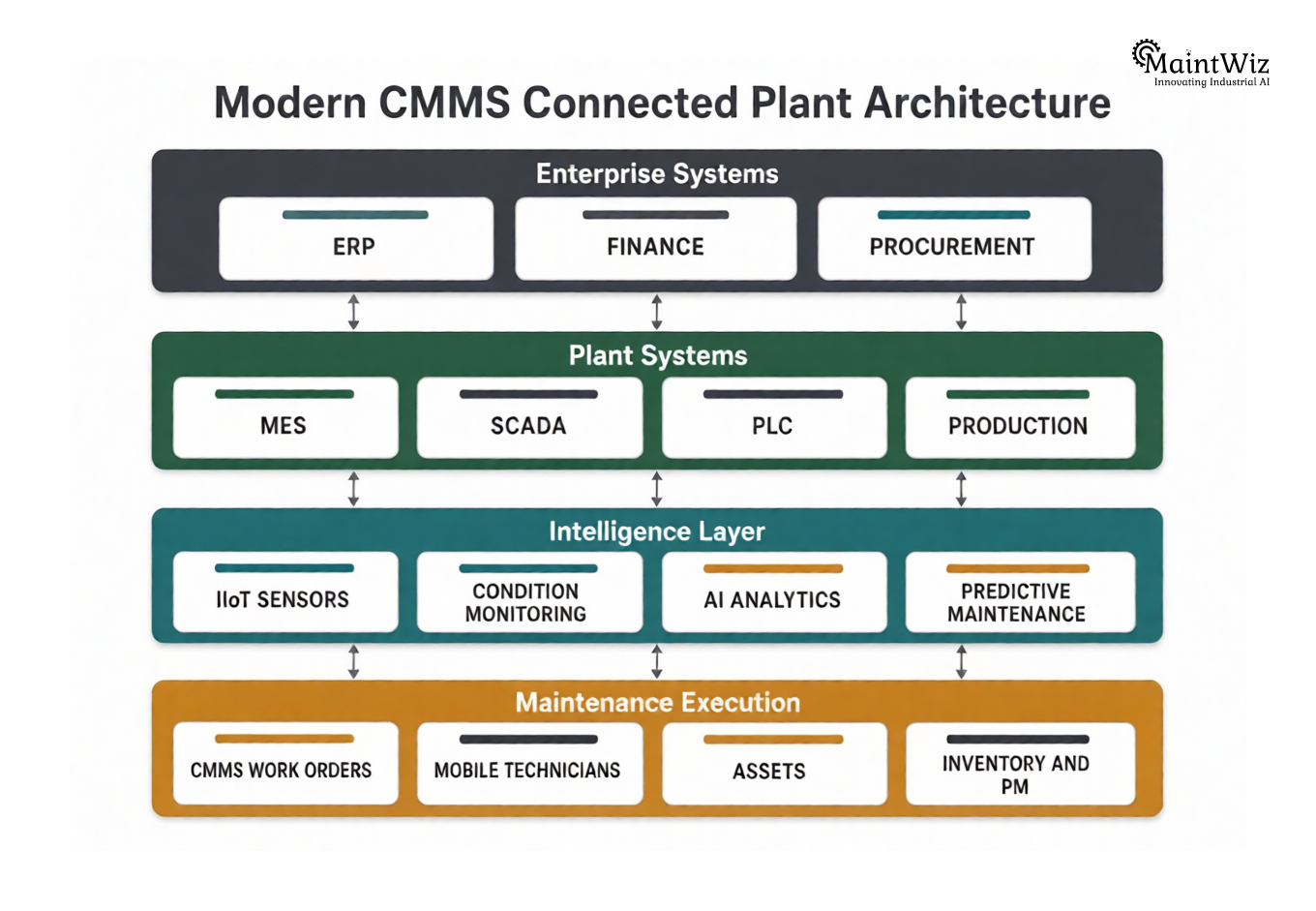
A legacy CMMS often sits beside these systems rather than communicating with them.
That creates another form of manual work.
Production discovers a problem.
Someone calls maintenance.
Maintenance creates a work order.
A technician investigates the equipment.
The result is entered manually.
Management later exports data for analysis.
That is not digital integration. It is digital administration.
A modern CMMS should increasingly function as a connected maintenance layer.
For example, MaintWiz describes integration with ERP and operational technologies, including SAP and IoT, while its IoT capabilities can use sensor information to support automated work-order creation.
The strategic test
Ask:
“What happens in our CMMS when an asset condition crosses a critical threshold?”
If the answer is:
“Someone has to notice it and create a work order manually,”
there is significant room for modernization.
4. Your Maintenance Reports Tell You What Happened—Not What Will Happen
This is one of the most consequential CMMS upgrade signs.
Legacy systems often produce reports containing:
- Number of work orders
- Maintenance costs
- PM completion
- Breakdown counts
- MTTR
- MTBF
- Technician hours
These metrics are useful, but they are largely retrospective.
They answer:
What happened?
Modern reliability management increasingly requires answers to:
Why did it happen?
What is changing?
Which asset is becoming risky?
What should we do next?
Which intervention will have the greatest operational impact?
That requires analytics beyond static reporting.
Condition monitoring and predictive maintenance can help convert raw equipment data into maintenance decisions. MaintWiz describes AI-driven condition monitoring, historical data analysis, asset-health reporting and integration with IoT, SCADA and DCS data.
The distinction is critical.
A reporting system describes maintenance performance.
A modern maintenance platform should help improve maintenance decisions.
5. Your Technicians Avoid the CMMS
A CMMS can have hundreds of features and still fail if technicians do not want to use it.
This is often underestimated during software evaluations.
Plant leadership may see:
“We have a CMMS.”
Technicians may experience:
“It takes too long to enter a work order.”
That gap is strategically dangerous.
Low adoption typically creates a feedback loop:
Poor usability → incomplete data → weak analytics → poor decisions → technician frustration → even lower adoption
The opposite loop is equally powerful:
Simple workflow → better adoption → better data → stronger insights → better maintenance decisions → greater trust in the system
A modern CMMS should reduce the administrative burden placed on technicians.
Mobile interfaces, QR asset identification, digital checklists, simplified work-order entry, photographs, voice or structured data capture, and contextual asset information can all reduce friction.
The question should therefore not be:
“How many features does our CMMS have?”
Ask:
“How many minutes does it take a technician to complete a typical maintenance transaction?”
That is a much more useful measure of usability.
6. Your Asset Data Is Incomplete, Duplicated, or Difficult to Trust
Maintenance decisions are only as good as the asset information supporting them.
A legacy CMMS can accumulate years of inconsistent data:
- Duplicate equipment records
- Incorrect asset hierarchies
- Missing specifications
- Outdated locations
- Inconsistent naming conventions
- Incomplete failure codes
- Missing maintenance history
- Incorrect spare-part associations
Over time, the CMMS becomes a digital archive rather than a reliable representation of the physical plant.
This is particularly dangerous because poor data can create false confidence.
A dashboard may look sophisticated while the underlying asset hierarchy is wrong.
Modern asset management requires a connected digital representation of equipment, location, maintenance history, criticality, condition, work orders, costs and performance.
MaintWiz positions asset management around centralized digital records, real-time asset performance monitoring, lifecycle information, predictive analytics, inventory, audits and asset intelligence.
The data-quality test
Select 20 critical assets and ask:
- Is each asset correctly identified?
- Is its parent-child hierarchy accurate?
- Is its maintenance history complete?
- Are failure modes consistently coded?
- Are critical spare parts connected?
- Is the asset’s current condition visible?
- Can a technician access this information from the field?
If several answers are “no,” the issue may be more than poor housekeeping.
Your CMMS architecture may need modernization.
7. Your CMMS Requires Expensive Customization for Basic Requirements
Another warning sign is when simple operational changes require technical intervention.
Examples include:
- Adding a new approval workflow
- Changing a maintenance form
- Creating a report
- Adding a new plant
- Modifying asset fields
- Connecting another system
- Introducing mobile workflows
- Configuring a new maintenance strategy
A mature enterprise platform should provide configuration flexibility without turning every operational requirement into a software-development project.
This matters because maintenance organizations evolve.
Your plant may introduce:
- New production lines
- New assets
- New regulatory requirements
- New maintenance strategies
- New plants
- New contractors
- New digital technologies
If every change requires significant customization, the total cost of ownership can increase even when the software license itself appears inexpensive.
The hidden cost equation
The real cost of legacy software is not:
License Cost
It is:
License + Customization + Infrastructure + Support + Manual Work + Integration + Training + Lost Productivity
This is why a seemingly expensive modern CMMS can sometimes have a lower total cost of ownership than a heavily customized legacy platform.
8. Your CMMS Cannot Scale Across Plants, Assets, or Maintenance Teams
A CMMS that works reasonably well at one site may struggle when the organization expands.
Scaling problems commonly appear through:
- Multiple plants
- Different asset hierarchies
- Different maintenance standards
- Multiple currencies
- Multiple user roles
- Contractor access
- Centralized reporting
- Multi-site benchmarking
- Different production environments
A modern CMMS should provide a scalable architecture that allows standardization without forcing every plant into an identical operating model.
The objective is controlled standardization.
Corporate teams should be able to establish common maintenance principles while individual plants retain the flexibility required by their operating context.
MaintWiz describes multi-site support and SaaS deployment as part of its platform capabilities, including cross-site OEE tracking and comparison.
A useful question
Ask your IT and maintenance teams:
“If we acquired three additional plants next year, how difficult would it be to bring them onto our current CMMS?”
If the answer involves extensive infrastructure, custom development and manual data consolidation, scalability should become part of your replacement business case.
9. Your CMMS Is Disconnected from Inventory and Maintenance Planning
Maintenance reliability is not determined only by whether a failure is detected.
It is also determined by whether the organization can respond.
Imagine a critical pump showing signs of deterioration.
Your system identifies the issue.
A work order is created.
But the required bearing is unavailable.
The maintenance intervention is delayed.
The equipment eventually fails.
The organization had predictive information but still experienced downtime.
This illustrates an important principle:
Maintenance intelligence has limited value when execution capability is disconnected from it.
Modern maintenance planning should connect equipment needs with:
- Spare parts
- Technicians
- Skills
- Work orders
- Maintenance windows
- Production schedules
- Contractors
- Budgets
- Inventory availability
MaintWiz’s asset-management capabilities include inventory management, budget management, work-order management and predictive analytics, while its spare-parts functionality is designed around stock visibility, availability and traceability.
A modern CMMS should therefore help answer not only:
“What needs maintenance?”
but also:
“Can we execute that maintenance effectively?”
10. Your CMMS Cannot Support the Maintenance Strategy You Want to Become
This is ultimately the most important sign.
Perhaps your organization wants to move toward:
- Predictive maintenance
- Condition-based maintenance
- Reliability-centered maintenance
- Mobile maintenance
- IIoT-enabled monitoring
- AI-assisted decision-making
- Digital inspections
- Real-time asset health
- Integrated safety permits
- Multi-site maintenance analytics
- Industry 4.0 operations
But your existing CMMS was designed primarily for:
- Work-order entry
- PM scheduling
- Basic asset records
- Historical reporting
That creates a strategic mismatch.
Your CMMS is effectively defining the ceiling of your maintenance maturity.
The question is therefore not:
“Does the current system still work?”
It is:
“Does the current system enable the maintenance organization we are trying to build?”
If the answer is no, replacement becomes a strategic transformation rather than a software refresh.
Legacy CMMS vs Modern CMMS: What Actually Changes?
Replacing a legacy CMMS should not be justified merely by saying that the new system has “more features.”
The real difference lies in the operating model.
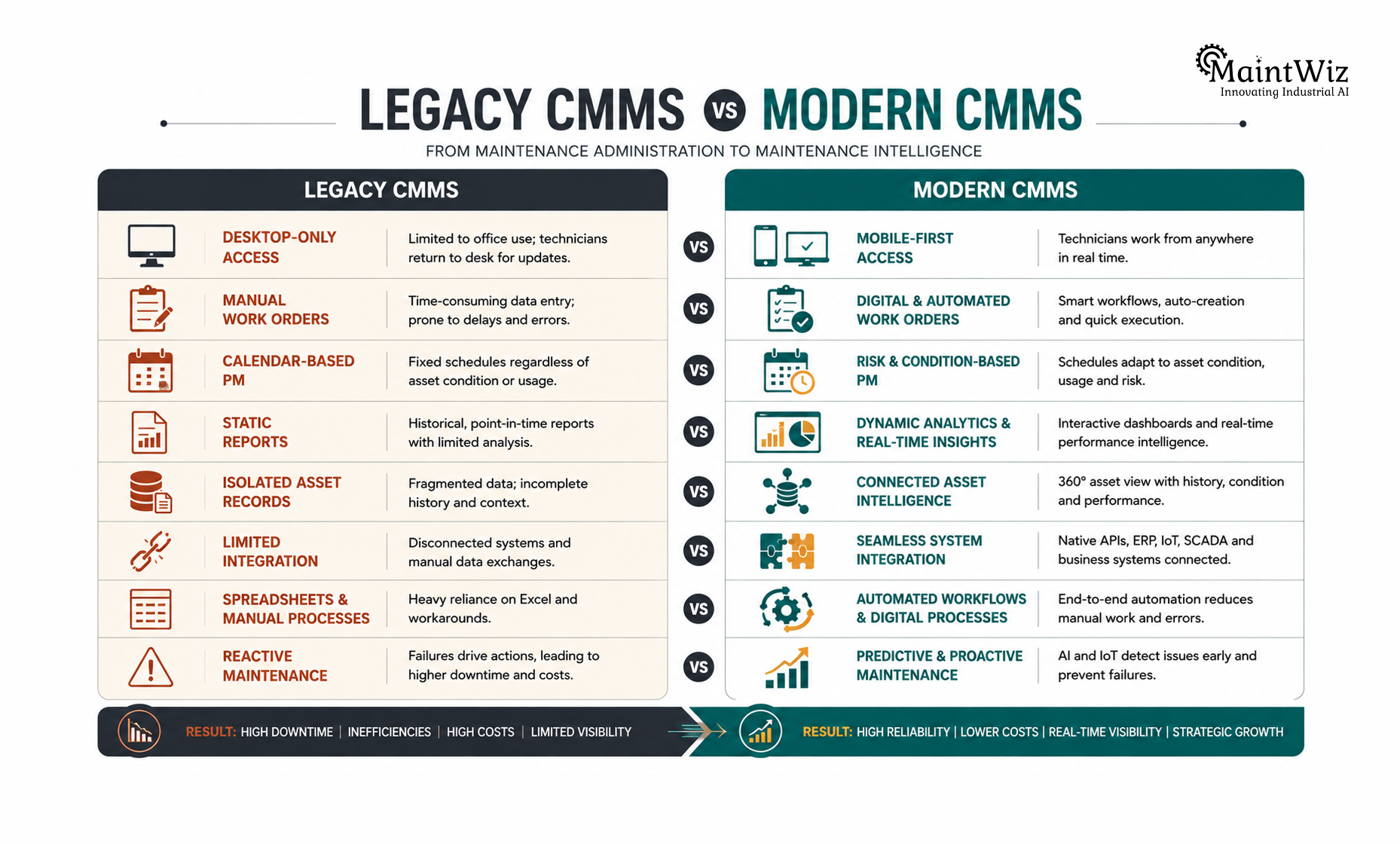
| Capability | Legacy CMMS | Modern CMMS |
|---|---|---|
| Work Orders | Manual entry and tracking | Automated, prioritized workflows |
| PM | Calendar-driven | Risk-, usage- and condition-aware |
| Mobile | Limited or unavailable | Field-first access |
| Asset Data | Static records | Connected asset intelligence |
| Analytics | Historical reporting | Real-time and predictive insights |
| IoT | Limited integration | Connected condition data |
| AI | Minimal | Decision support and predictive capabilities |
| ERP | Batch/manual exchange | API/integration-oriented |
| Inventory | Separate process | Connected maintenance planning |
| User Experience | Administrative | Technician-centric |
| Scaling | Customization-heavy | Cloud/SaaS-oriented |
| Safety | Separate systems | Integrated workflows |
| Data | Historical repository | Operational intelligence |
The transformation is therefore not from old software to new software.
It is from maintenance administration to maintenance intelligence.
How to Build the Business Case to Replace a Legacy CMMS
The strongest CMMS replacement proposals do not begin with software features.
They begin with operational problems.
Start by quantifying the current state.
1. Measure maintenance friction
Track:
- Average work-order creation time
- Average work-order closure time
- PM compliance
- Emergency work percentage
- Maintenance backlog
- Technician administrative time
- Report preparation time
- Data-entry duplication
2. Quantify reliability losses
Measure:
- Unplanned downtime
- MTTR
- MTBF
- Asset availability
- Repeat failures
- Production losses
- Maintenance-related quality losses
3. Measure system costs
Calculate:
- Licensing
- Infrastructure
- Customization
- Support
- Integration
- Upgrades
- Internal IT effort
- Manual reporting effort
4. Measure adoption
Determine:
- Percentage of technicians actively using the CMMS
- Mobile usage
- Work orders completed digitally
- Data completeness
- PM tasks documented correctly
- Asset records updated consistently
Only after establishing this baseline should you evaluate replacement options.
A 90-Day CMMS Replacement Evaluation Framework
Replacing a CMMS does not need to become a year-long technology exercise.
A disciplined 90-day evaluation can establish whether replacement is justified and identify the right implementation approach.
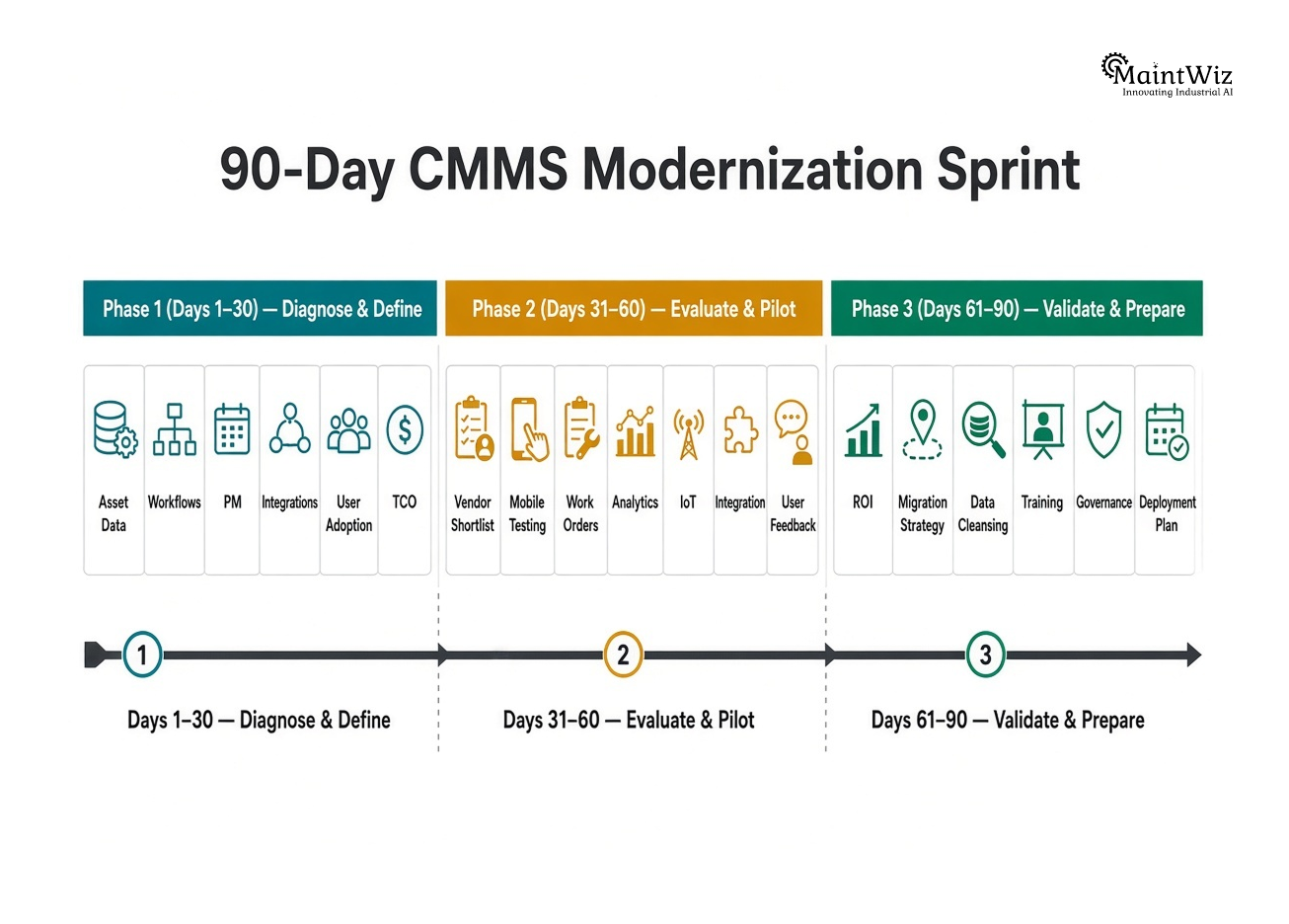
Days 1–30: Diagnose and Define
The first month should focus on understanding the current state.
Evaluate:
- Asset hierarchy
- Maintenance workflows
- PM strategy
- Work-order processes
- Mobile requirements
- Inventory integration
- ERP interfaces
- IoT/condition monitoring
- Reporting
- User adoption
- Data quality
- Total cost of ownership
Create a Legacy CMMS Gap Assessment.
Then classify every issue as:
Critical → High → Medium → Low
Do not allow the evaluation to become a feature-shopping exercise.
Define the operational problems first.
Days 31–60: Evaluate and Pilot
Now evaluate shortlisted platforms against real maintenance scenarios.
Instead of asking vendors to demonstrate generic features, give them actual plant scenarios:
“A critical compressor generates a vibration alert. Show us exactly what happens.”
Or:
“A technician discovers a recurring failure. Show us how the system captures the failure, identifies history, creates follow-up work, and supports root-cause analysis.”
Also test:
- Mobile usability
- QR asset identification
- Work-order creation
- PM scheduling
- Condition monitoring
- Inventory availability
- Approval workflows
- Analytics
- Integration
- User administration
The objective is to test workflow reality, not presentation quality.
Days 61–90: Validate ROI and Prepare Migration
The final phase should establish whether the new platform can produce measurable business value.
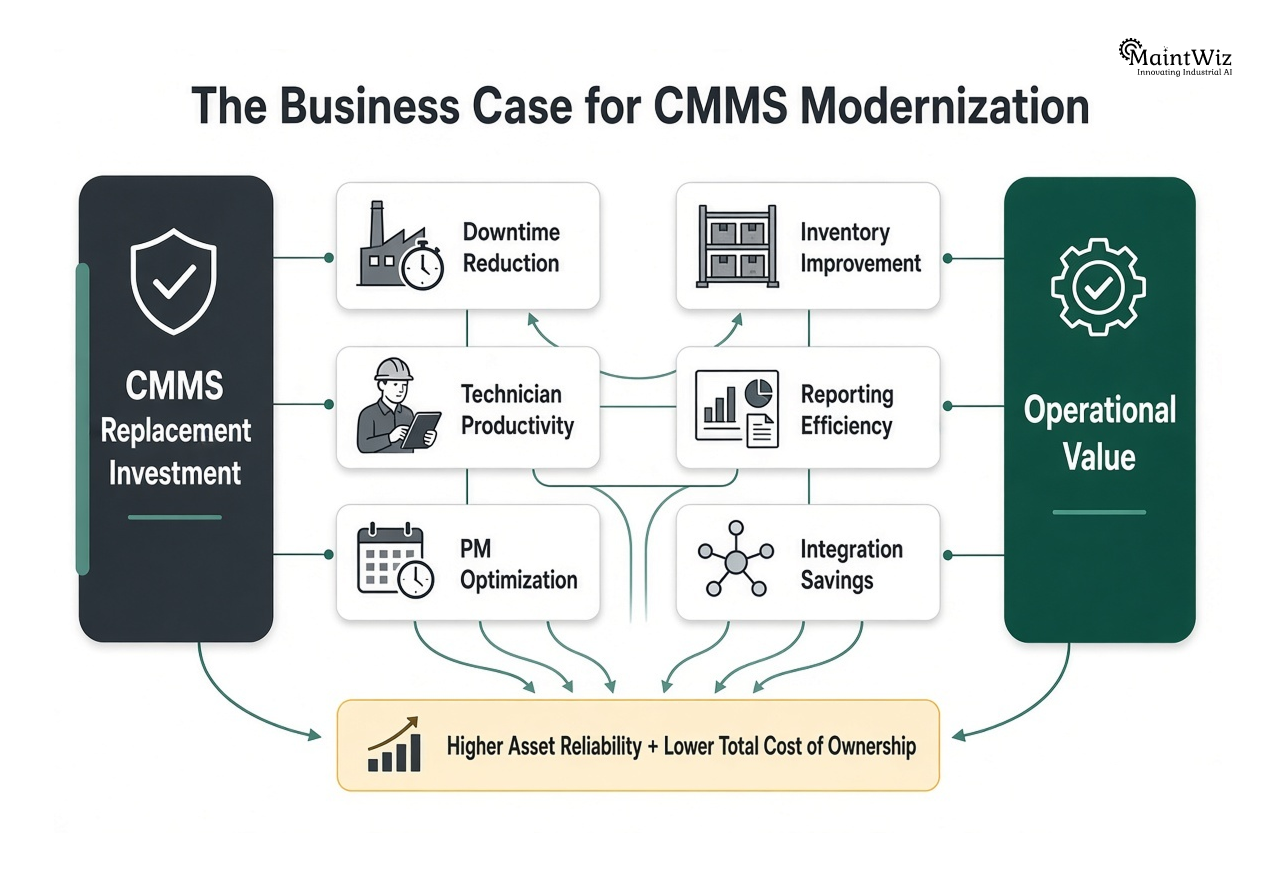
Build a business case around:
Downtime reduction + technician productivity + PM optimization + inventory improvement + reporting efficiency + integration savings − implementation cost
At the same time, define migration requirements:
- Asset master migration
- Historical work orders
- PM templates
- Spare parts
- User accounts
- Roles
- Documents
- Failure codes
- Maintenance standards
The migration should preserve valuable knowledge without automatically carrying every legacy data problem into the new platform.
How MaintWiz Supports Legacy CMMS Replacement
A modern CMMS should not simply recreate the workflows of an older system on a newer interface.
It should help the maintenance organization operate differently.
MaintWiz positions its CMMS around asset management, work-order management, preventive maintenance, predictive maintenance, analytics, mobile access, OEE and integration with ERP and operational technologies.
That makes it relevant to a legacy-modernization program in several areas.
Asset reliability
A modernized asset-management layer should connect equipment records with work history, condition information, maintenance strategies and performance indicators. MaintWiz supports digital asset records, real-time performance monitoring, predictive analytics, asset audits and asset intelligence.
Predictive maintenance
Modernization becomes particularly valuable when the organization wants to move beyond reactive and calendar-based maintenance. MaintWiz’s predictive-maintenance capabilities use equipment-condition data and AI-driven analysis to identify deterioration and support earlier intervention.
Planning and execution
Replacement should improve the connection between planning and execution—not simply replace the database. MaintWiz supports preventive-maintenance scheduling, work-order workflows, resource planning and mobile execution.
Analytics
A modern CMMS should turn maintenance data into operational decisions. MaintWiz supports OEE, asset-performance analytics, predictive insights and condition monitoring, helping organizations move toward more data-driven maintenance management.
Why a 90-day sprint matters
A focused 90-day program can use MaintWiz—or another shortlisted modern platform—as a controlled proof point rather than attempting an immediate enterprise-wide transformation.
A practical sequence is:
30 days → Diagnose
30 days → Pilot
30 days → Validate
This approach allows plant leadership to prove usability, data quality, workflow improvement and integration feasibility before scaling.
The Real Benefits of Replacing Outdated Maintenance Software
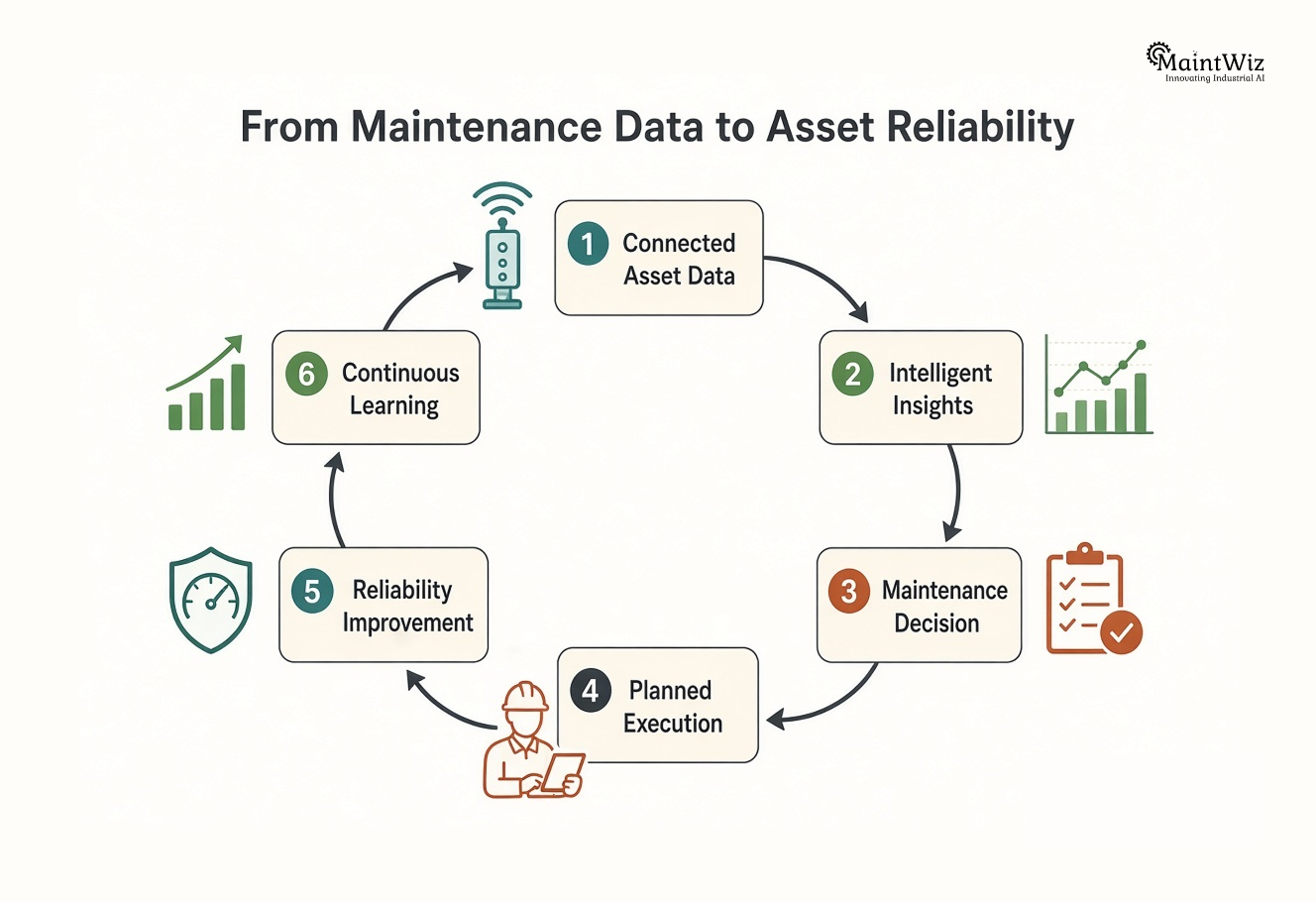
The business case for replacing outdated maintenance software should ultimately be expressed in operational outcomes.
1. Higher technician productivity
Less administrative work means more time available for actual maintenance.
2. Better asset reliability
Better asset histories and condition information support stronger maintenance decisions.
3. Faster response
Mobile workflows and automated notifications reduce information delays.
4. Stronger preventive maintenance
Dynamic scheduling and better asset intelligence help maintenance teams move beyond rigid calendar-based PM.
5. More effective predictive maintenance
Connected condition data creates a foundation for earlier failure detection.
6. Better management visibility
Managers can monitor backlog, PM compliance, MTBF, MTTR, availability, OEE and asset health using a common data environment.
7. Lower hidden maintenance costs
Automation can reduce repetitive administrative work, reporting effort, duplicate data entry and unnecessary customization.
8. Stronger integration
A modern platform can become part of the broader digital manufacturing ecosystem rather than remaining an isolated maintenance database.
Don't Replace Your CMMS Until You Understand Why the Existing One Failed
There is one final strategic warning.
Replacing software without changing the underlying maintenance process can simply reproduce the same problems.
If technicians did not complete work orders in the old system, ask why.
If PM compliance was poor, determine whether the problem was scheduling, resource availability, task quality, accountability or system usability.
If asset records were inaccurate, understand why the master data deteriorated.
If reports were ignored, determine whether they were actually useful to decision-makers.
Software can enable better maintenance.
It cannot compensate indefinitely for unclear processes, weak ownership, poor standards or inadequate governance.
The strongest CMMS replacement programs therefore combine technology modernization with maintenance-process modernization.
Final Decision: Is It Time to Replace Your Legacy CMMS?
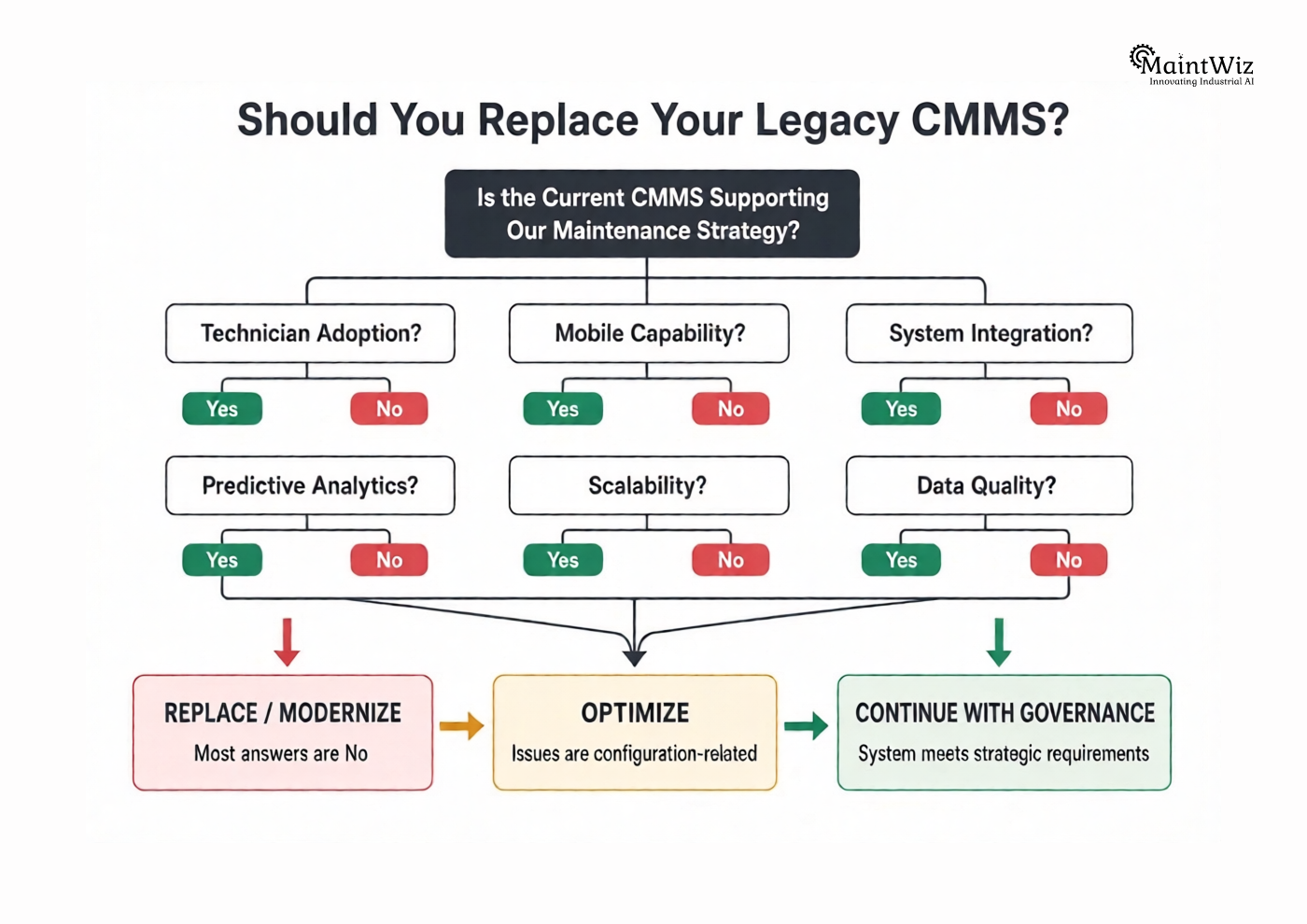
If your factory recognizes several of these signs, the decision should no longer be framed as:
“Should we buy a newer CMMS?”
The better question is:
“What maintenance operating model do we need for the next five to ten years, and can our current CMMS support it?”
If the system is preventing mobile execution, predictive maintenance, connected assets, integrated workflows, meaningful analytics, scalable operations or technician adoption, continuing to invest in it may create more risk than replacing it.
The most valuable modern CMMS benefits are not the features displayed during a software demonstration.
They are the outcomes that become possible afterward:
better information → better decisions → better maintenance execution → better asset reliability → better plant performance.
That is the real reason to replace a legacy CMMS.


Jai Balachandran is an industry expert with a proven track record in driving digital transformation and Industry 4.0 technologies. With a rich background in asset management, plant maintenance, connected systems, TPM and reliability initiatives, he brings unparalleled insight and delivery excellence to Plant Operations.
Company
Download App