

Planned Shutdown Maintenance Software: Features That
Prevent Turnaround Overruns

A planned shutdown is supposed to be controlled downtime. Yet in many industrial plants, the shutdown window becomes a race against incomplete work packages, material shortages, contractor delays, scope changes, and tasks that quietly consume schedule float. Planned shutdown maintenance software is increasingly becoming the control layer that connects scope, work orders, resources, schedules, costs, asset history, and execution data before these issues become turnaround overruns.
The underlying problem is not simply that maintenance teams lack scheduling tools. A shutdown compresses a large volume of maintenance work into a short, highly interdependent execution window. Hundreds or thousands of activities may compete for the same equipment, crafts, permits, materials, access points, and specialist resources. Turnaround scheduling therefore depends on sequencing, dependencies, resource availability, and critical-path control—not just assigning dates to work orders.
The right software should help a shutdown team answer five questions continuously:
- What work must be done?
- What must be ready before that work can start?
- Which activities can delay the return-to-service date?
- Where are resources, materials, contractors, or approvals becoming constraints?
- What has changed—and what is the impact on cost, safety, and schedule?
That distinction is critical. A digital shutdown plan should not merely document the turnaround. It should actively help the organization protect the turnaround baseline.
Why Planned Shutdowns Overrun Even When the Schedule Looks Good
Most shutdown overruns do not originate from one dramatic failure. They emerge from small planning weaknesses that compound during execution.
A work order may exist, but the required spare is not staged. A contractor may be assigned, but the required skill or certification is unavailable. An inspection may reveal additional work, but the new activity has no clear priority. A critical task may slip by six hours, while its downstream consequences remain invisible until the schedule is already under pressure.
This is why shutdown management software must connect planning with execution.
Research and industry software practices consistently emphasize the importance of work-package readiness, dependency management, critical-path visibility, resource planning, cost control, and real-time progress tracking in turnaround environments.
A spreadsheet can represent a schedule. It is much harder for a spreadsheet-based process to maintain one reliable operational picture when hundreds of work orders, contractors, materials, approvals, changes, and actual progress updates are moving simultaneously.
The objective, therefore, is not to digitize the spreadsheet. It is to create a single operational model of the shutdown.
What Is Planned Shutdown Maintenance Software?
Planned shutdown maintenance software is a specialized digital solution that helps maintenance and operations teams plan, schedule, coordinate, execute, monitor, and close maintenance activities during a defined plant shutdown or turnaround window.
Unlike a basic maintenance calendar, the software needs to connect:
- Shutdown scope
- Assets and equipment
- Work orders
- Maintenance history
- Job plans
- Labor requirements
- Contractor activities
- Spare parts and materials
- Task dependencies
- Milestones
- Critical-path activities
- Costs and budgets
- Progress updates
- Safety and compliance requirements
- Emergent work
- Schedule changes
- Post-shutdown findings
The distinction matters because shutdown work is inherently project-like. It has a defined start and finish, a fixed operating window, multiple workstreams, resource constraints, dependencies, and a high financial consequence for delays.
A capable platform therefore sits between conventional CMMS functionality and project execution management.
10 Features to Look for in Planned Shutdown Maintenance Software
The best shutdown maintenance software is not defined by the number of features on its product page. It is defined by how effectively those features reduce uncertainty before and during the outage.
1. Centralized Shutdown Scope and Work Package Management
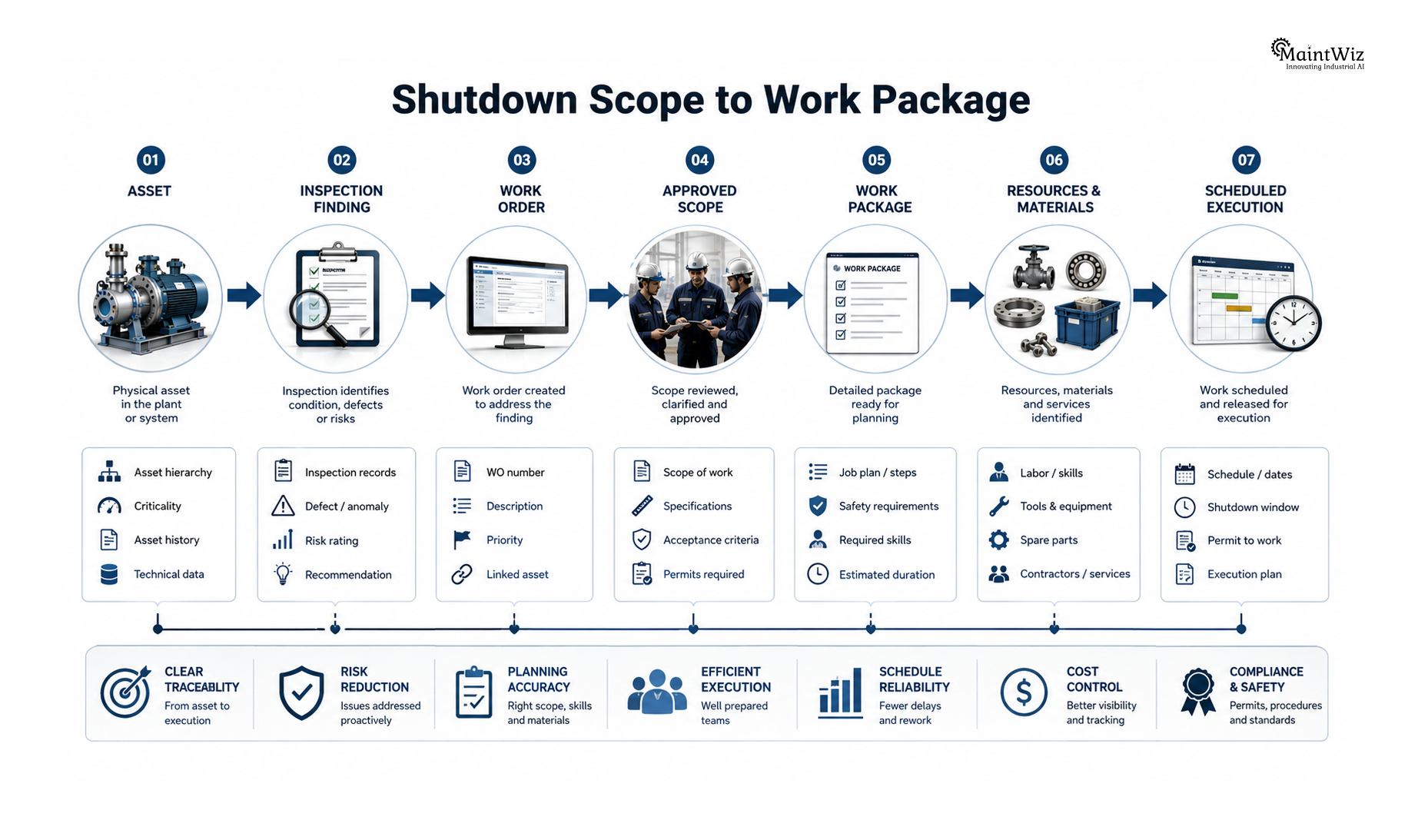
The first requirement is a controlled shutdown scope.
Every job should have a clear relationship with the relevant asset, work order, job plan, discipline, priority, estimated duration, required resources, materials, and execution window.
A mature shutdown planning process should allow planners to distinguish between:
- Approved scope
- Deferred work
- Mandatory statutory work
- Reliability-critical work
- Inspection-driven work
- Opportunity maintenance
- Emergent work
- Optional work
This prevents the shutdown from becoming a container into which every desirable maintenance activity is added.
Scope discipline is one of the strongest defenses against turnaround overruns because the execution team needs to know what the baseline actually contains.
A digital work package should ideally provide technicians and supervisors with the information required to execute without repeatedly returning to the planning office for clarification.
2. Dependency and Critical-Path Management
A shutdown schedule becomes valuable when it reveals relationships between activities.
Consider a simplified sequence:
Isolation → Equipment Opening → Inspection → Defect Identification → Repair → Reassembly → Testing → Commissioning → Startup
If inspection is delayed, repair cannot start. If repair takes longer than planned, reassembly moves. If reassembly moves, testing moves. Eventually, startup moves.
This is why critical path analysis for shutdown maintenance is more important than simply tracking completion percentages.
The critical path represents the sequence of dependent activities that determines the minimum achievable shutdown duration. Turnaround scheduling systems commonly use dependency logic, critical-path analysis, and resource optimization to identify activities capable of affecting the return-to-service date.
Planned shutdown maintenance software should therefore provide:
- Predecessor and successor relationships
- Critical-path identification
- Float visibility
- Milestone tracking
- Dependency alerts
- Delayed-task impact analysis
- Schedule baseline comparison
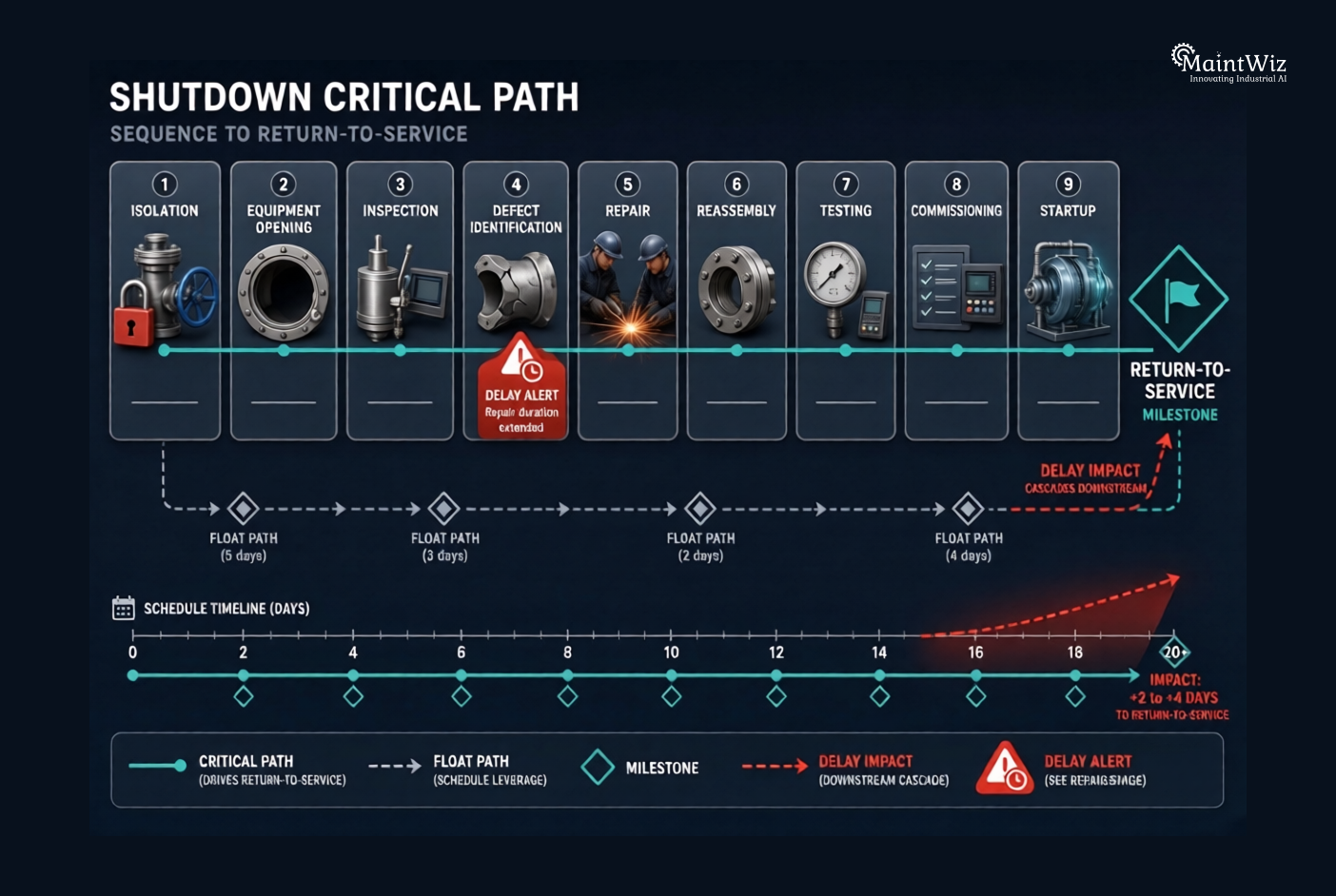
The objective is straightforward: find the tasks that can move the finish date before the finish date moves.
3. Resource Planning and Capacity Visibility
A shutdown can have an excellent schedule on paper and still fail because the resources behind the schedule are unavailable.
Typical constraints include:
- Mechanical technicians
- Electricians
- Instrumentation specialists
- Welders
- Inspectors
- Scaffolding teams
- Crane operators
- NDT specialists
- Specialized contractors
- Tools
- Lifting equipment
- Temporary facilities
A strong shutdown maintenance planning system should connect planned work with resource requirements.
Instead of asking, “How many jobs are scheduled on Tuesday?”, the planner should be able to ask:
“Do we have enough qualified people, equipment, and capacity to execute Tuesday’s critical work?”
Resource leveling becomes particularly important when multiple work packages compete for the same specialist.
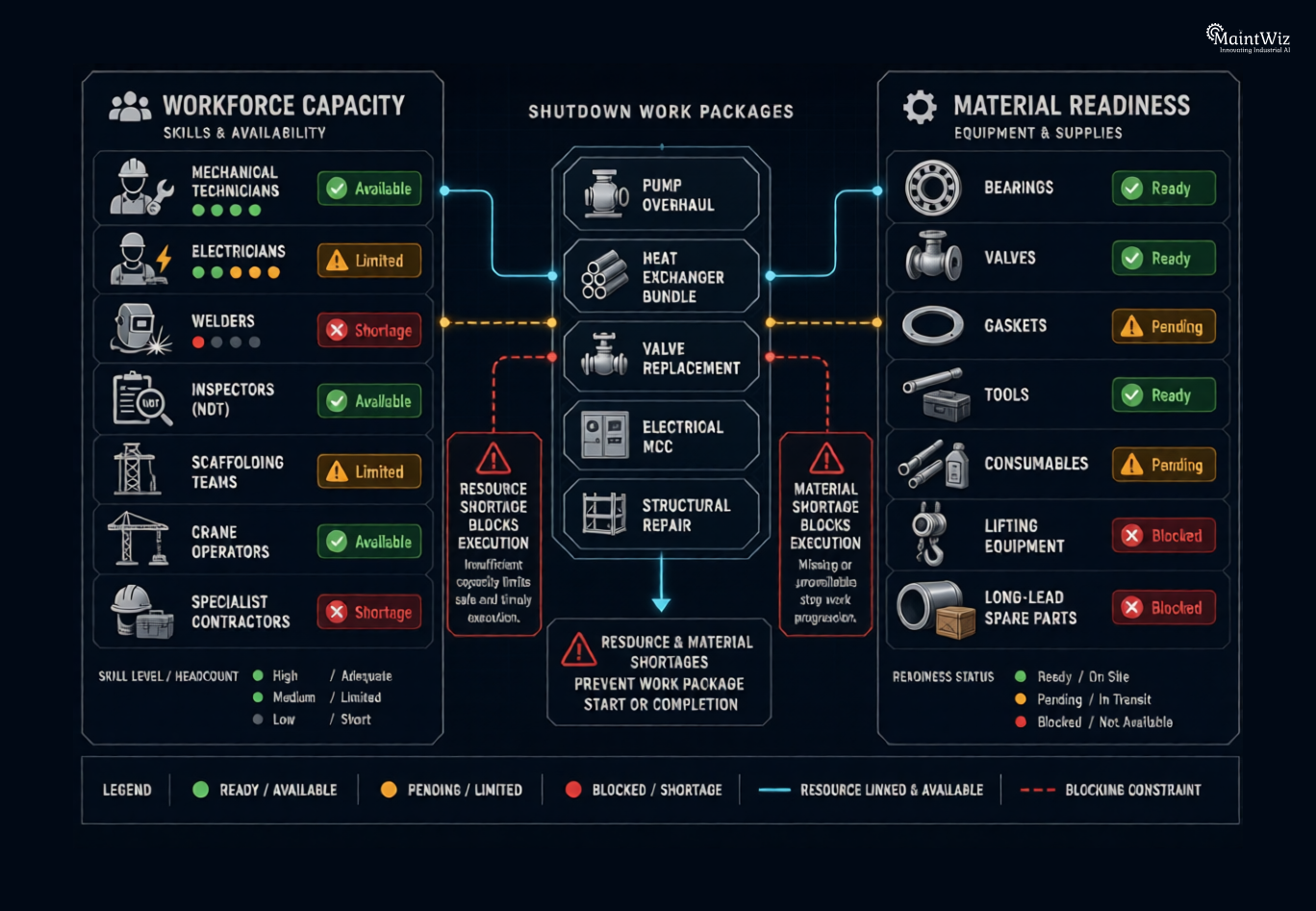
Software with real-time resource utilization and allocation capabilities can help identify bottlenecks earlier and rebalance resources before delays propagate through the schedule.
4. Material and Spare Parts Readiness
One of the most expensive forms of shutdown waiting is waiting for something that should already have been available.
A shutdown job may be technically ready but operationally blocked because:
- A gasket is missing.
- A bearing has not arrived.
- A valve is awaiting delivery.
- A special tool is unavailable.
- A consumable has not been staged.
- A purchase order is delayed.
- The wrong spare has been issued.
This is why shutdown maintenance planning software should connect work orders with material requirements.
Before the outage, planners should be able to identify which jobs require:
- Critical spares
- Consumables
- Tools
- External services
- Special equipment
- Long-lead materials
During execution, the system should make shortages visible instead of allowing them to surface as field-level surprises.
The objective is not simply inventory optimization. It is work-package readiness.
5. Contractor and Vendor Coordination
Large turnarounds often involve a temporary expansion of the maintenance workforce.
Contractors may handle mechanical work, scaffolding, insulation, inspection, electrical work, instrumentation, cleaning, NDT, civil work, lifting, and specialist activities.
That creates another layer of complexity.
Turnaround management platforms increasingly emphasize centralized contractor coordination, resource visibility, digital records, and real-time information exchange because contractor data often sits outside the core maintenance workflow.
Planned shutdown maintenance software should therefore support:
- Contractor assignment
- Work-package ownership
- Planned versus actual labor
- Skill and qualification requirements
- Contractor progress
- Timesheets or labor records
- Performance monitoring
- Vendor documentation
- Contractor communication
- Scope-change accountability
The goal is not to create another contractor database. It is to ensure that contractor execution remains connected to the master shutdown plan.
6. Real-Time Shutdown Progress Tracking
During the shutdown, yesterday’s schedule is not enough.
Supervisors need to know what is happening now.
A useful shutdown dashboard should expose information such as:
- Planned versus actual progress
- Completed work orders
- Overdue activities
- Critical-path status
- Blocked jobs
- Resource utilization
- Material shortages
- Emergent work
- Schedule variance
- Cost variance
- Safety-related constraints
- Upcoming milestones
The value of real-time visibility is not visual appeal. It is decision speed.
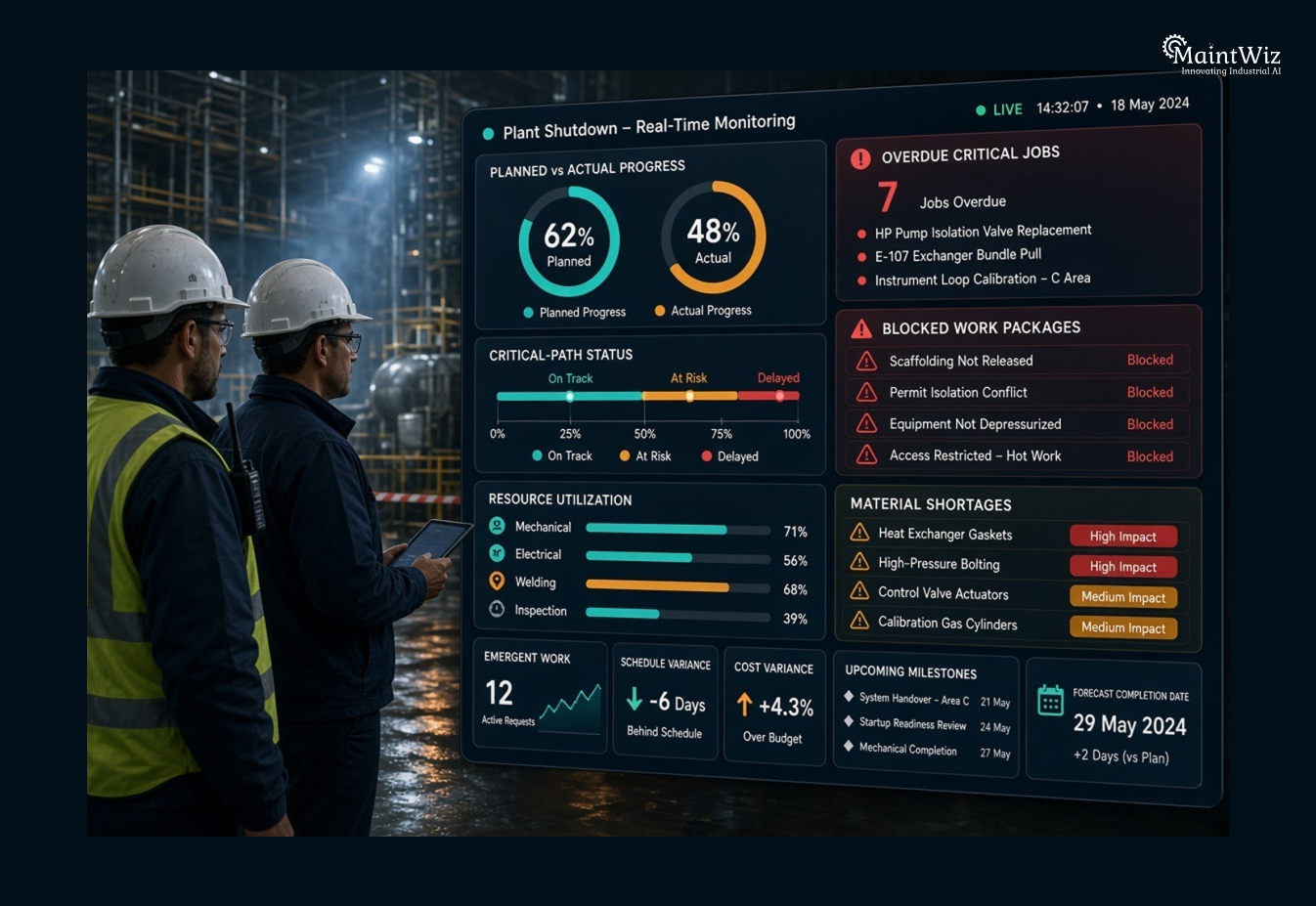
If a critical activity is slipping, management should know while corrective action can still influence the outcome.
Digital turnaround systems increasingly position centralized dashboards and real-time progress monitoring as core capabilities for managing complex shutdown execution.
7. Emergent Work and Scope-Change Control
No matter how carefully a shutdown is planned, some equipment will reveal additional defects once opened or inspected.
This is normal.
The dangerous response is to treat every discovery as automatically approved work.
A controlled process should evaluate:
Is the work necessary?
Does it need to happen during this shutdown?
What is its estimated duration?
What resources are required?
What materials are required?
What downstream activities will it affect?
Will it change the critical path?
What is the cost impact?
This is where digital change governance becomes valuable.
A well-designed workflow should capture the discovery, assess its impact, route the decision, and preserve the approval trail. Research into turnaround decision support similarly highlights emergent scope as a major challenge because teams must make rapid decisions within a constrained execution window.
The software should make scope expansion visible—not make it easier to hide.
8. Cost and Budget Tracking
A turnaround overrun is rarely just a schedule problem.
Every additional day can create additional labor, contractor, equipment, logistics, energy, and production impacts.
Shutdown maintenance software should therefore connect:
- Planned cost
- Approved budget
- Purchase commitments
- Contractor costs
- Labor costs
- Material costs
- Actual expenditure
- Forecast cost
- Scope-change cost
Real-time budget tracking and predictive analytics can help maintenance project teams identify cost variance before final closeout.
The key principle is cost-to-complete visibility.
A shutdown manager should not have to wait until the end of the turnaround to discover that productivity is materially below the original estimate.
9. Asset History and Maintenance Intelligence
A shutdown is also an opportunity to improve the next shutdown.
The software should preserve what happened to each asset:
- Failure history
- Inspection findings
- Repairs completed
- Components replaced
- Labor consumed
- Actual duration
- Materials used
- Recurring defects
- Recommendations
- Follow-up work
This creates a feedback loop.
For example, if a pump overhaul repeatedly takes 30% longer than the standard job plan, the organization has evidence to challenge the estimate before the next turnaround.
Historical data becomes particularly powerful when combined with predictive maintenance and condition monitoring. MaintWiz, for example, describes using historical and real-time asset data to forecast maintenance requirements and support proactive interventions.
The most valuable shutdown software therefore does not simply manage the current outage. It makes the next outage smarter.
10. Analytics, Alerts, and Decision Support
Reports are useful. Decision support is better.
A shutdown control room should be able to identify:
- Which critical jobs are behind?
- Which work packages are blocked?
- Which resources are overloaded?
- Which materials are unavailable?
- Which contractors are underperforming?
- Which scope changes threaten the baseline?
- Which milestones are at risk?
- What is the forecast completion date?
This requires more than static reporting.
Modern maintenance platforms increasingly combine dashboards, automated alerts, predictive analytics, and historical trend analysis to move maintenance management from retrospective reporting toward proactive decision-making.
How to Use Shutdown Maintenance Software Across a 90-Day Sprint
A major mistake is assuming that shutdown software becomes useful only when the plant goes offline.
The highest-value period is often the preparation window.
A 90-day shutdown execution sprint can be structured into four phases.
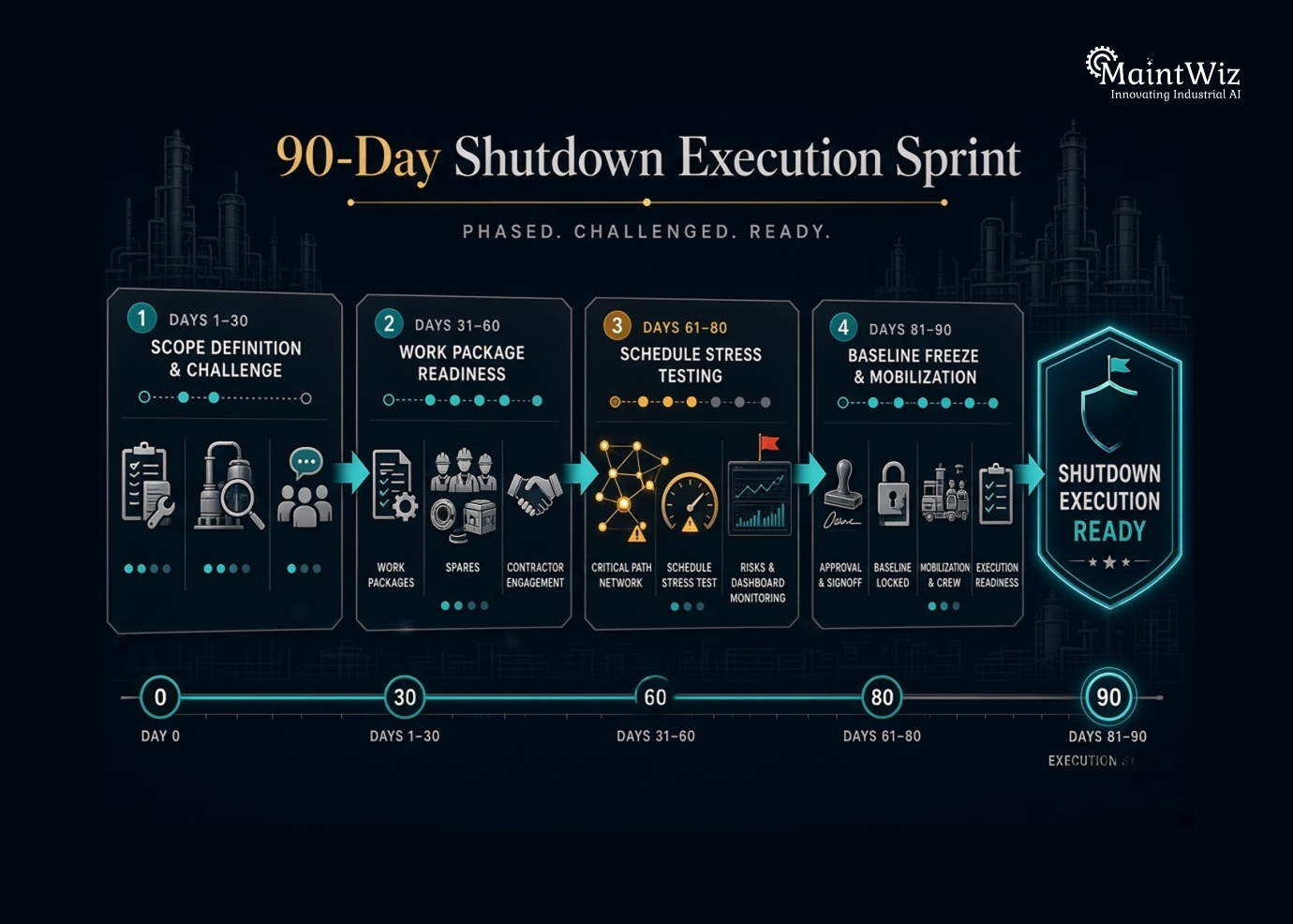
Days 1–30: Build and Challenge the Scope
The first month should establish scope quality.
Start by consolidating:
- Existing work orders
- Inspection recommendations
- Preventive maintenance backlog
- Predictive maintenance alerts
- Statutory inspections
- Reliability recommendations
- Historical shutdown findings
- Known equipment defects
Then challenge the scope.
Every proposed task should have a reason for inclusion.
Classify work by asset criticality, safety relevance, production impact, reliability benefit, and execution requirement.
The goal at Day 30 is not a large work list. It is a defensible work list.
Days 31–60: Convert Scope Into Ready-to-Execute Packages
The second phase should focus on readiness.
For every major job, verify:
- Job plan available
- Scope defined
- Duration estimated
- Labor identified
- Contractor assigned where required
- Materials identified
- Spare parts available
- Tools identified
- Permits or safety requirements understood
- Dependencies mapped
- Predecessors identified
- Execution sequence established
This is where planned shutdown maintenance software provides significant leverage because planners can connect the individual work order to the broader project structure rather than managing each activity independently.
The objective is to move from “planned” to “ready.”
Days 61–80: Stress-Test the Schedule
The third phase should challenge the schedule before the plant does.
Run scenarios around:
- Critical-path activities
- Resource shortages
- Contractor capacity
- Long-lead materials
- Simultaneous operations
- Major inspection findings
- Potential emergent work
- High-risk tasks
- Delayed milestones
Ask a deliberately uncomfortable question:
“What happens if this activity takes twice as long?”
Then ask:
“What happens if the contractor is one shift late?”
And:
“What happens if inspection discovers additional repair work?”
Scenario thinking exposes hidden schedule fragility.
Days 81–90: Freeze, Mobilize, and Establish Control
The final phase is about execution readiness.
The team should establish:
- Approved baseline
- Final work packages
- Confirmed resources
- Confirmed contractors
- Material readiness
- Critical-path visibility
- Daily reporting structure
- Escalation rules
- Change-control process
- Shutdown control dashboard
Once execution begins, the objective changes from planning to protecting the return-to-service date.
The schedule becomes a live management instrument.
The Metrics That Matter During a Shutdown
A shutdown dashboard should focus on indicators that support decisions rather than overwhelm managers with data.
Useful KPIs include:
| KPI | What It Reveals |
|---|---|
| Schedule adherence | Whether execution is following the baseline |
| Critical-path variance | Whether return-to-service is at risk |
| Work-package readiness | How much planned work is genuinely executable |
| Planned vs. actual hours | Productivity and estimation accuracy |
| Completed work orders | Execution progress |
| Overdue critical tasks | Immediate schedule threats |
| Emergent work percentage | Scope stability |
| Material readiness | Supply-related execution risk |
| Contractor productivity | External-resource performance |
| Cost variance | Financial control |
| Forecast completion | Expected shutdown finish |
| Rework rate | Quality of execution |
The important principle is that every KPI should trigger a management question.
A 92% completion rate may look excellent. But if the remaining 8% contains the activities controlling startup, the plant is not 92% safe from an overrun.
Planned Shutdown Software vs. Spreadsheet-Based Planning
Spreadsheets remain useful for analysis, temporary calculations, and planning workshops. The problem begins when the spreadsheet becomes the operational system of record for a complex shutdown.
A spreadsheet-based environment can become fragmented across:
- Multiple planners
- Different file versions
- Separate contractor trackers
- Email attachments
- Manual progress updates
- Standalone cost files
- Material lists
- Separate schedules
- Shared-drive documents
The result is often reconciliation rather than management.
A centralized shutdown maintenance platform creates a common data environment in which the relationship between scope, assets, work orders, resources, schedule, costs, and execution status can be maintained continuously.
That is the real value of digitization.
How MaintWiz CMMS Supports Asset Reliability During a 90-Day Shutdown Sprint
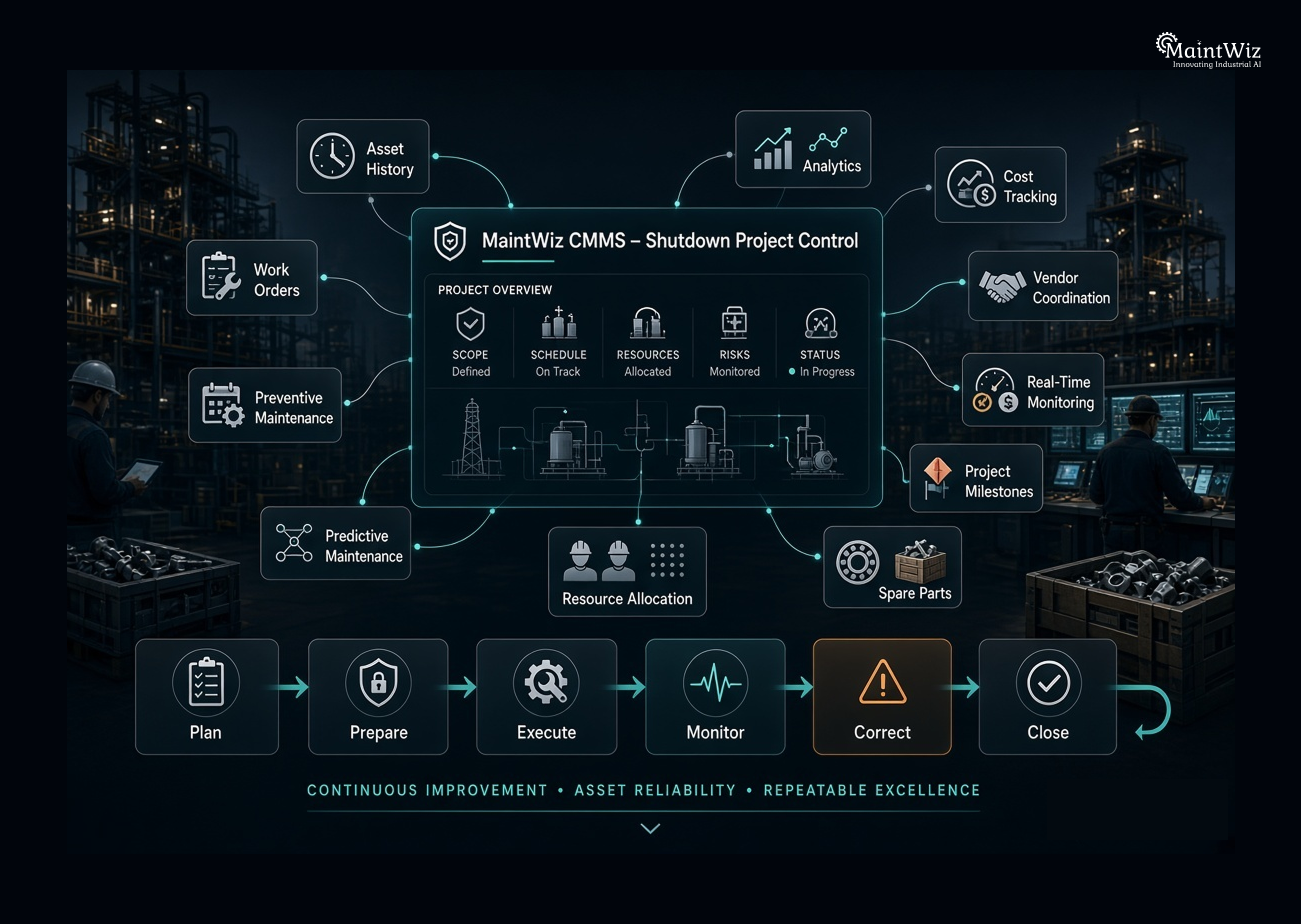
MaintWiz CMMS is relevant to shutdown execution because its maintenance project capabilities connect project planning with broader asset-management workflows rather than treating the shutdown as an isolated spreadsheet exercise.
Its maintenance project functionality includes centralized project planning, milestone tracking, resource allocation, real-time monitoring, document management, budget tracking, predictive analytics, and project reporting.
For a 90-day shutdown sprint, that can translate into three practical layers.
Before the Shutdown: Turn Asset Data Into Better Scope
MaintWiz can support the planning process by bringing together maintenance history, preventive maintenance requirements, asset information, work orders, and predictive maintenance insights.
Its maintenance planning capabilities also support asset-criticality-based prioritization, unified equipment calendars, condition monitoring, and predictive maintenance workflows.
That matters because shutdown scope should not be built solely from last year’s shutdown list.
The better question is:
“What does the current condition of the asset portfolio tell us should be included this time?”
During Preparation: Connect Work Orders, Resources, and Projects
MaintWiz’s work-order capabilities can accommodate shutdown tasks and connect individual work orders with broader maintenance projects. Its platform also supports resource planning and project-level visibility.
This creates an important hierarchy:
Asset → Work Order → Work Package → Shutdown Project → Milestone → Execution
That structure helps planners understand not only whether a job is complete, but how its status affects the wider shutdown.
During Execution: Monitor Progress and React Earlier
Once execution starts, real-time project monitoring, dashboards, notifications, resource visibility, and variance reporting become more important.
MaintWiz describes capabilities for monitoring project progress, risks, milestones, costs, quality metrics, resource utilization, and performance variances, along with predictive analytics and reporting.
Its predictive maintenance capabilities can also use condition and historical data to support proactive maintenance decisions, while IoT-CMMS integration can connect sensor-driven anomalies with maintenance workflows.
For a 90-day sprint, this matters because the platform can support a continuous loop:
Plan → Prepare → Execute → Monitor → Correct → Close → Learn
The objective is not simply to complete shutdown work digitally. It is to create better decision quality at each stage of the shutdown lifecycle.
What Should Be Automated in a Shutdown Workflow?
Automation should target repetitive coordination—not engineering judgment.
High-value automation opportunities include:
- Work-order generation
- Task notifications
- Preventive maintenance scheduling
- Schedule reminders
- Resource-status updates
- Approval workflows
- Progress reporting
- Exception alerts
- Material-status visibility
- KPI reporting
- Predictive maintenance alerts
- Asset-history updates
For example, when condition data indicates an emerging equipment problem, an integrated maintenance environment can help convert that information into an actionable maintenance intervention rather than leaving the signal isolated in a monitoring system.
The principle is simple:
Automate information movement so people can focus on decisions.
How to Select the Right Planned Shutdown Maintenance Software
Before purchasing software, shutdown leaders should evaluate the platform against actual turnaround failure modes.
Ask vendors:
Can it manage complex shutdown scope?
Can the platform distinguish approved, deferred, emergent, and optional work?
Can it show the critical path?
Can planners identify the tasks that directly influence the return-to-service date?
Can it connect work orders to project milestones?
A shutdown should not become a separate universe from the organization’s CMMS.
Can it manage resources?
Can the system show labor, contractor, equipment, and capacity constraints?
Can it track materials?
Can planners identify readiness issues before execution?
Can it handle scope changes?
Can emergent work be evaluated for cost and schedule impact before approval?
Can management see real-time progress?
Can leaders identify risk without waiting for manually consolidated reports?
Can the organization learn from the shutdown?
Does the system retain asset history, actual duration, costs, findings, and lessons for future planning?
These questions are more useful than asking how many features the software contains.
The Strategic Shift: From Shutdown Scheduling to Shutdown Control
The strongest organizations do not treat turnaround management as a scheduling problem alone.
It is a control problem.
A schedule tells the organization what should happen.
A shutdown management system should additionally tell the organization:
- What is happening?
- What is not happening?
- Why is it not happening?
- What is becoming constrained?
- What is changing?
- What will the change affect?
- What decision is required now?
That is the difference between passive visibility and operational control.
Planned shutdowns will always contain uncertainty. Equipment discoveries, contractor performance, weather, material availability, safety constraints, and operational decisions cannot be eliminated completely.
But uncertainty can be surfaced earlier.
And early visibility creates decision time.
Conclusion: Prevent Turnaround Overruns Before the Shutdown Starts
A successful shutdown is largely won before the plant goes offline.
The execution window simply reveals the quality of the preparation.
Planned shutdown maintenance software should therefore be evaluated not by whether it can create a shutdown schedule, but by whether it can help the organization create a reliable, executable, measurable, and adaptable shutdown plan.
The essential capabilities are clear:
- Controlled scope management
- Work-package readiness
- Dependency and critical-path analysis
- Resource planning
- Contractor coordination
- Material readiness
- Real-time progress tracking
- Emergent-work control
- Cost visibility
- Asset-history integration
- Predictive maintenance intelligence
- Analytics and decision support
When these capabilities operate together, the shutdown becomes more than a collection of maintenance work orders. It becomes a controlled asset-reliability project with measurable outcomes.
For plants preparing for their next 90-day shutdown sprint, the strategic question is no longer “Do we have a schedule?”
It is:
“Can our maintenance system tell us early enough what could prevent us from finishing on time?”
That is the capability that protects the turnaround.
Frequently Asked Questions About Planned Shutdown Maintenance Software
What is planned shutdown maintenance software?
Planned shutdown maintenance software is a digital system used to plan, schedule, coordinate, execute, and monitor maintenance work during planned plant shutdowns and turnarounds. It typically connects work orders, assets, resources, contractors, materials, schedules, costs, milestones, and execution data.
How does shutdown maintenance software prevent turnaround overruns?
It helps prevent overruns by identifying schedule dependencies, critical-path activities, resource constraints, material shortages, delayed work, emergent scope, and cost variances earlier. This gives shutdown managers time to take corrective action before delays affect the return-to-service date.
What features should shutdown maintenance software have?
Core features should include shutdown scope management, work-package planning, work-order management, critical-path analysis, resource allocation, contractor management, material readiness, cost tracking, real-time dashboards, change control, notifications, asset history, and predictive analytics.
How does CMMS support shutdown maintenance planning?
A CMMS connects shutdown work with existing asset records, maintenance history, preventive maintenance, work orders, spare parts, resources, and maintenance analytics. This helps planners build shutdown scope using actual asset information rather than relying only on spreadsheets or previous shutdown lists.
How do you plan a plant shutdown in 90 days?
A practical 90-day approach is to spend the first 30 days validating scope, the next 30 days developing execution-ready work packages, days 61–80 stress-testing resources and dependencies, and the final 10 days freezing the baseline and preparing execution controls.
How does critical path analysis help during a turnaround?
Critical-path analysis identifies the dependent sequence of activities that determines the minimum shutdown duration. Monitoring these activities helps management focus resources and corrective actions on work that can directly affect the return-to-service date.
Can planned shutdown software manage emergent work?
Yes. A capable platform should allow discovered work to be recorded, prioritized, estimated, approved, scheduled, and linked to its potential cost and schedule impact. This prevents emergent scope from entering the shutdown informally.
How does shutdown software improve contractor coordination?
It creates a shared view of contractor assignments, work packages, planned labor, progress, qualifications, schedules, and performance. This reduces fragmented contractor reporting and helps align external teams with the master shutdown plan.
What is the difference between CMMS and turnaround management software?
A CMMS primarily manages maintenance activities, assets, work orders, preventive maintenance, inventory, and maintenance history. Turnaround management software focuses more heavily on project-style shutdown execution, including complex dependencies, resources, contractors, critical paths, and fixed execution windows. Modern CMMS platforms can increasingly incorporate maintenance project capabilities that bridge these requirements.
Can predictive maintenance improve planned shutdown planning?
Yes. Predictive maintenance data can identify developing equipment issues before the shutdown and help planners determine whether certain interventions should be included in the planned scope. This can improve scope quality and reduce the risk of discovering avoidable equipment problems during execution.
How can MaintWiz support a shutdown project?
MaintWiz CMMS supports maintenance project planning, resource allocation, milestones, work orders, real-time project monitoring, budget tracking, predictive analytics, asset intelligence, and reporting. These capabilities can help connect shutdown preparation and execution with the organization’s broader maintenance strategy.
What should be measured during a plant shutdown?
Important measures include schedule adherence, critical-path variance, work-package readiness, planned versus actual labor hours, overdue critical tasks, material readiness, emergent-work percentage, contractor productivity, cost variance, rework, and forecast completion date.


Jai Balachandran is an industry expert with a proven track record in driving digital transformation and Industry 4.0 technologies. With a rich background in asset management, plant maintenance, connected systems, TPM and reliability initiatives, he brings unparalleled insight and delivery excellence to Plant Operations.
Company
Download App