How to Choose the Right CMMS Software: 10
Questions Every Plant Manager Must Ask
Choosing a Computerized Maintenance Management System (CMMS) has become one of the most important technology decisions a manufacturing organization can make. A modern CMMS is no longer just a digital repository for work orders or preventive maintenance schedules. It has evolved into the operational intelligence platform that connects maintenance, production, reliability engineering, inventory, procurement, and Industry 4.0 technologies into a single ecosystem.

As manufacturing enters a new era of artificial intelligence (AI), Industrial Internet of Things (IIoT), predictive analytics, digital twins, and cloud-based operations, the expectations placed on maintenance software have fundamentally changed. Plant managers are now expected to reduce downtime, increase Overall Equipment Effectiveness (OEE), optimize maintenance costs, extend asset life, improve technician productivity, and support sustainability initiatives—all while operating with leaner teams and tighter budgets.
The software selected today will shape maintenance performance for the next decade. Yet many organizations continue to make purchasing decisions based primarily on licensing costs or feature checklists rather than long-term business value.
The consequences of selecting the wrong CMMS are significant. Organizations often encounter poor user adoption, disconnected maintenance workflows, inaccurate asset data, costly implementation delays, integration challenges, and low return on investment. In many cases, maintenance teams eventually abandon the system altogether and revert to spreadsheets, paper records, or fragmented applications.
Conversely, manufacturers that choose the right CMMS establish a foundation for reliability-centered maintenance, predictive maintenance, digital inspections, AI-assisted decision-making, and continuous operational improvement.
The challenge is that the market has become increasingly crowded. Hundreds of CMMS platforms claim to offer AI capabilities, cloud deployment, mobile maintenance, analytics, and Industry 4.0 readiness. While many solutions appear similar during vendor demonstrations, their long-term value differs substantially.
The key question is no longer, “Which CMMS has the most features?” Instead, it is:
“Which CMMS best supports our maintenance strategy, business objectives, and future digital transformation?”
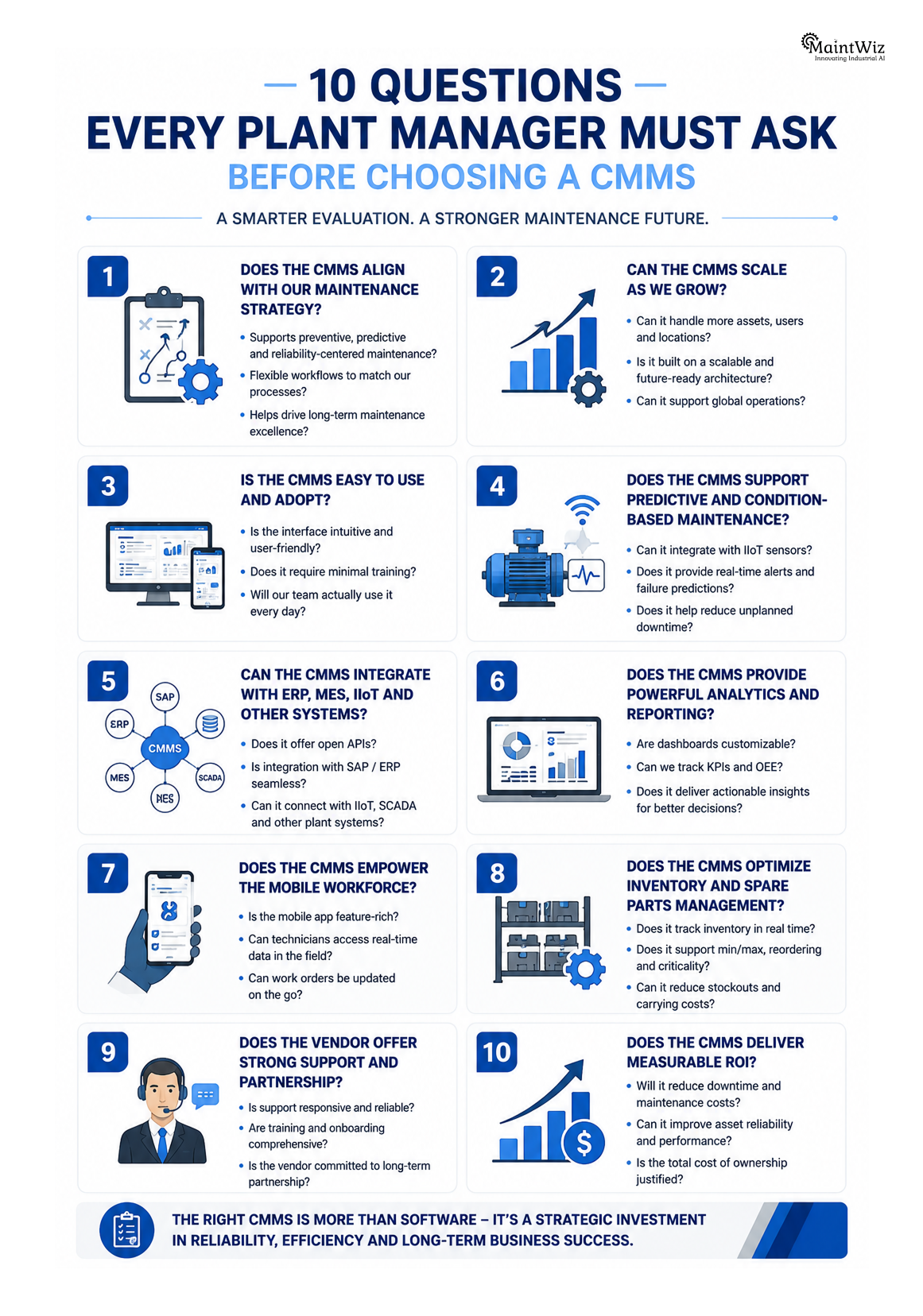
This guide presents ten strategic questions every plant manager should ask before selecting a CMMS. These questions move beyond marketing claims and focus on the practical capabilities that determine long-term success in modern manufacturing environments.
Why Choosing the Right CMMS Matters More Than Ever
Manufacturing organizations are operating in an environment defined by increasing complexity. Production assets are becoming more automated, equipment is generating vast amounts of operational data, and customers expect higher product quality delivered with minimal downtime.
Maintenance departments are expected to do more than simply repair equipment. They are now responsible for ensuring asset reliability, maximizing equipment availability, supporting production efficiency, and contributing directly to business profitability.
This shift has elevated maintenance software from an operational tool to a strategic business platform.
A modern CMMS should help organizations:
- Reduce unplanned downtime
- Improve preventive maintenance compliance
- Enable predictive maintenance strategies
- Increase technician productivity
- Optimize spare parts inventory
- Improve asset lifecycle management
- Support regulatory compliance
- Deliver actionable maintenance analytics
- Integrate with ERP, IIoT, and Industry 4.0 technologies
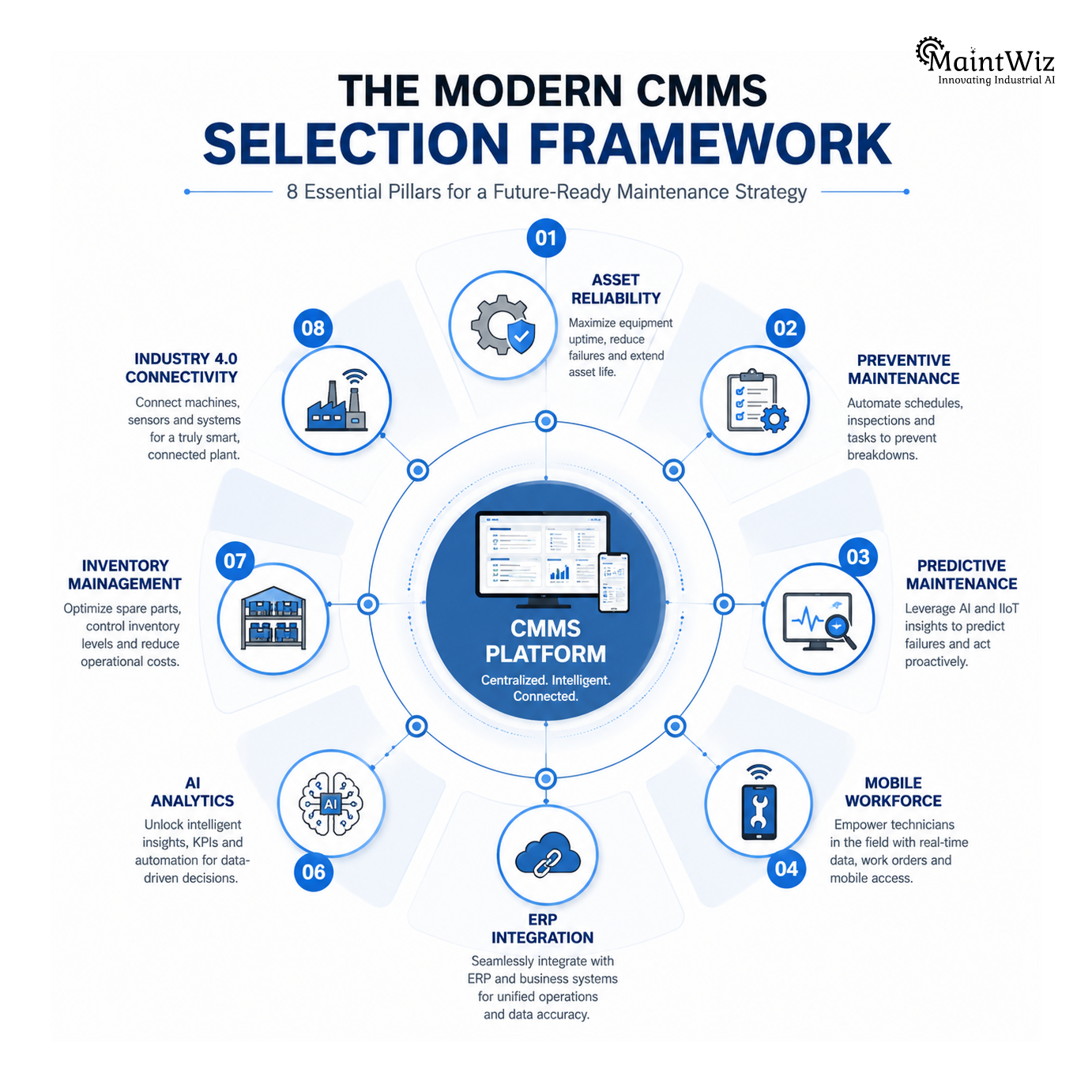
When evaluated through this broader lens, selecting a CMMS becomes a strategic investment rather than a software purchase.
The Hidden Costs of Choosing the Wrong CMMS
The financial impact of poor maintenance software selection often extends well beyond licensing costs.
A system that is difficult to use may discourage technicians from recording accurate maintenance data. Limited mobile capabilities can delay work order completion. Weak reporting functions may prevent managers from identifying recurring failures or reliability trends. Lack of integration with ERP systems creates duplicate data entry and inconsistent asset records.
These operational inefficiencies accumulate over time.
Common consequences include:
- Increased equipment downtime
- Higher maintenance costs
- Reduced preventive maintenance compliance
- Poor technician adoption
- Duplicate maintenance records
- Inefficient spare parts management
- Delayed maintenance planning
- Limited visibility into KPIs
- Difficulty scaling across multiple facilities
Many organizations discover these shortcomings only after implementation, when changing systems becomes expensive and disruptive.
A structured evaluation process significantly reduces this risk.
Question 1: Does the CMMS Align with Your Maintenance Strategy?
The first and most important question is not about technology—it is about strategy.
Every manufacturing organization operates with different maintenance priorities. Some plants emphasize preventive maintenance, while others focus on predictive maintenance, reliability-centered maintenance (RCM), Total Productive Maintenance (TPM), or condition-based maintenance.
Selecting software without first defining maintenance objectives often leads to poor alignment between business needs and system capabilities.
Plant managers should begin by asking:
- What are our primary maintenance challenges?
- Are we trying to reduce downtime?
- Do we need better preventive maintenance scheduling?
- Are we pursuing predictive maintenance?
- Do we need stronger asset lifecycle management?
- Are we implementing TPM or Lean Manufacturing?
- Do we require enterprise-wide standardization?
The answers to these questions should guide software selection.
For example, an organization investing heavily in IIoT and predictive maintenance requires AI-enabled analytics, sensor integration, and real-time asset monitoring. A plant focused on regulatory compliance may prioritize digital audit trails, inspection workflows, and document management.
The right CMMS should strengthen—not redefine—your maintenance strategy.
Best Practice
Before engaging software vendors, create a maintenance strategy document that outlines business objectives, reliability targets, current challenges, and future digital initiatives. This document becomes the benchmark for evaluating every CMMS solution.
Question 2: Can the CMMS Scale as Your Business Grows?
Many organizations purchase maintenance software based solely on current operational requirements.
However, manufacturing businesses rarely remain static.
Production capacity expands. New facilities are commissioned. Additional production lines are installed. Maintenance teams grow. New asset classes are introduced. Corporate acquisitions create multi-site operations.
A CMMS selected for today’s needs should remain effective five or even ten years into the future.
Key scalability considerations include:
Multi-Plant Management
Can the platform manage multiple factories while maintaining standardized maintenance processes?
Enterprise Asset Hierarchies
Does it support thousands—or even hundreds of thousands—of equipment records without compromising performance?
User Scalability
Can the system accommodate increasing numbers of technicians, planners, supervisors, contractors, and reliability engineers?
Cloud Infrastructure
Does the platform scale automatically as transaction volumes increase?
Global Operations
Can it support multiple languages, currencies, time zones, and regional compliance requirements?
Organizations often underestimate future growth, resulting in costly software replacements only a few years after implementation.
A scalable CMMS protects long-term technology investments while enabling sustainable business growth.
Best Practice
Evaluate how the vendor supports organizations of different sizes. Case studies involving multi-site manufacturing companies often provide valuable insight into long-term scalability.
Question 3: Will Maintenance Technicians Actually Use It?
One of the most overlooked aspects of CMMS selection is user adoption.
Even the most feature-rich platform delivers little value if technicians find it difficult to use.
Maintenance professionals spend the majority of their working hours on the production floor—not in front of desktop computers.
Modern maintenance software should therefore prioritize simplicity, mobility, and speed.
Technicians should be able to:
- Receive work orders instantly
- Scan QR code asset labels
- View equipment history
- Access maintenance procedures
- Upload photographs
- Record inspection readings
- Complete digital checklists
- Request spare parts
- Capture digital signatures
- Close work orders in the field
If completing these activities requires excessive navigation or manual data entry, adoption rates will decline.
The best CMMS platforms are designed around technician workflows rather than administrative processes.
Evaluate the Mobile Experience
During software demonstrations, ask vendors to show real maintenance workflows rather than presentation slides.
Request live demonstrations covering:
- Creating a work order
- Completing an inspection
- Scanning a QR code
- Recording meter readings
- Uploading photographs
- Working offline
- Synchronizing data
- Closing work orders
The fewer clicks required, the higher the likelihood of technician adoption.
A Practical Evaluation Tip
Many organizations invite maintenance managers, planners, supervisors, and reliability engineers to vendor demonstrations while excluding the people who will use the system every day.
Instead, involve frontline technicians throughout the evaluation process.
Their feedback often reveals usability issues that executives may overlook.
A CMMS that technicians enjoy using will generate more accurate maintenance data, improve preventive maintenance compliance, and provide management with reliable insights for continuous improvement.
The best maintenance software is not necessarily the one with the longest feature list—it is the one that becomes an integral part of technicians’ daily workflow, enabling them to work more efficiently while improving overall asset reliability.
These first three questions establish the strategic foundation for selecting a CMMS. They ensure that organizations evaluate software based on business outcomes, scalability, and user adoption rather than marketing claims or licensing costs alone. The remaining questions build on this foundation by examining integration capabilities, predictive maintenance, analytics, implementation, and long-term return on investment.
Question 4: Does the CMMS Support Preventive, Predictive, and Condition-Based Maintenance?
A modern maintenance organization cannot rely on corrective maintenance alone. While reactive maintenance will always have a place in managing unexpected failures, world-class manufacturers focus on preventing failures before they occur.
This requires maintenance software that supports multiple maintenance methodologies within a single platform.

A future-ready CMMS should seamlessly manage:
- Preventive Maintenance (PM)
- Predictive Maintenance (PdM)
- Condition-Based Maintenance (CBM)
- Reliability-Centered Maintenance (RCM)
- Risk-Based Maintenance (RBM)
- Total Productive Maintenance (TPM)
Rather than scheduling every asset on fixed calendar intervals, modern CMMS platforms combine operational history, equipment condition, runtime data, and AI analytics to determine the optimal maintenance window.
For example, an electric motor equipped with vibration and temperature sensors should automatically trigger maintenance when abnormal conditions are detected rather than waiting for the next scheduled inspection.
This transition from time-based maintenance to condition-based decision-making significantly reduces unnecessary maintenance while minimizing catastrophic failures.
Best Practice
Choose a CMMS that supports:
- AI-driven maintenance recommendations
- IIoT sensor integration
- Condition monitoring
- Automated preventive maintenance generation
- Predictive maintenance dashboards
- Remaining Useful Life (RUL) estimation
- Equipment health scoring
The software should evolve alongside your maintenance maturity rather than limiting future digital transformation initiatives.
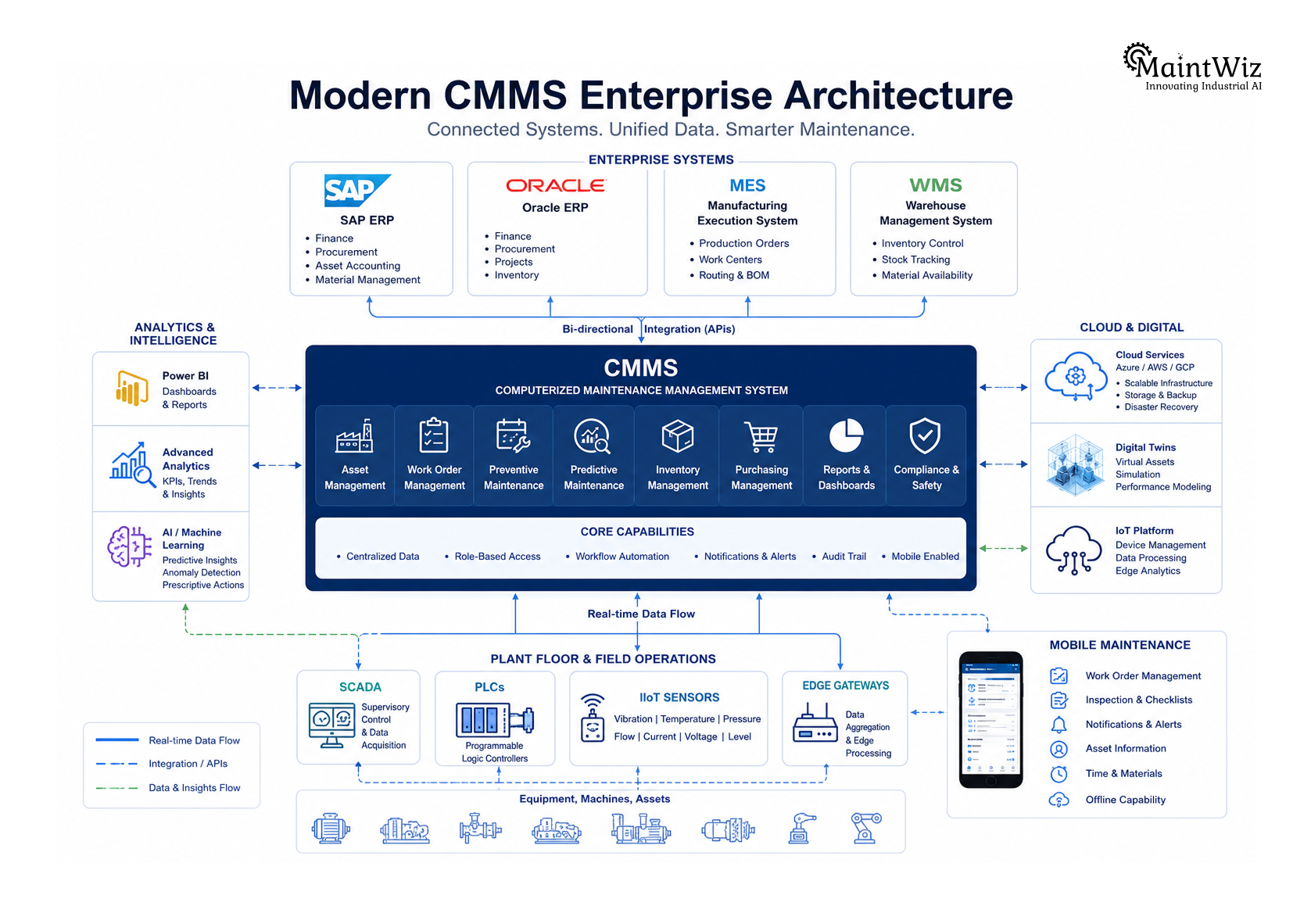
Question 5: Can the CMMS Integrate with ERP, SAP, IIoT, MES, and Other Business Systems?
Maintenance software should never operate in isolation.
Today’s manufacturing plants rely on an interconnected technology ecosystem consisting of ERP platforms, production systems, quality management software, warehouse management systems, Industrial Internet of Things (IIoT) devices, Manufacturing Execution Systems (MES), SCADA platforms, and business intelligence tools.
A disconnected CMMS creates duplicate data entry, inconsistent asset records, delayed reporting, and fragmented decision-making.
When evaluating vendors, determine whether the CMMS can integrate with:
- SAP S/4HANA
- SAP PM
- Oracle ERP
- Microsoft Dynamics
- MES platforms
- PLCs
- SCADA systems
- IIoT sensors
- Barcode and QR code systems
- RFID infrastructure
- Power BI
- Microsoft Azure
- AWS Cloud
- Digital Twin platforms
Modern cloud CMMS platforms should provide secure APIs and integration frameworks that enable near real-time synchronization of work orders, equipment data, inventory transactions, and maintenance history.
Integration is no longer a premium feature—it is a core requirement for Industry 4.0 manufacturing.
Best Practice
Request a detailed integration architecture from the vendor rather than simply asking if integration is possible. Review available APIs, middleware options, authentication methods, supported protocols, and existing ERP connectors.
Question 6: Does the CMMS Provide Actionable Analytics Instead of Just Reports?
Most maintenance software generates reports.
Far fewer systems generate insights.
There is an important distinction.
Traditional reporting answers questions such as:
- How many work orders were completed?
- How many preventive maintenance tasks were overdue?
- What was last month’s maintenance cost?
Actionable analytics answer more strategic questions:
- Which assets are most likely to fail next?
- Which production lines generate the highest maintenance costs?
- Which technicians require additional training?
- Which preventive maintenance activities deliver the highest ROI?
- Which spare parts are consistently causing downtime?
The best CMMS platforms transform maintenance data into operational intelligence.
Plant managers should expect dashboards covering:
- Overall Equipment Effectiveness (OEE)
- Mean Time Between Failures (MTBF)
- Mean Time to Repair (MTTR)
- Asset Availability
- Preventive Maintenance Compliance
- Maintenance Backlog
- Maintenance Cost by Asset
- Technician Productivity
- Work Order Completion Rates
- Spare Parts Consumption
- Failure Trend Analysis
Artificial Intelligence further enhances these dashboards by identifying reliability risks before they become operational problems.
Best Practice
Ask vendors to demonstrate live dashboards using realistic manufacturing data instead of static screenshots.
Evaluate whether dashboards provide recommendations—not just historical statistics.
Question 7: How Strong Are the Mobile Maintenance Capabilities?
Maintenance work happens beside machines—not behind office desks.
Technicians require instant access to maintenance information regardless of location.
A modern mobile CMMS should allow technicians to:
- Receive assigned work orders
- Scan QR codes
- Record inspection values
- Upload photographs
- Access equipment manuals
- Complete digital checklists
- Request spare parts
- Capture electronic signatures
- Record voice notes
- Work offline
- Synchronize automatically
Offline capability is especially important for:
- Large manufacturing facilities
- Mining operations
- Oil & Gas installations
- Utility plants
- Remote industrial sites
The mobile application should mirror real technician workflows rather than simply replicating desktop interfaces on smaller screens.
Best Practice
Ask technicians to test the mobile application during vendor demonstrations.
User adoption often becomes the deciding factor between successful and unsuccessful CMMS implementations.
Question 8: Does the CMMS Improve Spare Parts and Inventory Management?
Maintenance efficiency depends heavily on spare parts availability.
Even the most experienced maintenance team cannot complete repairs if the required components are unavailable.
An effective CMMS should integrate maintenance planning with inventory management by supporting:
- Spare parts cataloging
- Minimum and maximum stock levels
- Automatic reorder points
- Warehouse management
- Supplier information
- Purchase requisitions
- Critical spare identification
- Barcode and QR code inventory tracking
- Parts consumption analytics
Organizations frequently underestimate the financial impact of poor inventory visibility.
Excess inventory increases carrying costs.
Insufficient inventory extends equipment downtime.
A modern CMMS helps maintain the right balance by combining maintenance schedules with inventory forecasting.
Best Practice
Evaluate whether spare parts can be linked directly to equipment, work orders, preventive maintenance tasks, and Bills of Materials (BOMs).
Question 9: What Level of Vendor Support, Training, and Implementation Services Is Available?
Software implementation success depends as much on people as technology.
Many organizations invest heavily in software while underestimating the importance of implementation planning, user training, and change management.
Ask potential vendors:
- What implementation methodology do you follow?
- How long does deployment typically require?
- Is data migration included?
- Will you assist with asset hierarchy creation?
- Is administrator training provided?
- Do you offer technician onboarding?
- What post-implementation support is available?
- Are software updates included?
- What is your average customer response time?
The best software can still fail if implementation lacks structure and stakeholder engagement.
Best Practice
Request customer success stories from organizations with similar industries, plant sizes, and maintenance challenges.
Question 10: What Is the Total Cost of Ownership and Expected Return on Investment?
Many organizations compare software based solely on subscription pricing.
This approach overlooks numerous hidden costs.
Total Cost of Ownership (TCO) should include:
- Licensing
- Implementation
- Data migration
- User training
- System integration
- Hardware requirements
- Mobile devices
- Annual maintenance
- Customization
- Internal IT resources
More importantly, organizations should evaluate expected business outcomes.
Potential ROI includes:
- Reduced downtime
- Increased asset availability
- Higher preventive maintenance compliance
- Lower maintenance costs
- Reduced overtime
- Improved technician productivity
- Extended equipment lifespan
- Better inventory optimization
- Reduced emergency repairs
The objective is not purchasing the cheapest software.
It is selecting the platform that delivers the highest long-term operational value.
How MaintWiz CMMS Supports Modern Manufacturing Organizations
Selecting the right CMMS requires balancing operational usability with enterprise-level capabilities. MaintWiz CMMS is designed specifically for manufacturers seeking to improve asset reliability while accelerating digital transformation.
Rather than functioning solely as a work order management system, MaintWiz provides an integrated maintenance platform supporting preventive, predictive, and reliability-centered maintenance strategies.
Key capabilities include:
- AI-assisted maintenance planning
- Predictive maintenance analytics
- Digital work order management
- Preventive maintenance automation
- Mobile maintenance applications
- QR code asset identification
- Asset lifecycle management
- Spare parts and inventory management
- MTBF, MTTR, and OEE dashboards
- IIoT-enabled condition monitoring
- Digital inspection checklists
- Reliability analytics
- Multi-site asset management
- Cloud deployment with enterprise scalability
MaintWiz also integrates with enterprise platforms such as ERP systems and Industry 4.0 technologies, enabling manufacturers to create a connected maintenance ecosystem without disrupting existing business processes.
For organizations planning digital transformation initiatives, MaintWiz supports phased implementation, making it practical to achieve measurable maintenance improvements within a focused 90-day execution program.
A Practical 90-Day CMMS Evaluation Roadmap
Selecting maintenance software should follow a structured evaluation process rather than relying solely on vendor demonstrations.
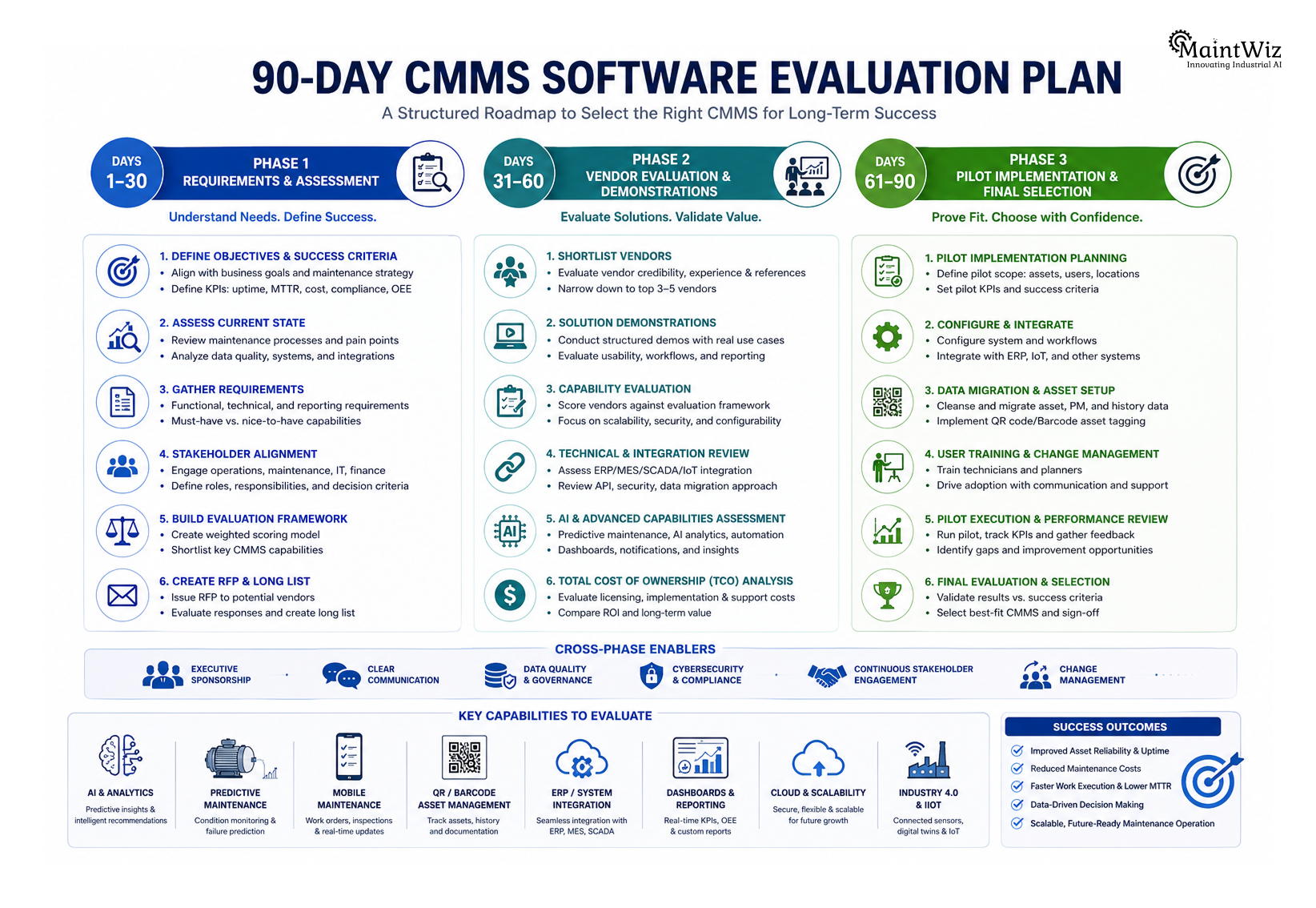
Days 1–30: Define Requirements
- Identify maintenance challenges.
- Document business objectives.
- Map current maintenance workflows.
- Define evaluation criteria.
- Form a cross-functional selection team.
Days 31–60: Evaluate Vendors
- Shortlist CMMS providers.
- Conduct product demonstrations.
- Test mobile applications.
- Review integration capabilities.
- Score each solution using standardized evaluation criteria.
Days 61–90: Pilot and Validate
- Run a pilot on selected production assets.
- Train maintenance technicians.
- Measure user adoption.
- Validate KPIs.
- Review implementation readiness.
- Finalize vendor selection.
A phased approach minimizes risk while ensuring the selected platform aligns with both operational requirements and long-term business objectives.
Conclusion
Choosing a CMMS is no longer a simple software procurement exercise—it is a strategic investment in the future of maintenance, asset reliability, and manufacturing performance.
The ten questions outlined in this guide provide a practical framework for evaluating CMMS solutions beyond marketing claims and feature lists. They encourage organizations to assess strategic alignment, scalability, technician adoption, predictive maintenance capabilities, integration readiness, analytics, mobility, inventory management, implementation support, and total cost of ownership.
The right CMMS should not only solve today’s maintenance challenges but also provide the technological foundation for Industry 4.0 initiatives, AI-driven maintenance, and continuous operational improvement.
Manufacturers that invest time in a structured evaluation process are far more likely to select a platform that delivers measurable improvements in equipment reliability, technician productivity, maintenance efficiency, and business performance.
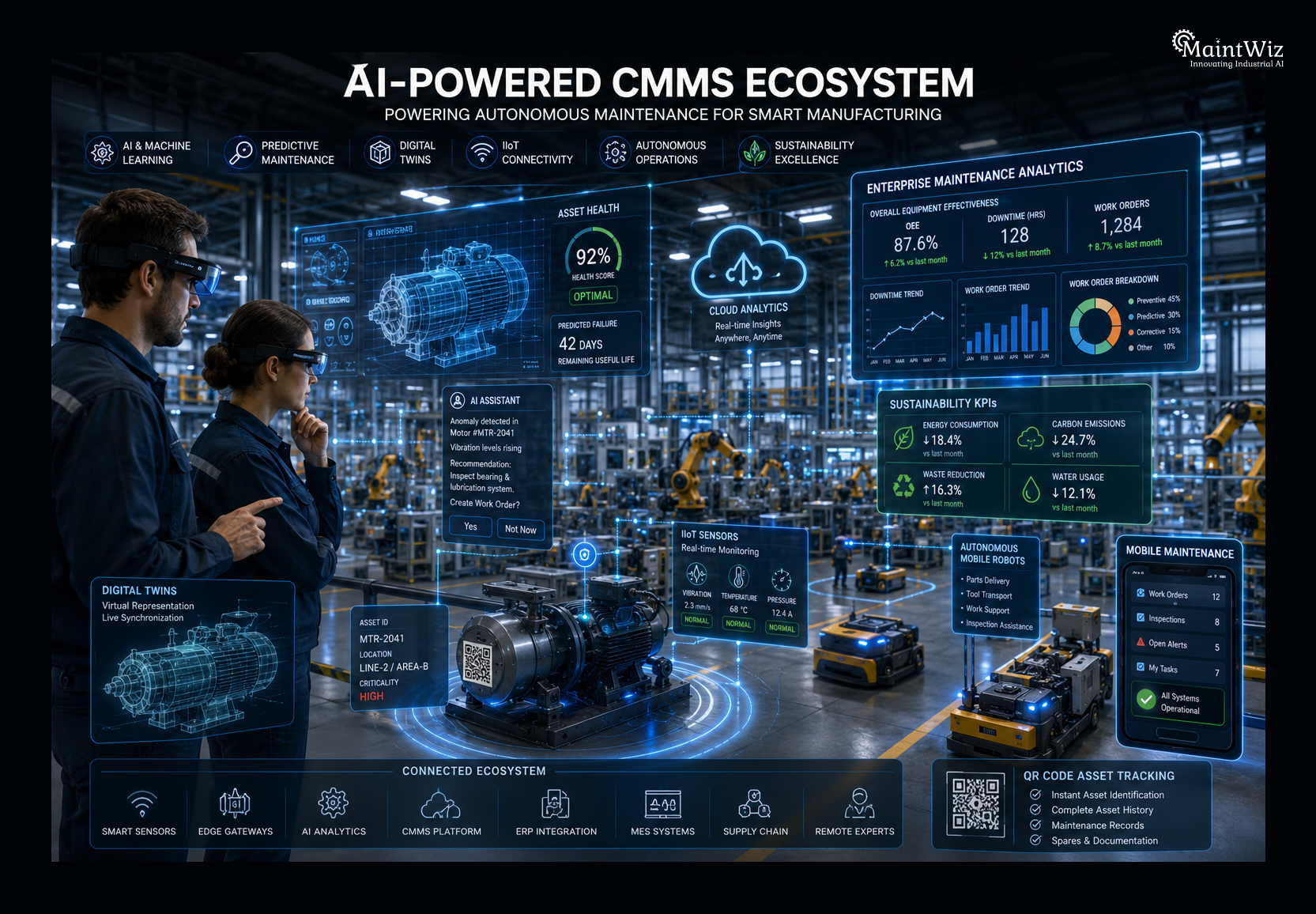
In an increasingly competitive industrial landscape, the best CMMS is not necessarily the one with the most features—it is the one that enables maintenance teams to make smarter decisions, execute work more efficiently, and create lasting value across the entire asset lifecycle.


Jai Balachandran is an industry expert with a proven track record in driving digital transformation and Industry 4.0 technologies. With a rich background in asset management, plant maintenance, connected systems, TPM and reliability initiatives, he brings unparalleled insight and delivery excellence to Plant Operations.