
SAP MM
SAP MM Shutdown Materials: Simple in MaintWiz, Posted to SAP
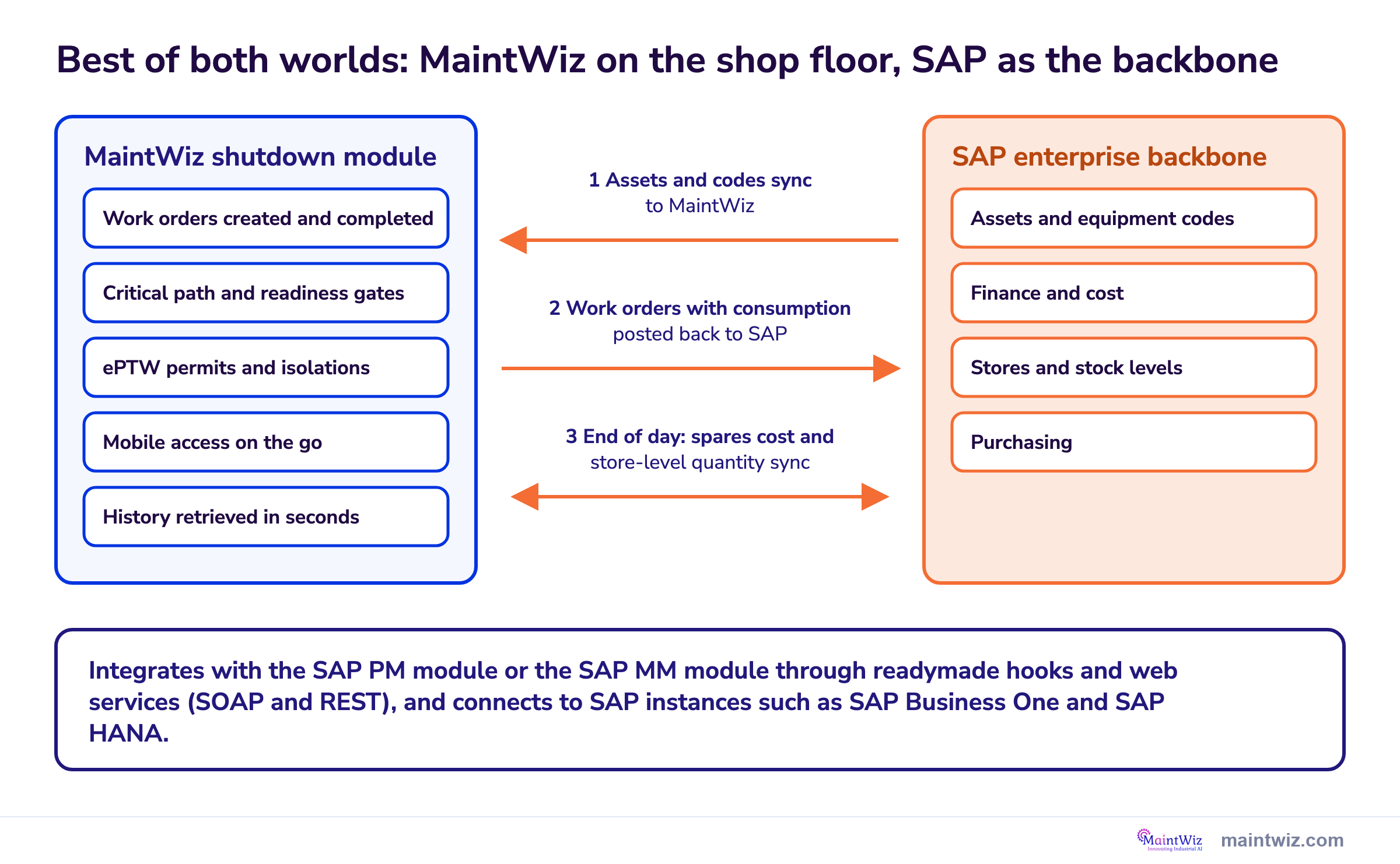
MaintWiz gives shutdown teams an easy, mobile way to plan, issue and track shutdown spares, while SAP stays the enterprise backbone: assets sync from SAP, work orders are created and completed in MaintWiz, and each work order is posted back to SAP with its consumption. At the end of the day, spares cost and store-level quantity sync between the two systems.
How MaintWiz helps: Your crews get a simple, mobile, feature-rich shutdown module with quick history, ePTW and readiness gates, and your enterprise keeps SAP PM or SAP MM as its backbone. Best of both worlds. See the module · Get the SAP preparation worksheet
By Jai Balachandran · Published · Last reviewed
What MaintWiz adds:SAP PM or SAP MM modeConsumption posts to SAPMobile and ePTWEasy to use
Why MaintWiz
Why do plants run MaintWiz alongside SAP for shutdown materials?
Plants run MaintWiz alongside SAP because MaintWiz is a best-of-breed, comprehensive application for shutdowns with a simple, easy-to-learn interface, while SAP stays the backbone for finance, procurement, stores and assets. Teams get easy parts and work order handling, quick history and integrated functions such as ePTW, and SAP receives every work order with its consumption.
| Need | Typical SAP experience | MaintWiz shutdown module |
|---|---|---|
| Ease of use | Users often find transaction codes and the classic screens hard to learn, especially occasional users | Simple screens that planners, storekeepers, supervisors and technicians pick up quickly |
| Focus | Built around the money cycle: cost, procurement and finance | Built around shop-floor requirements: jobs, crews, permits, spares and progress |
| History | Reached through several transactions and reports | Equipment, job and parts history retrieved quickly from the work order |
| Mobile | Mobile options are available as separate apps and set-ups | Mobile access on the go for supervisors, storekeepers and technicians |
| Functionality | Shutdown scheduling and permits are often handled in separate tools | Integrated functions in one module: ePTW, critical path, readiness gates and an executive view |
| Enterprise records | Strong for finance, procurement, stores and assets | Work orders and consumption post to SAP, so SAP stays the enterprise backbone |
The result is the best of both worlds: a deep shutdown and turnaround module for the people doing the work, and SAP as the enterprise backbone for the business. Book a demo to see it with your SAP setup.
How it works
How does MaintWiz work with SAP PM or SAP MM during a shutdown?
Assets, including their codes, sync from SAP to MaintWiz; work orders are created and completed in MaintWiz; each completed work order, with its consumption, is posted back to SAP; and at the end of the day spares cost and store-level quantity sync between the two.

| Step | What happens | Direction |
|---|---|---|
| 1 Assets sync | Equipment and assets, including their codes, are synced from SAP so work is planned against the same records | SAP to MaintWiz |
| 2 Create | Work orders for the shutdown are created in MaintWiz with the parts each job needs | In MaintWiz |
| 3 Execute | Crews and storekeepers work from mobile devices, with ePTW permits and isolations on each work order | In MaintWiz |
| 4 Complete and post | Work orders are completed in MaintWiz and posted to SAP with their consumption | MaintWiz to SAP |
| 5 End-of-day sync | Spares cost and store-level quantity sync, so stock and cost in SAP stay current | Both ways |
Integration uses readymade hooks and web services (SOAP and REST), through the SAP PM module or the SAP MM module, and connects to different SAP instances such as SAP Business One and SAP HANA. The same foundation serves any SAP integration. For the PM side see SAP PM shutdown management.
What SAP does
How do reservations and purchase requisitions work for maintenance orders in SAP?
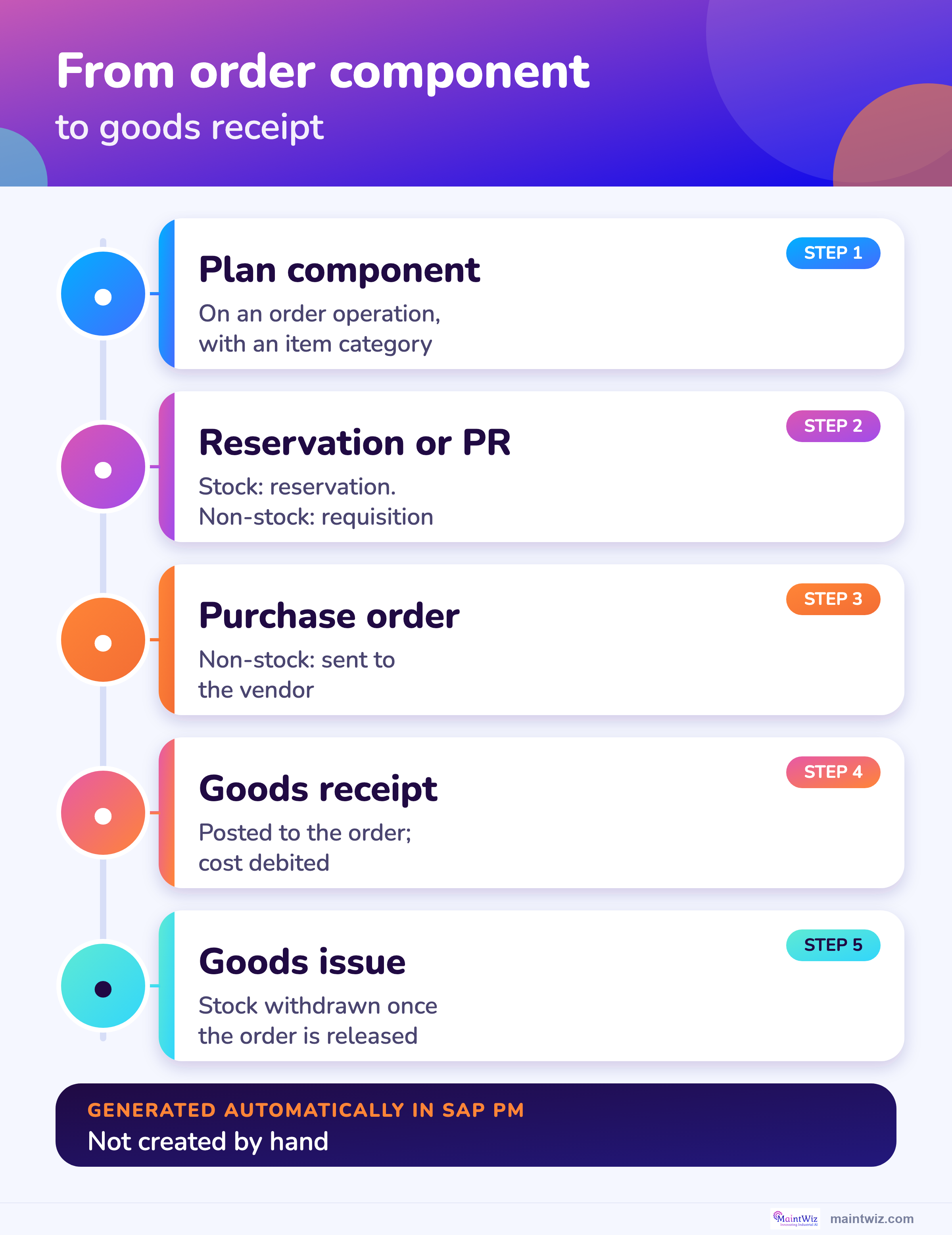
In SAP Plant Maintenance the system generates a reservation for stock material and a purchase requisition for non-stock material or external services from the components planned on a maintenance order; you cannot create either individually in PM, and goods receipt for requested material is posted to the order. 2,1,4
| Step | What SAP does | Source |
|---|---|---|
| 1. Plan components | Material components are assigned to an operation of the order; a component can be a spare part or a repairable spare | SAP: Materials Planning |
| 2. Item category | The system generates a reservation for stock material and a purchase requisition for non-stock material or external services | SAP: Materials Planning, SAP: Stock and Non-Stock Material |
| 3. Order release | Stock material is withdrawn once the order is released; the reservation is always generated automatically when a component is planned | SAP: Materials Planning, SAP: Stock and Non-Stock Material |
| 4. Procurement | For non-stock material a purchase order is sent to a vendor based on the requisition | SAP: Stock and Non-Stock Material |
| 5. Goods receipt | The goods receipt is posted directly to the order, which is debited with the cost; invoice differences are settled to the order | SAP: Stock and Non-Stock Material |
In contrast to the Materials Management (MM) component, a reservation or purchase requisition cannot be created individually in Plant Maintenance: both are generated automatically. 2,4 The word "reservation" also has two meanings in the order: the technical object, and the stage at which the demand becomes relevant for materials planning. 3
Stock or not
What is the difference between stock and non-stock material on a shutdown order?
Stock material is available in stock and is reserved with a reservation, while non-stock material is not in stock and is procured externally through a purchase requisition and a purchase order; for shutdowns the non-stock items carry the lead-time risk. 1,2
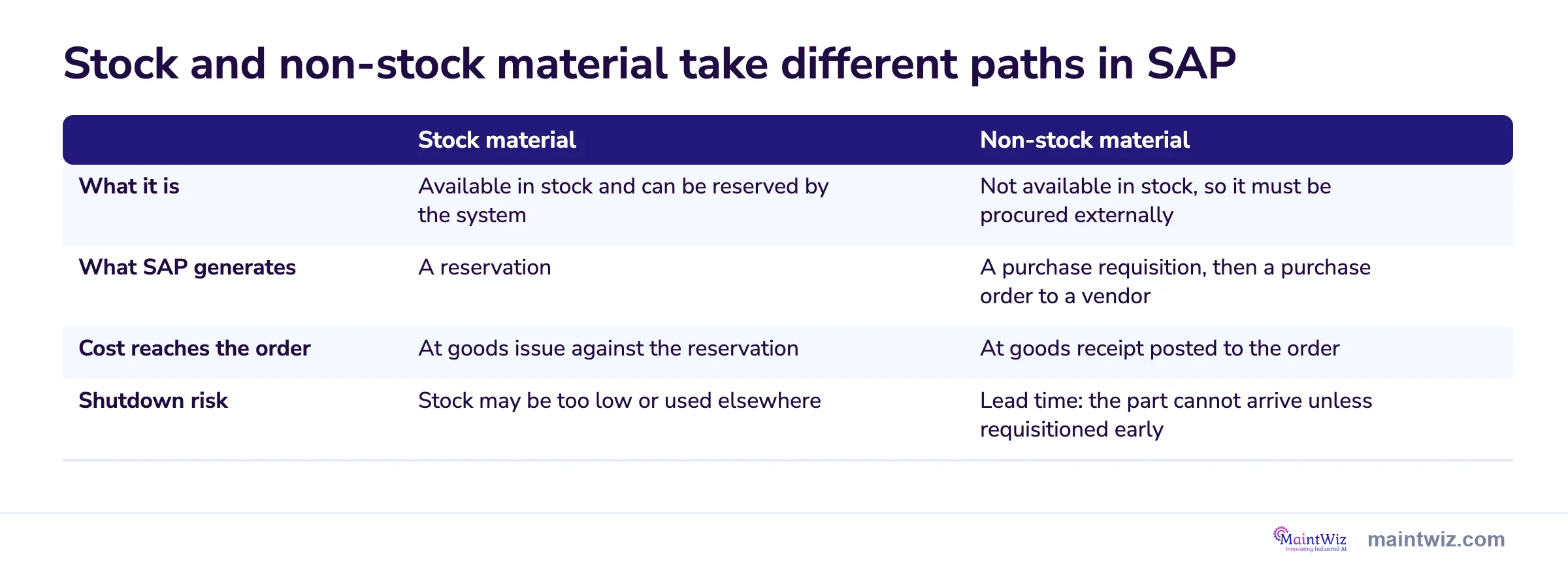
Sort your shutdown bill of materials into the two columns first. Stock lines need a check that quantity is still there when the job starts. Non-stock lines need a requisition raised early enough to cover vendor lead time. The bottom row shows which lines belong on the early order list.
| Stock material | Non-stock material | |
|---|---|---|
| What it is | Available in stock and can be reserved by the system | Not available in stock, so it must be procured externally |
| What SAP generates | A reservation | A purchase requisition, then a purchase order to a vendor |
| Cost reaches the order | At goods issue against the reservation | At goods receipt posted to the order |
| Shutdown risk | Stock may be too low or used elsewhere | Lead time: the part cannot arrive unless requisitioned early |
Summary of the page table; it describes SAP maintenance order behaviour. Check against your SAP configuration.
Related: SAP PM and shutdown planning · Shutdown spare parts planning
| Stock material | Non-stock material | |
|---|---|---|
| What it is | Available in stock and can be reserved by the system | Not available in stock, so it must be procured externally |
| What SAP generates | A reservation | A purchase requisition, then a purchase order to a vendor |
| Cost reaches the order | At goods issue against the reservation | At goods receipt posted to the order |
| Shutdown risk | Stock may be too low or used elsewhere | Lead time: the part cannot arrive unless requisitioned early |
Critical spares are described by DOE as parts of especially high value, long lead time or both, and a long-lead item is anything that cannot arrive before the stop unless ordered now. 6 See shutdown spare parts planning.
Software
How does MaintWiz handle shutdown materials with SAP behind it?
MaintWiz is the shutdown and turnaround layer on top of SAP: parts needed, in stock and short for every job, with the SAP status of each short part beside the schedule, mobile access and integrated ePTW for the people doing the work, and SAP kept as the enterprise backbone for finance, procurement and stores.
PM mode is covered in SAP PM shutdown management.
What the shutdown module covers
- SAP integration through the SAP MM or the SAP PM module, with readymade hooks and web services (SOAP and REST)
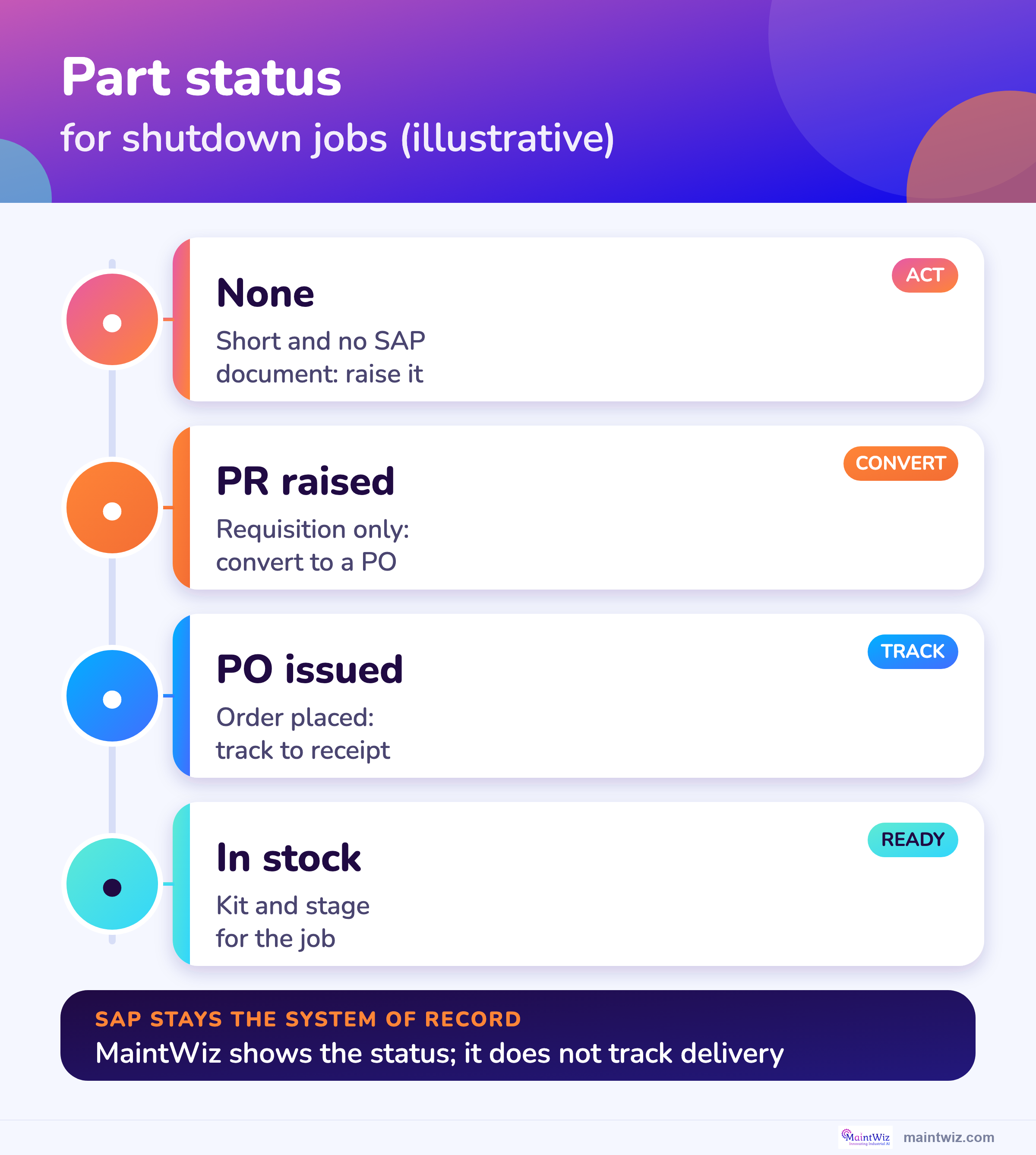
- Needed, in stock and short parts, with the SAP status of each short part: none, purchase request raised or purchase order issued
- A data table behind each chart with search, paging and CSV export
- Work orders with consumption post to SAP; spares cost and store-level quantity sync at end of day
- Spares status feeds the readiness gate for each work package
- Resources master loaded from an Excel template
- Reports and tables export to Excel
Proof
What MaintWiz customers report
Results from MaintWiz customers across maintenance operations.
Timing
When does SAP create the requisition for a shutdown part?
SAP creates reservations and purchase requisitions when the order is created if the reservation and requisition indicator is set for the order type, and only when the order is released if it is not, so for long-lead parts the indicator should be set before the shutdown orders are created. 2,3
In SAP, if you want purchase requisitions generated when the order is created, you must set the Res/PReq indicator in Customizing for the order type; if you have not set it, reservations and requisitions are only generated when the order is released. 2 The stage can be proposed for the whole order and changed per component. 3
For a shutdown, a requisition that waits for order release may be raised too late for a long-lead part. Agree the setting with your SAP team before creating the shutdown orders.
Cost
When does the cost of a shutdown part reach the order?
The cost of non-stock material reaches the order at goods receipt, which is posted directly to the order for which the material was requested, and any invoice differences are later settled to the order. 1
This matters for cost control in a stop: a requisition and purchase order show planned cost, and actual cost appears only when the goods are received. A part ordered early but received late will not show in actual cost until it arrives. For cost measures see the KPI guide and budget guide.
Readiness
How do you see material readiness for each shutdown job?
See material readiness per job as four numbers and one status for each part: quantity needed, in stock and short, plus the SAP status of each short part, none, requisition raised or purchase order issued, so a short part with no SAP document stands out. 1,2
A free Excel version is available: SAP reservation and purchase requisition tracker (.xlsx).
| Part | Needed | In stock | Short | SAP status | What to do |
|---|---|---|---|---|---|
| Seal kit (illustrative) | 2 | 0 | 2 | None | Raise a request now: it is short with no SAP document |
| Gasket set (illustrative) | 10 | 4 | 6 | PR raised | Convert the requisition to a purchase order |
| Cyclone liners (illustrative) | 2 | 0 | 2 | PO issued | Track to goods receipt before the start |
| Slurry pump wet end (illustrative) | 2 | 2 | 0 | In stock | Kit and stage |
The MaintWiz shutdown module shows needed, in stock, short and the SAP status of each short part, with the data table behind each chart. SAP stays the enterprise backbone. The example rows are for illustration. Download the SAP reservation and requisition tracker to try the same logic in Excel.
Before the freeze
What should be ordered before the scope freeze?
Before the scope freeze, identify the long-lead and critical parts, plan them as components with the right item category, set the requisition indicator, assign who converts each requisition to a purchase order, and set a needed-by date for each part using the float of its job. 6,7
| Question | Why |
|---|---|
| Which parts are long-lead or critical? | They set the latest order date |
| Are they planned as components on the right operation and item category? | Otherwise SAP raises no demand |
| Is the requisition indicator set so requisitions are raised at order creation? | Avoids waiting for release |
| Who converts each requisition to a purchase order and by when? | A requisition is not an order |
| What is the needed-by date for each part, and how much float does the job have? | A job with little float cannot wait |
| Who receives the goods and posts goods receipt to the order? | Cost and status depend on it |
Float is how long a job can slip without delaying the finish. 7 The latest order date is the needed-by date minus supplier lead time, transit and a buffer; the calculator is in the spare parts guide. See also scope management.
Long-lead
How do long-lead items show in SAP?
A long-lead item appears in SAP as a non-stock component that generates a purchase requisition, then a purchase order and a goods receipt posted to the order, and in a shutdown plan it should appear as a part with a needed-by date and an SAP status of none, requisition raised or purchase order issued. 1,2
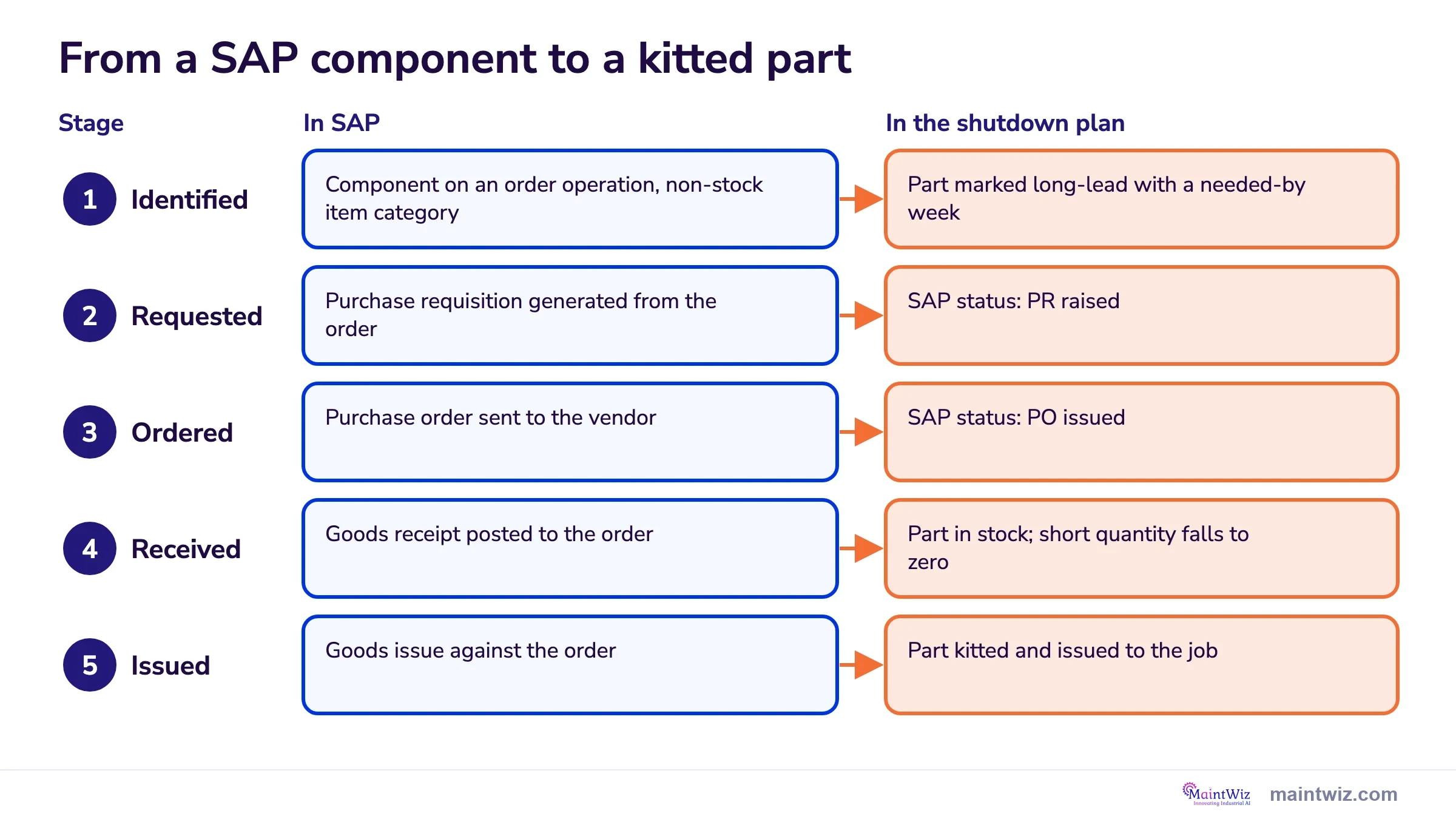
Read across each row to see which SAP posting changes the status the planner sees. A part with a requisition but no purchase order still needs chasing. Once the goods receipt is posted, the short quantity falls to zero. Materials planners can use the five stages as the status list for every long-lead part.
| Stage | In SAP | In the shutdown plan |
|---|---|---|
| Identified | Component on an order operation, non-stock item category | Part marked long-lead with a needed-by week |
| Requested | Purchase requisition generated from the order | SAP status: PR raised |
| Ordered | Purchase order sent to the vendor | SAP status: PO issued |
| Received | Goods receipt posted to the order | Part in stock; short quantity falls to zero |
| Issued | Goods issue against the order | Part kitted and issued to the job |
Summary of the page table. Check against your SAP configuration.
Related: Shutdown spare parts planning · SAP PM and shutdown planning
History of past parts use: SAP S4HANA maintenance data migration.
| Stage | In SAP | In the shutdown plan |
|---|---|---|
| Identified | Component on an order operation, non-stock item category | Part marked long-lead with a needed-by week |
| Requested | Purchase requisition generated from the order | SAP status: PR raised |
| Ordered | Purchase order sent to the vendor | SAP status: PO issued |
| Received | Goods receipt posted to the order | Part in stock; short quantity falls to zero |
| Issued | Goods issue against the order | Part kitted and issued to the job |
Visuals
Save the SAP materials charts
Three charts to share with your materials team. Click either for the full-size image.
FAQ
Frequently asked questions
Why use MaintWiz with SAP for shutdown materials?
MaintWiz gives shutdown teams a simple, mobile module with quick history, ePTW, critical path and readiness gates, while SAP stays the enterprise backbone. Work orders with consumption post back to SAP.
Can MaintWiz integrate with SAP MM or SAP PM?
Yes. MaintWiz integrates with SAP through the SAP MM module or the SAP PM module, using readymade hooks and web services (SOAP and REST), and connects to instances such as SAP Business One and SAP HANA.
How does MaintWiz post consumption to SAP?
Work orders are created and completed in MaintWiz, then posted back to SAP with their consumption. At the end of the day, spares cost and store-level quantity sync.
What data moves between SAP and MaintWiz?
Assets and codes sync from SAP, work orders with consumption post back to SAP, and spares cost and store-level quantity sync at end of day. Objects, direction and frequency are set during implementation.
How do you see material readiness for each shutdown job?
As needed, in stock and short for each part, plus the SAP status of each short part: none, request raised or order issued.
How do reservations and purchase requisitions work for maintenance orders in SAP?
The system generates a reservation for stock material and a purchase requisition for non-stock material from the components planned on the order. 2,4
Can I create a requisition by hand in SAP PM?
No: in Plant Maintenance neither a reservation nor a requisition can be created individually; both are generated automatically. 2
When is the requisition created?
At order creation if the Res/PReq indicator is set for the order type, otherwise when the order is released. 2,3
When does the cost reach the order?
For non-stock material at goods receipt, which is posted directly to the order. 1
What is a long-lead item?
Something that cannot arrive before the shutdown unless it is ordered now; DOE describes critical spares as parts of especially high value, long lead time or both. 6
Sources
Sources
- SAP Documentation, Use of Stock and Non-Stock Material (Plant Maintenance)
- SAP Documentation, Materials Planning (Plant Maintenance)
- SAP Documentation, Requirements Planning (Plant Maintenance)
- SAP Library, Materials Planning (Customer Service and Plant Maintenance; older release, no release stated)
- SAP Library, Maintenance Order (Plant Maintenance, PM)
- US Department of Energy FEMP / Pacific Northwest National Laboratory, O&M Best Practices: Glossary
- US Government Accountability Office, GAO Schedule Assessment Guide: Best Practices for Project Schedules (GAO-16-89G, December 2015)
- US Department of Health and Human Services, Earned Value Management, Appendix D: Glossary of Terms
Plan on top of SAP, keep SAP as the record
Book a demo and bring your SAP setup. We will walk through how MaintWiz can work with it.