
SAP PM
SAP PM Shutdown Management: Plan in MaintWiz, Post to SAP
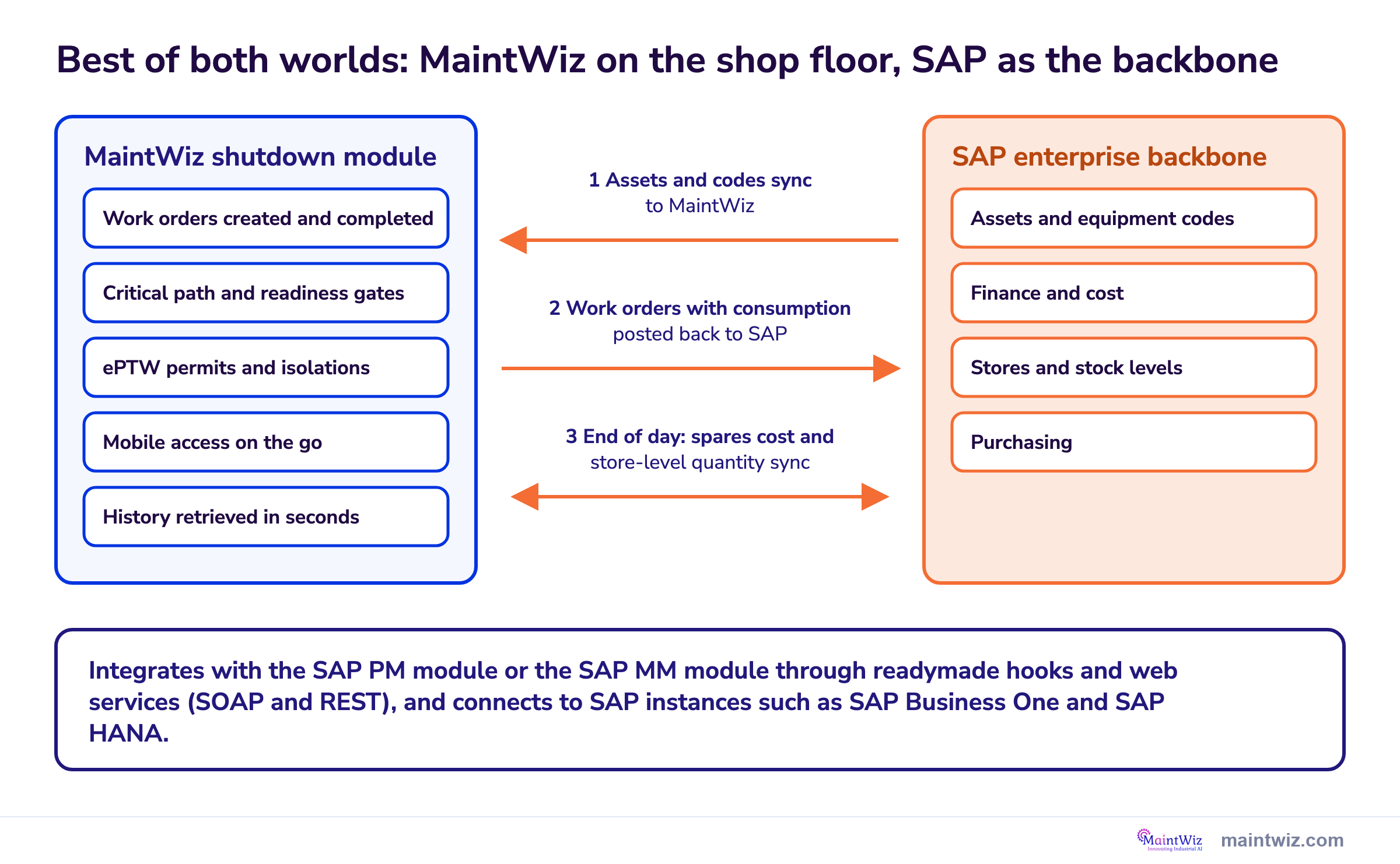
MaintWiz plans and runs shutdown work alongside SAP PM, which stays the enterprise system of record. Assets sync from SAP, work orders are created and completed in MaintWiz, and orders with consumption post back to SAP, with spares cost and store-level quantity synced at the end of the day. Integration runs through the SAP PM module or the SAP MM module.
How MaintWiz helps: Your crews get a simple, mobile, feature-rich shutdown module with ePTW, critical path and readiness gates, and your enterprise keeps SAP as its backbone. Best of both worlds. See the module · Get the SAP preparation worksheet
By Jai Balachandran · Published · Last reviewed
What MaintWiz adds:SAP PM or SAP MM modeWork orders and consumption post to SAPMobile and ePTWEasy to use
Why MaintWiz
Why do plants run MaintWiz alongside SAP PM for shutdowns?
Plants run MaintWiz alongside SAP PM because MaintWiz is a best-of-breed, comprehensive application for shutdowns with a simple, easy-to-learn interface, while SAP stays the backbone for finance, stores and assets. Teams get easy work order handling, quick history and integrated functions such as ePTW, and SAP receives every work order with its consumption.
| Need | Typical SAP PM experience | MaintWiz shutdown module |
|---|---|---|
| Ease of use | Transaction codes to remember, legacy screens and a steep learning curve for occasional users | Simple screens that planners, supervisors and technicians pick up quickly |
| Focus | Built around the money cycle: cost, procurement and finance | Built around shop-floor requirements: jobs, crews, permits, spares and progress |
| History | Reached through several transactions and reports | Equipment and job history retrieved quickly from the work order |
| Mobile | Desktop-centred screens; mobile use depends on add-ons | Mobile access on the go for supervisors and technicians |
| Functionality | Shutdown scheduling and permits usually sit in separate tools | Integrated functions in one module: ePTW, critical path, readiness gates and an executive view |
| Enterprise records | Strong for finance, stores and assets | Work orders and consumption post to SAP, so SAP stays the enterprise backbone |
The result is the best of both worlds: a superior, deep shutdown and turnaround module for the people doing the work, and SAP as the enterprise backbone for the business. Book a demo to see it with your SAP setup.
How it works
How does MaintWiz work with SAP PM during a shutdown?
Assets, including their codes, sync from SAP to MaintWiz; work orders are created and completed in MaintWiz; each completed work order, with its consumption, is posted back to SAP; and at the end of the day spares cost and store-level quantity sync between the two.

| Step | What happens | Direction |
|---|---|---|
| 1 Assets sync | Equipment and assets, including their codes, are synced from SAP so work is planned against the same records | SAP to MaintWiz |
| 2 Create | Work orders for the shutdown are created in MaintWiz and scheduled with critical path and float | In MaintWiz |
| 3 Execute | Crews work from mobile devices, with ePTW permits and isolations on each work order | In MaintWiz |
| 4 Complete and post | Work orders are completed in MaintWiz and posted to SAP with their consumption | MaintWiz to SAP |
| 5 End-of-day sync | Spares cost and store-level quantity sync, so stock and cost in SAP stay current | Both ways |
Software
Where does MaintWiz fit when SAP is your enterprise backbone?
MaintWiz is the shutdown and turnaround layer on top of SAP: deeper shutdown functionality, mobile access and integrated ePTW for the people doing the work, with SAP kept as the enterprise backbone for finance, stores and assets.
Also see the shutdown module FAQ and free templates.
What the shutdown module covers
- SAP integration through the SAP PM or the SAP MM module, with readymade hooks and web services
- Gantt chart with critical path and float, baselines and a float flag
- Readiness gates configured to your requirements, with signed waivers
- Needed, in stock and short parts, with the SAP status of each short part: none, purchase request raised or purchase order issued
- Permits and isolations from ePTW on each work order
- Import and export with Excel and Microsoft Project XML, with interoperability with Primavera P6
Proof
What MaintWiz customers report
Results from MaintWiz customers across maintenance operations.
What it adds
What does MaintWiz add on top of SAP PM?
MaintWiz adds the plan on top of the orders: a logic-linked schedule with critical path and float, readiness gates, shared-trade views, permits tied to each work order and an executive view, while SAP PM stays the enterprise backbone for orders, materials, costs and history.
| Need | SAP PM | Shutdown plan (MaintWiz shutdown module) |
|---|---|---|
| Logic-linked schedule with critical path and float | Orders carry dates and a revision groups them | Gantt chart with critical path and float, a flag at a float limit you set, baselines that show what moved |
| Readiness before a package starts | Release status of the order and component availability | Readiness gates configured to your requirements, with signed waivers: materials, resources, predecessors, tools and scaffold, permits and isolations, scope and engineering, go |
| Shared trades across projects | Work centers and capacity by plant | Availability of trades and common tools across projects |
| Permits and isolations tied to work | Depends on your PM configuration | ePTW permits and isolations on each work order; a package with an open permit cannot be closed |
| Executive view | Reports on orders and costs | Health matrix, decisions ranked by effect in days and money, one timeline across projects |
| Enterprise backbone | Orders, materials, costs and history | Work orders and consumption post back to SAP; SAP stays the backbone |
See the shutdown management software page and the MaintWiz shutdown module data sheet.
Data exchange
What data moves between SAP and MaintWiz?
Assets and their codes sync from SAP to MaintWiz, work orders with consumption post back from MaintWiz to SAP, and spares cost and store-level quantity sync at the end of the day; the exact objects, direction and frequency are set with each customer during implementation.
| Object | Direction | How it works |
|---|---|---|
| Assets and equipment codes | SAP to MaintWiz | Synced so every work order points to the same asset and code as in SAP |
| Work orders | Created and completed in MaintWiz | Planned, scheduled and executed in MaintWiz, on mobile if you wish |
| Completed work orders with consumption | MaintWiz to SAP | Posted back to SAP, so cost and consumption reach the enterprise record |
| Spares cost and store-level quantity | End-of-day sync | Keeps stock quantity and cost current in both systems |
| Revision, order status and dates | Agreed per customer | Set during implementation |
Integration uses readymade hooks and web services (SOAP and REST), so MaintWiz connects to different SAP instances such as SAP Business One and SAP HANA. The same foundation serves any SAP integration. A worksheet for this is in the free shutdown templates. For the materials side see SAP MM shutdown materials.
Enterprise backbone
How do you keep SAP the enterprise backbone during a shutdown?
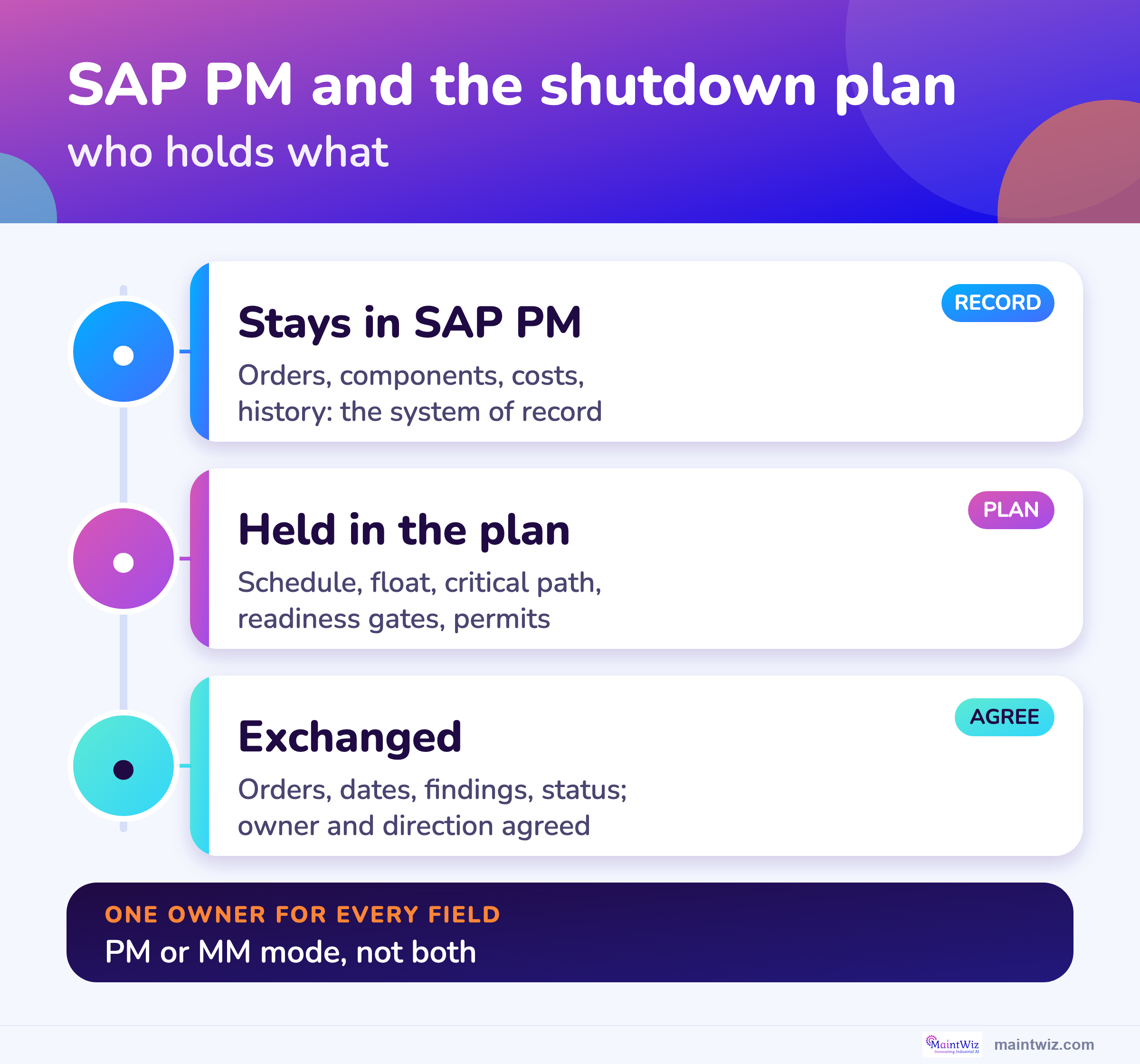
Keep SAP the enterprise backbone by giving every field one owner, changing each date in one place, starting new work as a request that becomes an SAP order, reconciling counts daily and closing orders in SAP only when the plan shows the package closed.
If you move to S/4HANA, see SAP S4HANA maintenance data migration.
| Rule | Why |
|---|---|
| Every field has one owner: SAP or the plan | Two owners create two versions of a date |
| Change dates in one place and send them across | Avoids silent overwrites |
| New work found in the stop starts as a notification or request, then becomes an order in SAP | Keeps scope traceable |
| Reconcile counts of orders, hours and cost daily | Catches missed exchanges early |
| Close orders in SAP only when the plan shows the package closed | Keeps history and cost consistent |
Revision
What is an SAP PM revision?
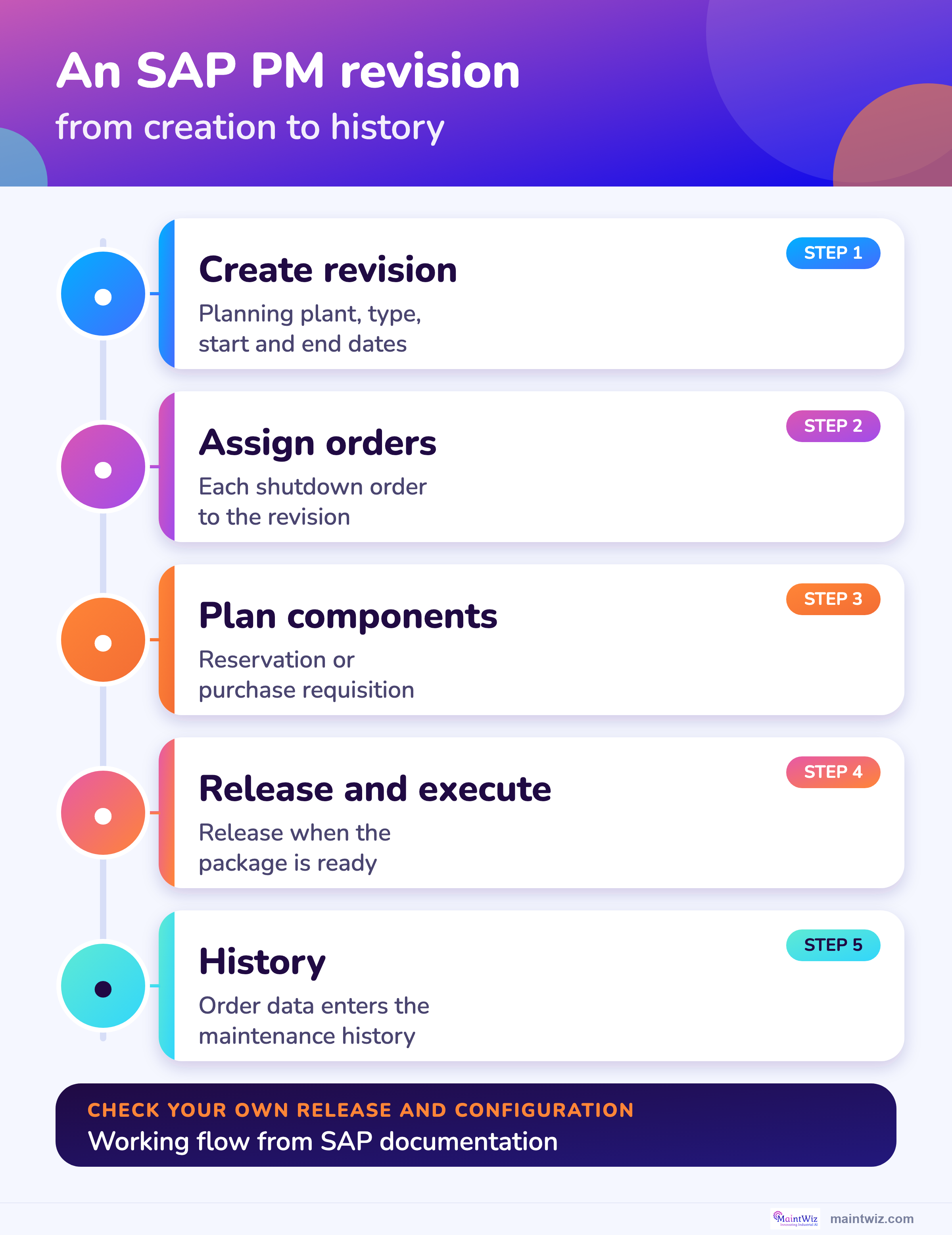
An SAP PM revision is an object that represents a planned maintenance period, such as a shutdown: it is created for a planning plant with a revision type, a description and start and end dates, and maintenance orders can be assigned to it. 2,1
SAP Help describes creating a revision in the Maintenance Event Builder by choosing a planning plant and a revision type, then entering a description and the revision start and end dates, a technical object, and optionally a WBS element or a network. 2 The Maintenance Order page lists the revision among the objects an order can be assigned to, beside profit center, project and investment program position. 1
In practice planners use the revision as the label for all work that belongs to a stop, so they can list and report on it.
Preparation
How do you prepare SAP PM for a MaintWiz shutdown?
Prepare SAP PM by creating the revision, assigning the shutdown orders to it, setting the requisition indicator for long-lead parts, planning components on operations, releasing orders only when their packages are ready and capturing findings as notifications. 2,1,3,4,5
A free Excel version is available: SAP PM shutdown preparation and data exchange (.xlsx).
| Step | Basis |
|---|---|
| Create the revision for the stop with its planning plant, type, dates and technical object | SAP Help, Creating Revisions in the Maintenance Event Builder |
| Assign the shutdown orders to the revision | SAP Library, Maintenance Order |
| Set the reservation and requisition indicator so long-lead items are requisitioned when the order is created | SAP Documentation, Materials Planning and Requirements Planning |
| Plan components on operations: material cannot be planned for sub-operations | SAP Documentation, Materials Planning |
| Release an order only when its package is ready: stock withdrawal needs a released order | SAP Documentation, Use of Stock and Non-Stock Material |
| Capture findings as notifications; approve added work in writing | Working practice |
Download the SAP PM preparation and data exchange worksheet to track these steps. See also the 40-step checklist and scope management.
Modes
Does MaintWiz connect through SAP PM or SAP MM?
MaintWiz connects to SAP through the PM module or through the MM module, one per customer, with SAP staying the enterprise backbone; PM mode centers on the maintenance orders and MM mode on reservations, requisitions and purchase orders.
| PM mode | MM mode | |
|---|---|---|
| SAP supplies | Maintenance orders and operations, the revision, notifications and technical objects | Reservations, purchase requisitions, purchase orders and stock |
| The shutdown plan adds | Schedule with critical path and float, readiness, permits, executive view | Material readiness per job: needed, in stock, short and the SAP status of each short part |
| Typical fit | PM drives planning and the orders already exist there | The materials team owns supply and the plan needs status |
| Read next | This page | SAP MM shutdown materials |
Both modes use readymade hooks and web services (SOAP and REST). Which objects each mode reads is settled per customer in implementation.
Visuals
Save the SAP PM shutdown charts
Three charts to share with your SAP and planning teams. Click either for the full-size image.
FAQ
Frequently asked questions
Why use MaintWiz with SAP PM for shutdowns?
MaintWiz gives shutdown teams a simple, mobile module with ePTW, critical path and readiness gates, while SAP PM stays the enterprise backbone. Work orders with consumption post back to SAP.
Can MaintWiz integrate with SAP PM?
Yes. MaintWiz integrates with SAP through the SAP PM module or the SAP MM module, using readymade hooks and web services (SOAP and REST).
How does MaintWiz post work orders to SAP?
Work orders are created and completed in MaintWiz, then posted back to SAP with their consumption. At the end of the day, spares cost and store-level quantity sync.
Does MaintWiz connect to SAP Business One and SAP HANA?
Yes. MaintWiz connects to different SAP instances, such as SAP Business One and SAP HANA, on the same integration foundation.
Does MaintWiz connect through SAP PM or SAP MM?
Through one of them per customer, with SAP staying the enterprise backbone. PM mode centers on maintenance orders and MM mode on reservations, requisitions and purchase orders.
What data moves between SAP and MaintWiz?
Assets and codes sync from SAP, work orders with consumption post back to SAP, and spares cost and store-level quantity sync at end of day. Objects, direction and frequency are set during implementation.
What does MaintWiz add on top of SAP PM?
A logic-linked schedule with critical path and float, readiness gates, shared-trade views, permits tied to work orders, mobile access and an executive view.
What is an SAP PM revision?
An object for a planned maintenance period, created with a planning plant, a revision type, a description and start and end dates; orders can be assigned to it. 2,1
Where does the maintenance history go after the stop?
Order data is entered in the maintenance history. 1 If you are moving to S/4HANA see keeping maintenance history.
Sources
Sources
- SAP Library, Maintenance Order (Plant Maintenance, PM)
- SAP Help, Creating Revisions in the Maintenance Event Builder (SAP ERP 6.0 EHP8, SAP for Aerospace and Defense documentation)
- SAP Documentation, Materials Planning (Plant Maintenance)
- SAP Documentation, Requirements Planning (Plant Maintenance)
- SAP Documentation, Use of Stock and Non-Stock Material (Plant Maintenance)
Run shutdowns in MaintWiz, keep SAP as your backbone
Book a demo and bring your SAP setup. We will walk through how MaintWiz can work with it.