
Key takeaways
- The 5S module has audits, reports and a dashboard.
- Dashboard views include compliance by month, top and low 10 zones, best zone, a radar by S and the average score trend.
- Findings become actions that are tracked, so an audit leads to a change, not just a score.
- Each plant audits against its own checklist and zones, offices and stores included.
- MaintWiz is an AI CMMS built for TPM: all eight pillars, 5S, OEE, Kaizen and one point lessons, a clickable dashboard per pillar, mobile capture, tags that convert to work orders and ePTW for safety, rolled out in 6 to 8 weeks.
Audit programme
From a 5S checklist to an audit programme
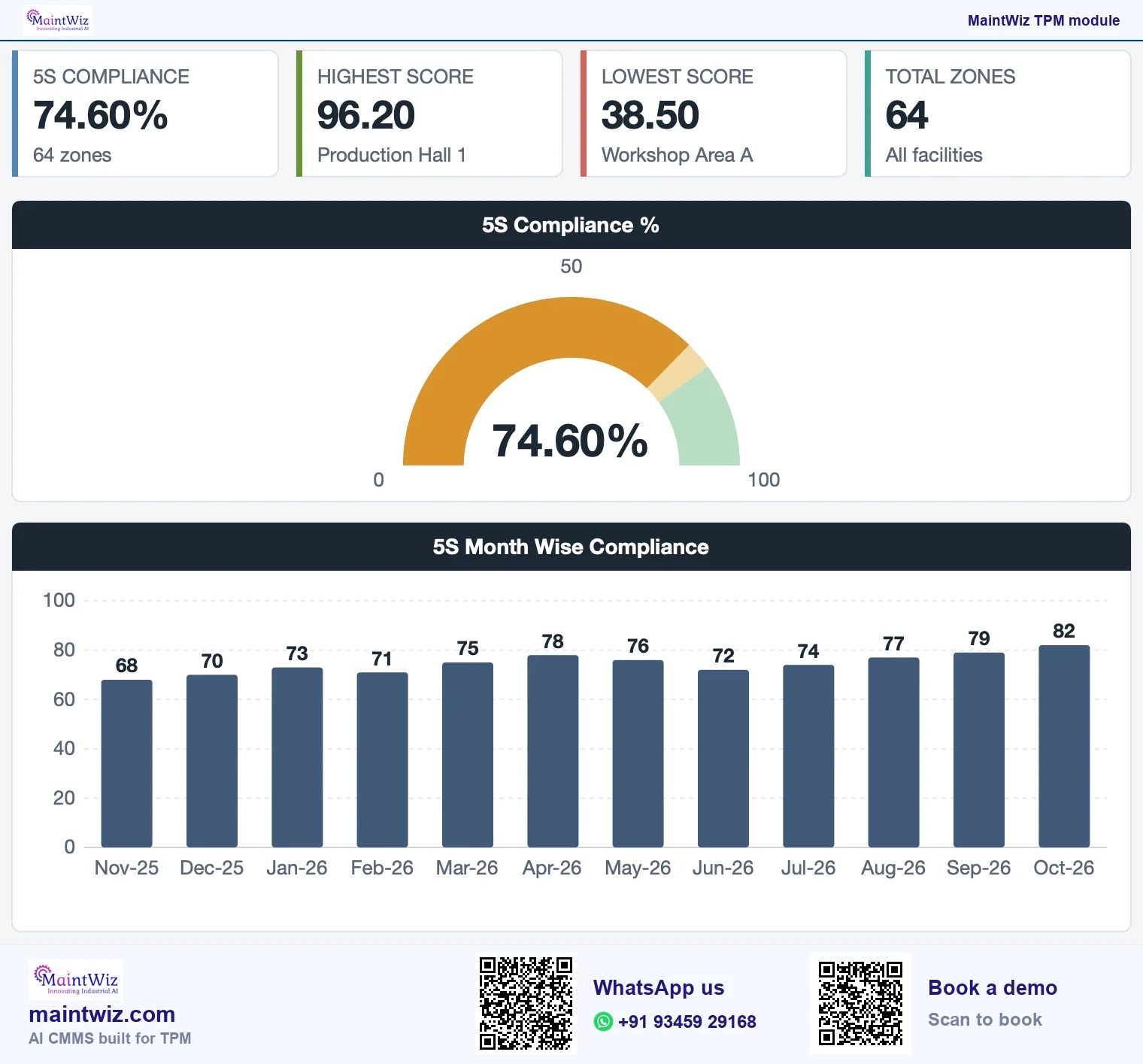
A one-off 5S campaign cleans an area once. An audit programme keeps it clean: zones are audited on a schedule, scores are compared, and weak zones get attention. The difference is a set of records that survive the person who made them. Software holds the zone list, the checklist, the scores and the follow-up actions in one place (Figure 2).
Why 5S matters to TPM: 5S in TPM is the foundation under the pillars, because clean, organised, labelled equipment is the condition for operators to find abnormalities.
From a 5S audit finding to a closed action
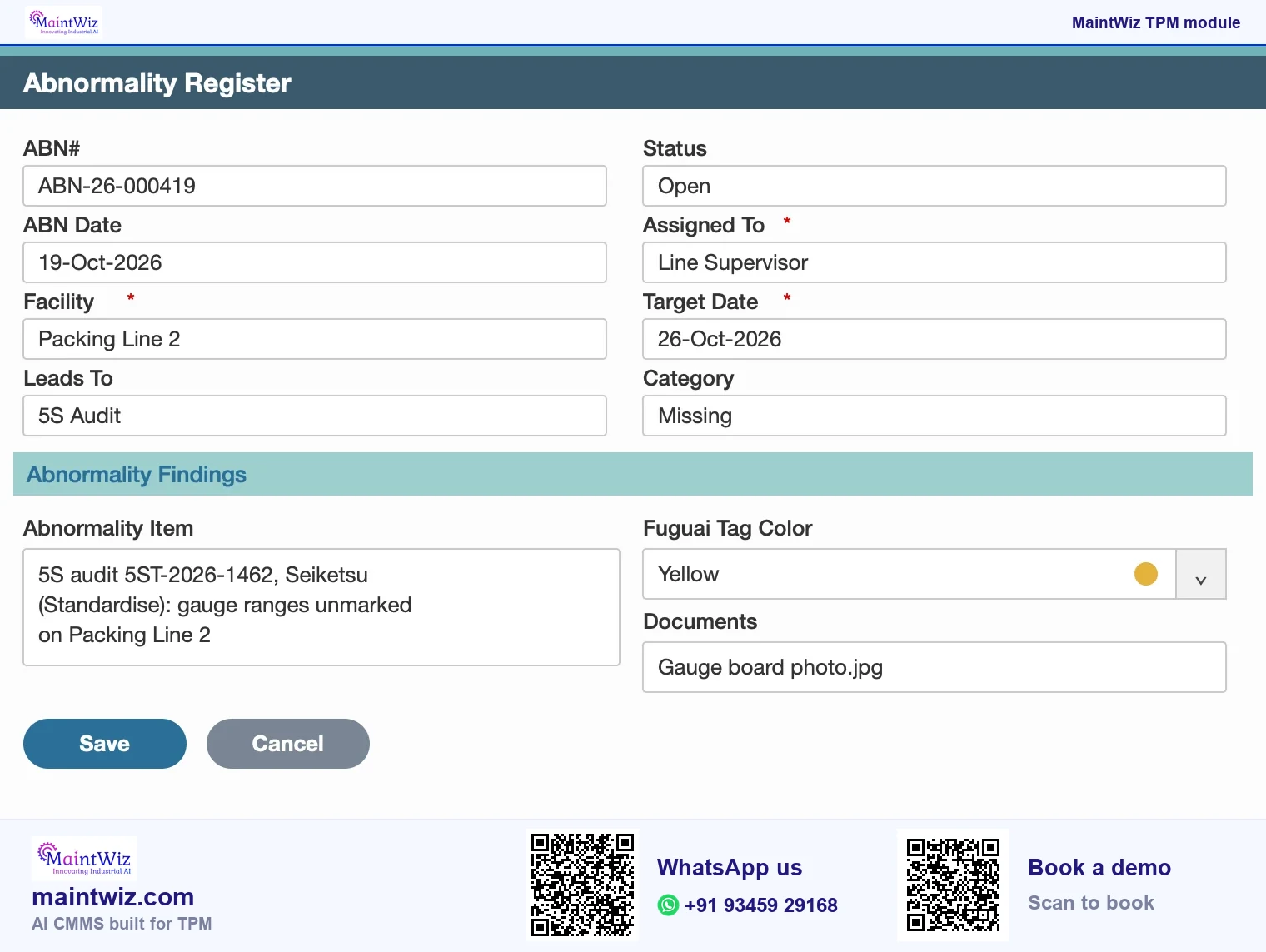
Findings that need follow-up are raised in the abnormality register
Audit the zone
Score each S
Finding needs follow-up
Raise it in the abnormality register
Owner and date, then close
 maintwiz.comAI CMMS built for TPM
 WhatsApp us
 +91 93459 29168
 Book a demo
Hiroyuki Hirano's 5 Pillars of the Visual Workplace (Productivity Press, 1995) sets out the five S.
| Item | Detail |
|---|---|
| Japanese term | Seiri, Seiton, Seiso, Seiketsu, Shitsuke |
| English meaning | Sort, set in order, shine, standardise, sustain |
| What it controls | Workplace order and cleanliness, the base of Jishu Hozen |
| What MaintWiz records | Zone audits and scores, with compliance by month, top and low 10, best zone and a radar |
Downloads
Start on paper, run it in MaintWiz: 5S audit and zone plan
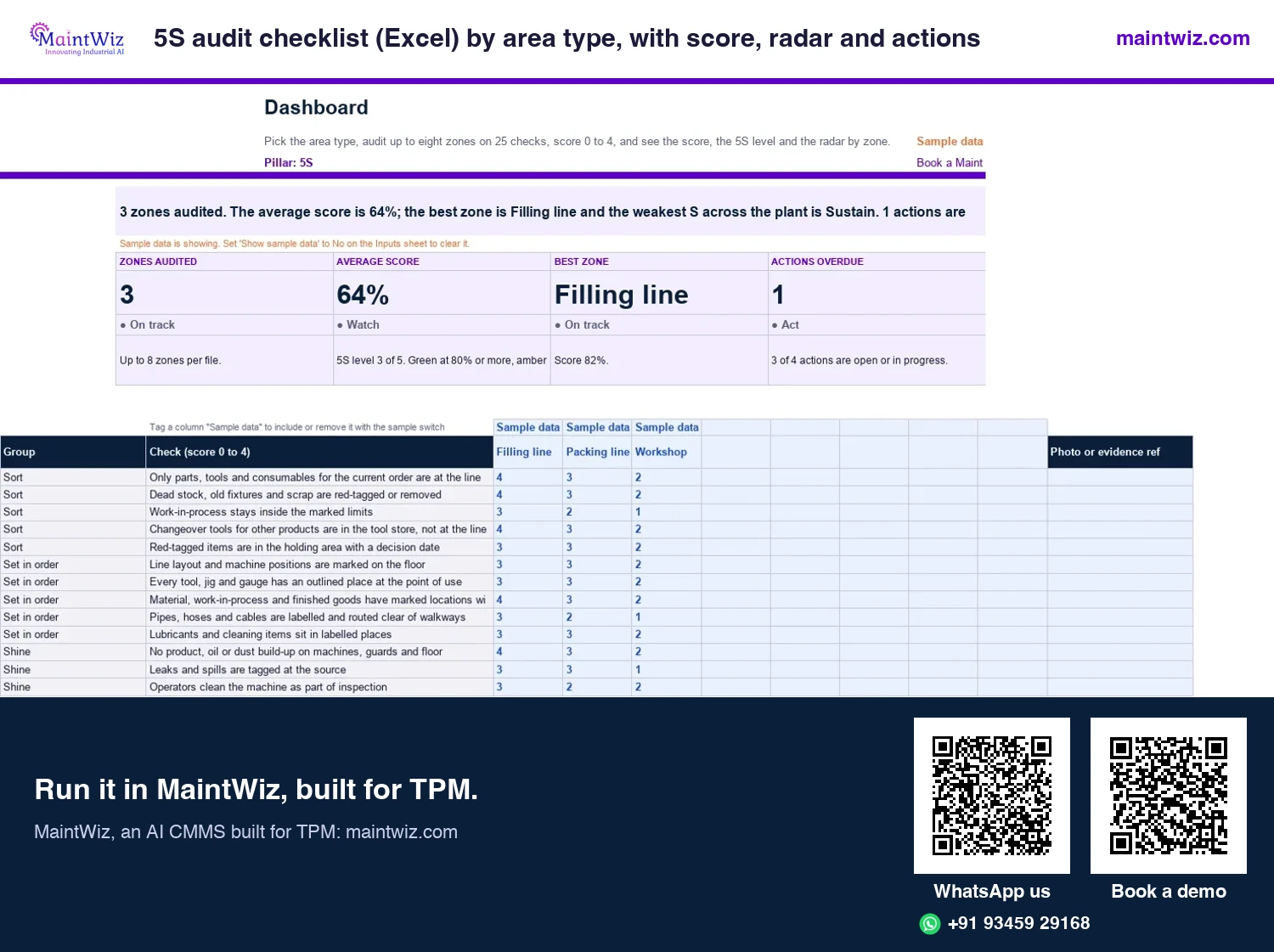
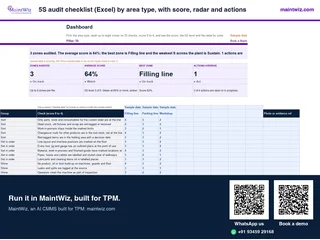 Excel5S audit checklist (Excel) by area type, with score, radar and actions
Run the 5S audit checklist for a production line, workshop, stores, office or utility area: 25 checks, score, 5S level, radar and actions.
Inside: 25 checks, five for each S, scored 0 to 4 · Check wording for five area types: production line, maintenance workshop, stores, office and utility · Up to eight zones per audit with score, 5S level and radar · Action log with owner and due date
- Sheets
- Dashboard, Inputs, Audit, Area checks, Actions, Read me
- A4
- Version
- v1.0, 2 November 2026
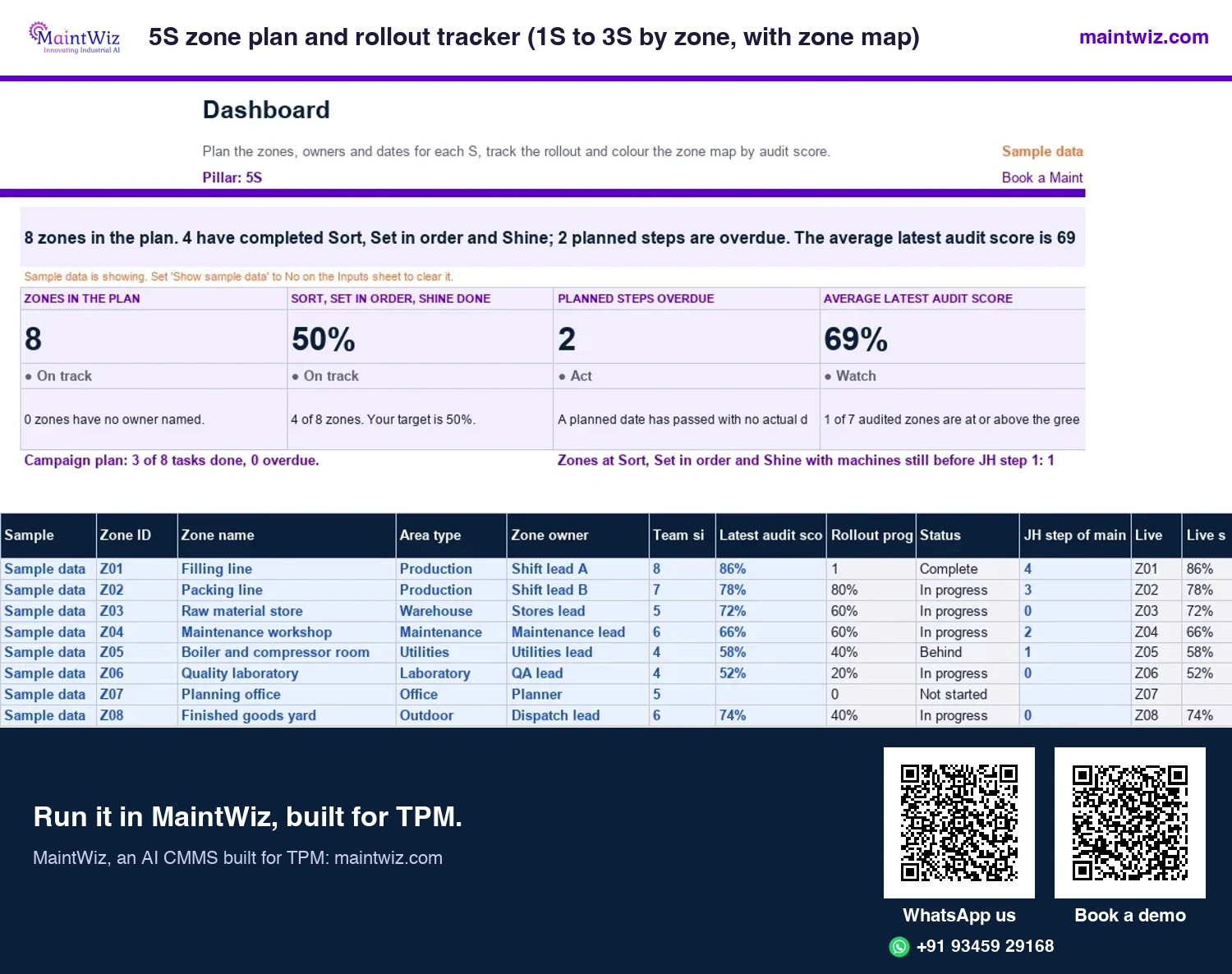
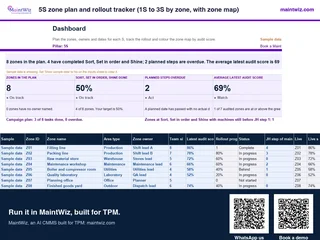 Excel5S zone plan and rollout tracker (1S to 3S by zone, with zone map)
Plan zones, owners and dates for the five S, colour a zone map by audit score
In MaintWiz: An audit finding can be raised in the abnormality register with an owner and a date.
- Sheets
- Dashboard, Inputs, Zones, Schedule, Campaign plan, Zone map, Audit trend, Read me
- A4
- Version
- v1.0, 2 November 2026
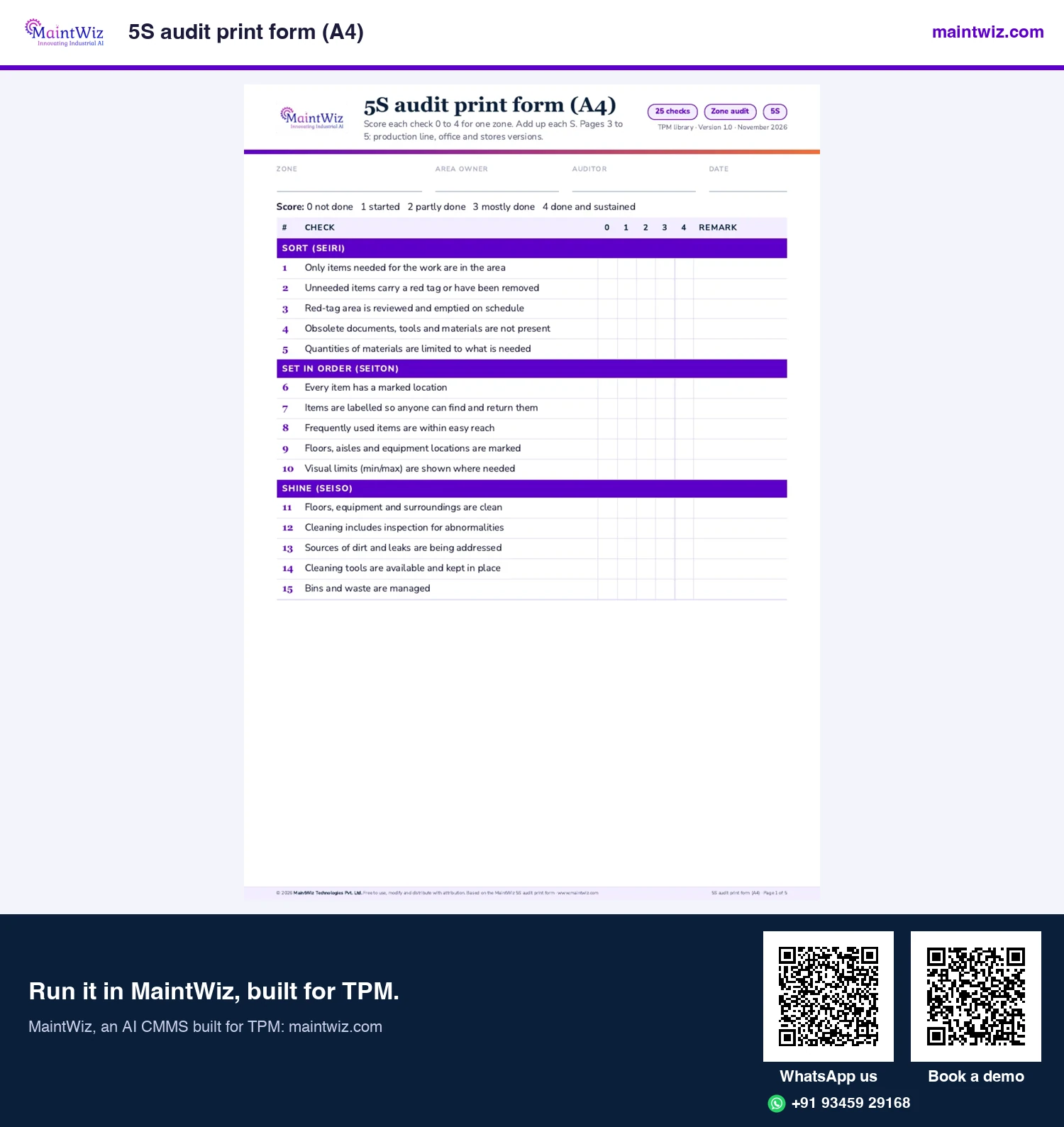
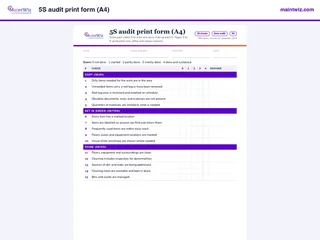 PDF5S audit print form
Score 25 checks on paper for any zone, with ready versions for a production line, an office and a store
In MaintWiz: Audits are entered in the 5S module with reports and a dashboard.
- Pages
- 5
- A4
- Created
- 5 November 2026
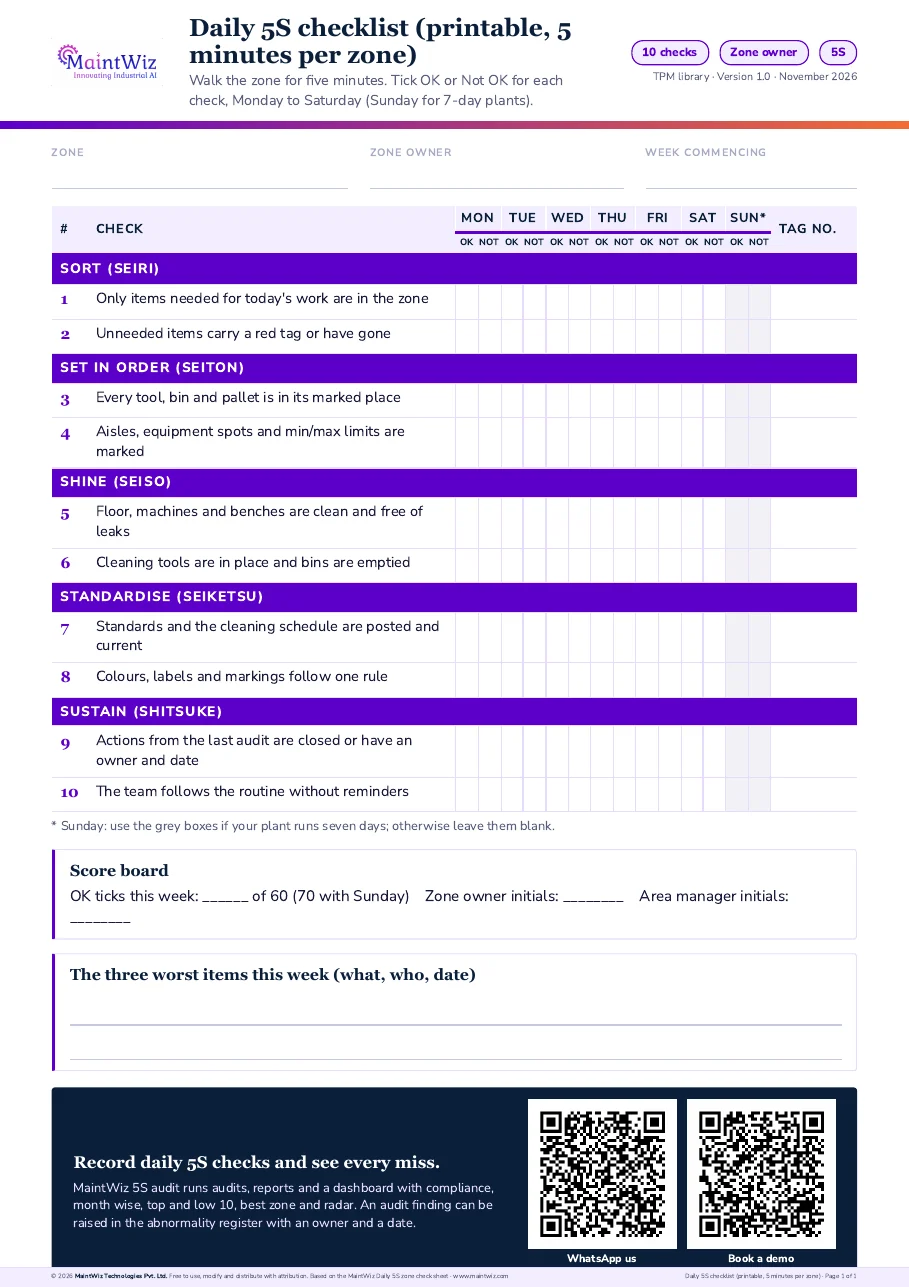
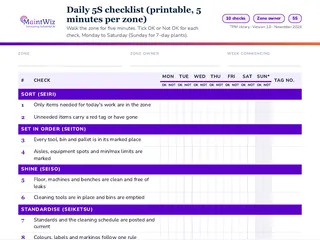 PDFDaily 5S checklist (printable, 5 minutes per zone)
Walk a zone in five minutes with a ten-check tick grid for Monday to Sunday, a score board and the three worst items
In MaintWiz: Operators capture audit records on mobile.
- Pages
- 1
- A4
- Created
- 5 November 2026
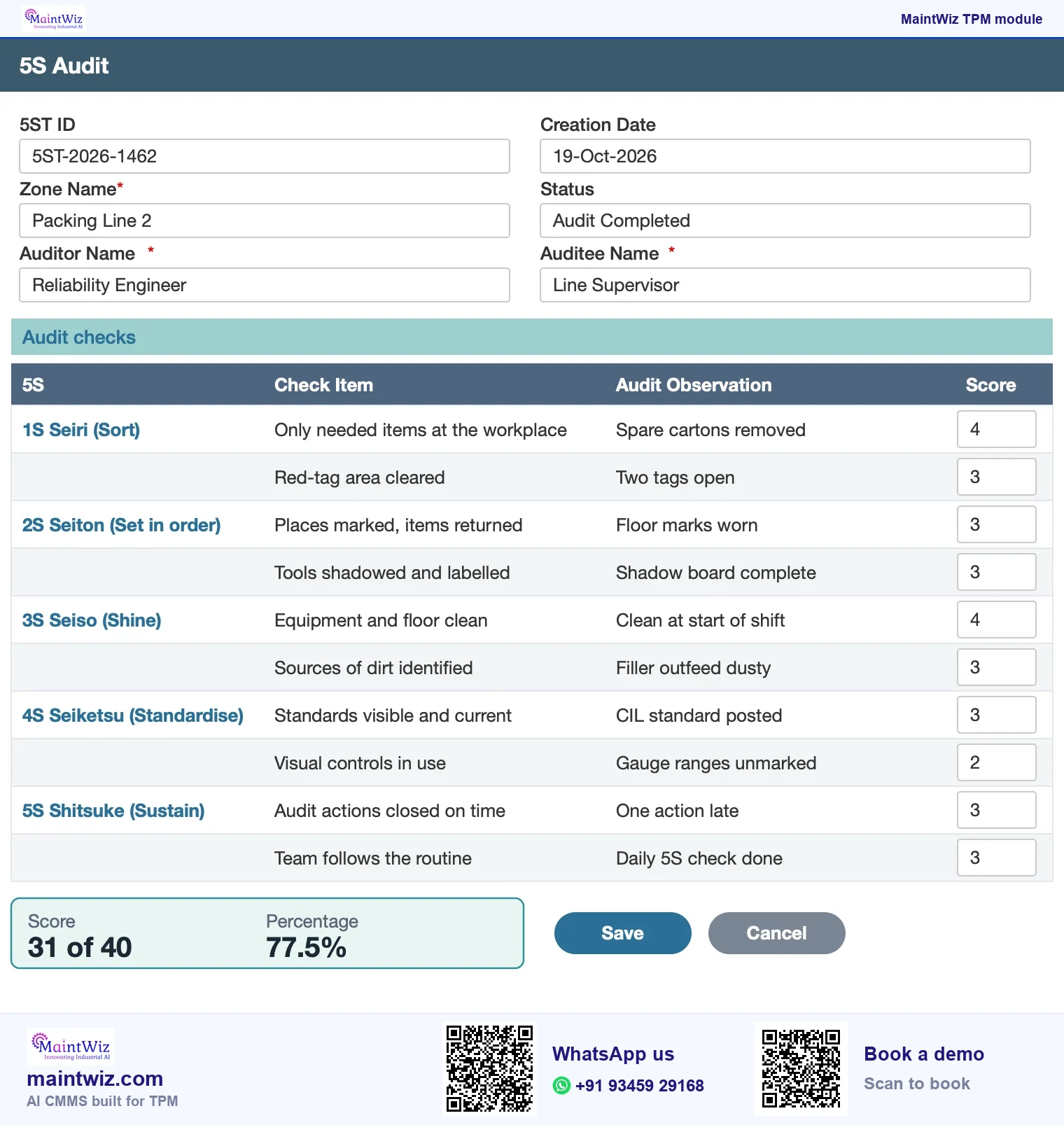
Audits by zone
How does a 5S audit run by zone?
- Define the zones (areas of the plant) and who owns each.
- Set the checklist: questions grouped under the five S (sort, set in order, shine, standardise, sustain).
- Audit the zone on its schedule, scoring each question.
- Record findings and assign corrective actions with owners and dates.
- Review the dashboard; re-audit the weak zones sooner.
A free 5S audit checklist and print form give you a checklist to start with on paper (Figure 4).
Scores and dashboard
What do the scores and dashboard show?
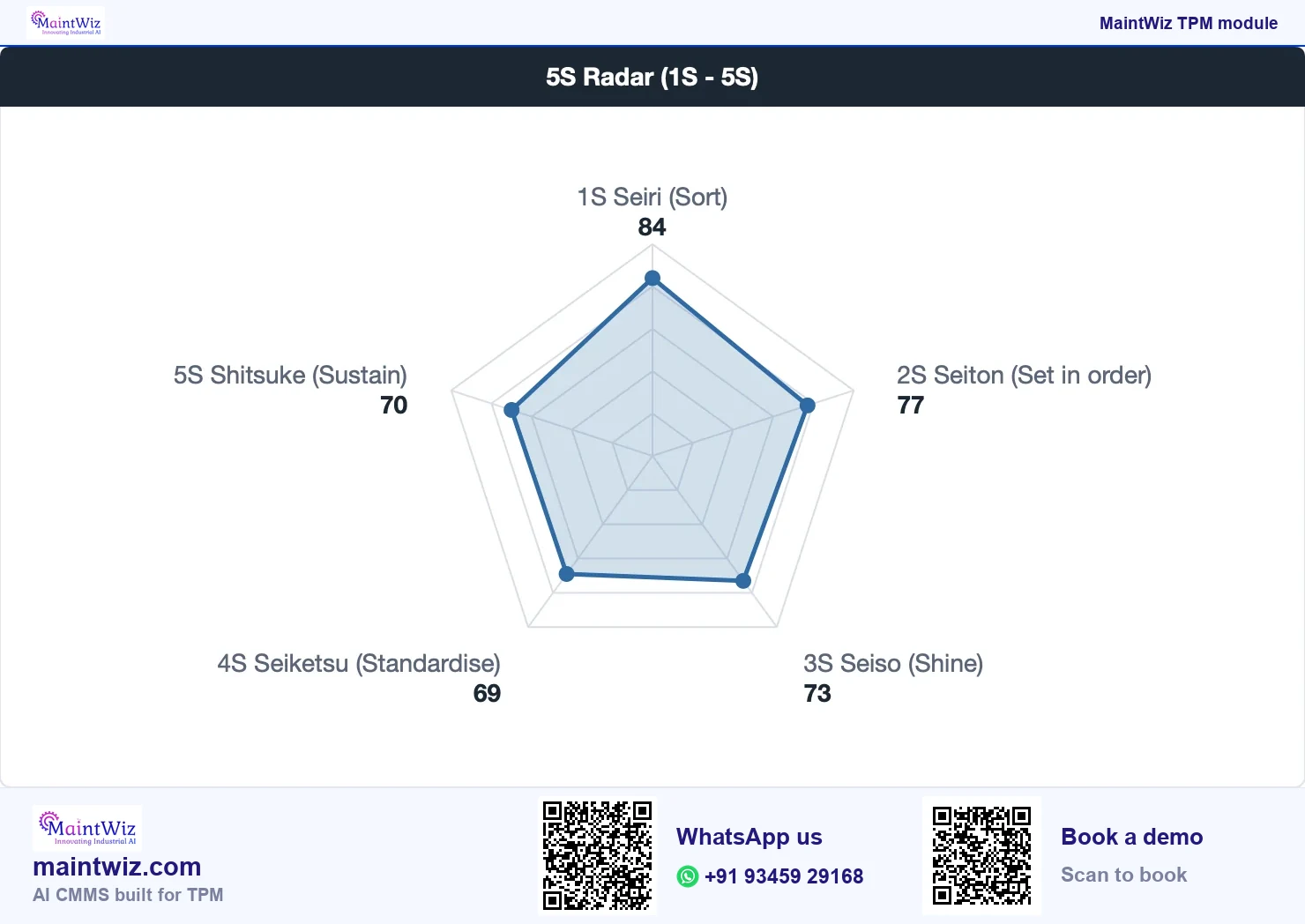
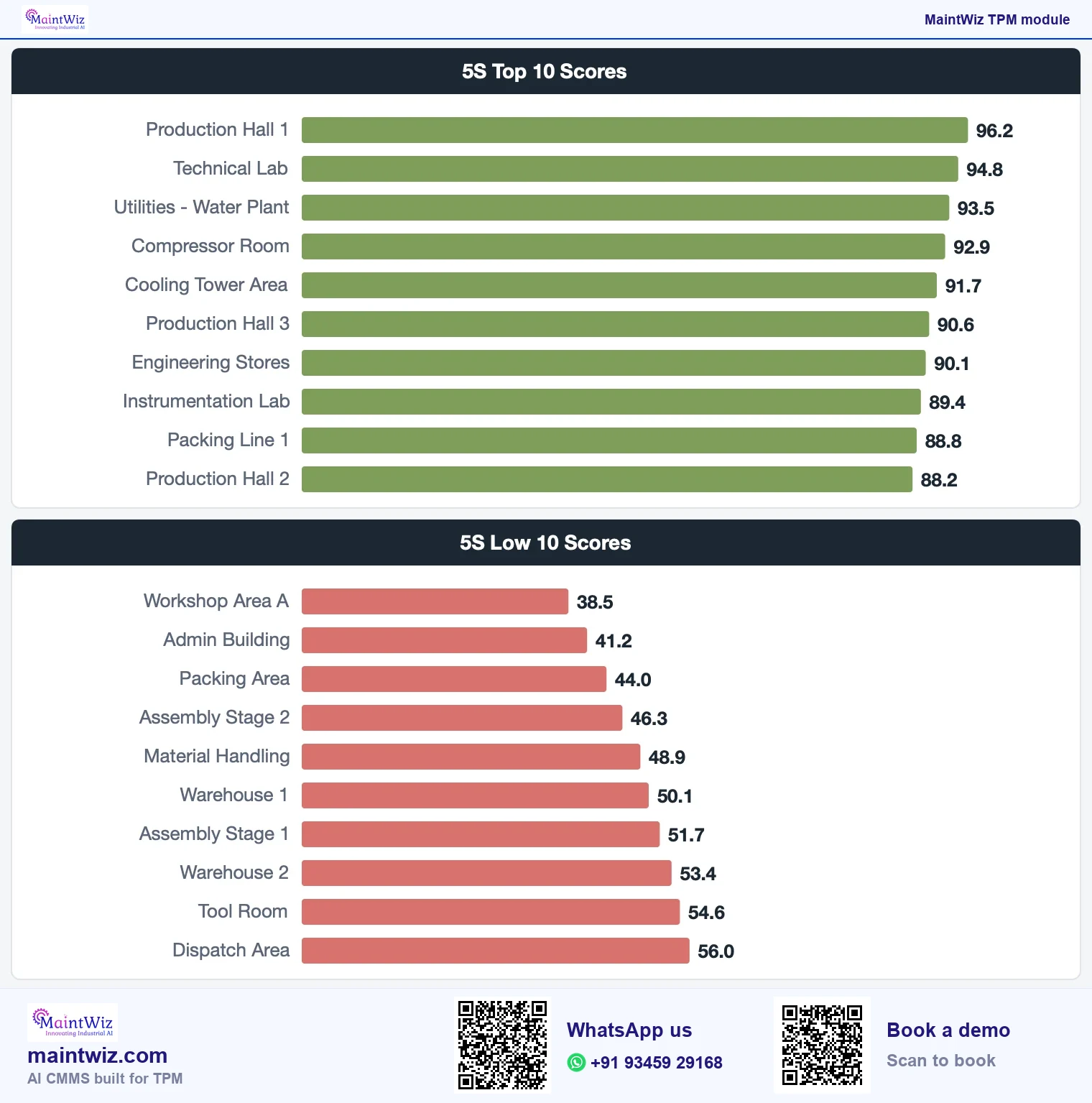
The 5S dashboard presents compliance by month, the top and lowest ten scoring zones, the best zone, a radar of scores by S and the trend of the average score. A radar shows at a glance whether weakness is in sorting, setting in order, shining, standardising or sustaining; the ranking shows which zones to visit first (Figure 7).
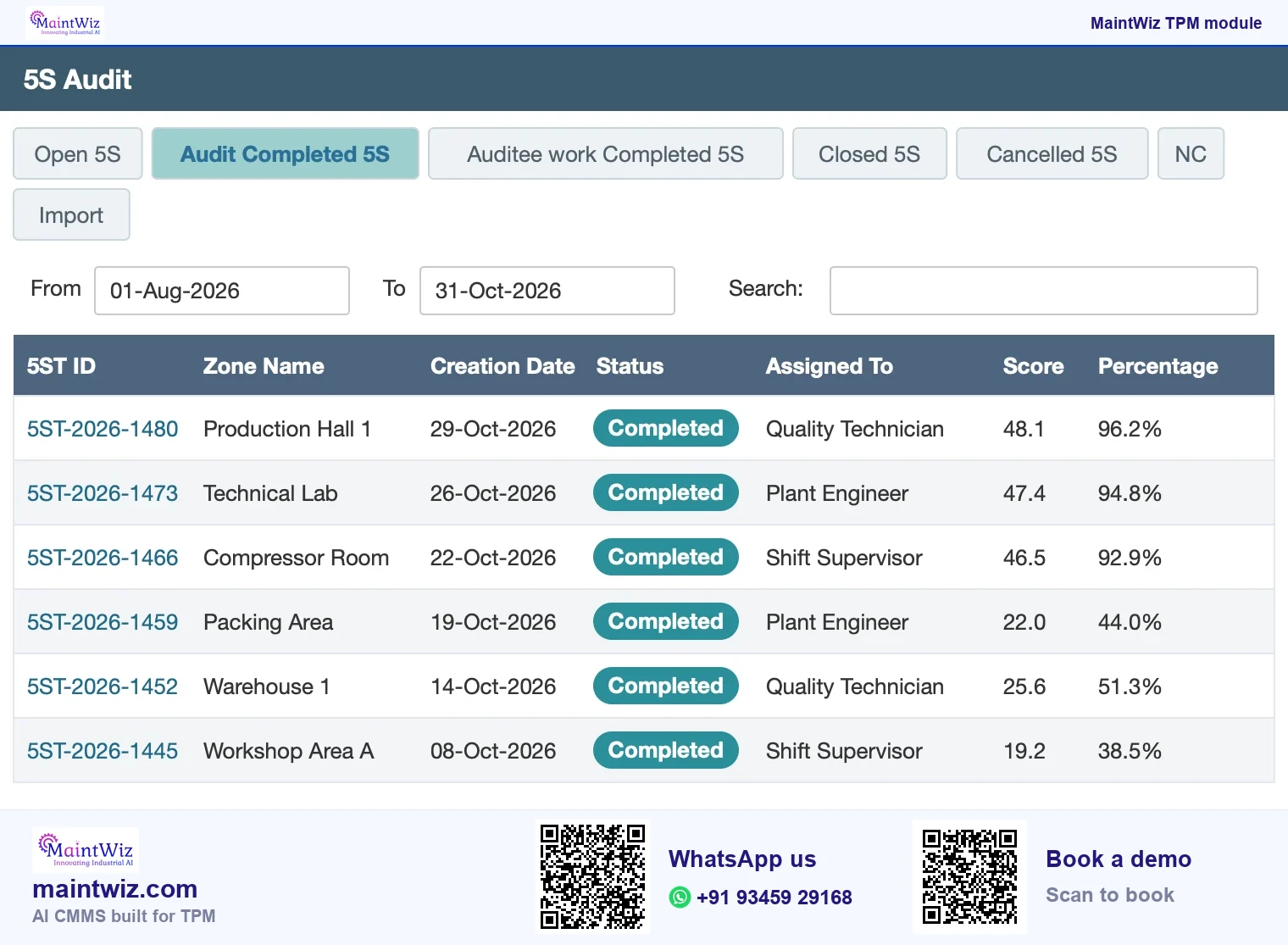
The module has audits, reports and a dashboard. Each audit follows the zone's own checklist, and the audit list shows the score and percentage for every zone as audits move from completed to closed. Zone owners see their scores and actions, and plant heads see compliance by month and the ranking of zones, so one set of records serves the auditor on the floor and the review meeting.
Book a demo and see your own zones ranked, with the weakest S on the radar and the lowest zones at the top of the list.
How do findings become actions?
An audit that ends in a score changes nothing. In the system, the audit scores are kept by zone and over time, and an audit finding can be raised in the abnormality register with an owner and a date, so it is followed to closure like any other tag, and a tag converts to a work order when maintenance work is needed. Each audited zone shows its score and percentage as audits move from completed to closed (Figure 5).
Digital vs paper
Is a digital 5S audit better than paper?
Yes, once more than a few zones are audited. In MaintWiz each score is entered against the zone and the S, zones rank into top and low 10, and a finding is raised in the abnormality register with an owner and a date, so nothing is keyed twice.
| Paper or spreadsheet | In the system | |
|---|---|---|
| Capture | Paper sheet scored in the area and keyed later | Scores entered against the zone and the S |
| Comparison | Averages calculated by hand | Zones ranked; top and low 10 shown |
| Follow-up | Actions in a separate list or in memory | Findings tracked as actions with owners and dates |
| Trend | Spreadsheet if someone maintains it | Compliance by month and the average score trend |
| Reporting | Slide built for the review | Dashboard and reports from the same data |
Setting it up for your plant
Zones, checklist questions, scoring scales and who may audit are set up with each plant, so a plant can start with its own checklist rather than a generic one.
What does the 5S module connect to?
- Autonomous maintenance: step 1 initial cleaning relies on the same clean-area discipline.
- Abnormality management: findings that need follow-up.
- TPM software: pillar-wise dashboards for all eight pillars, with 5S, OEE and Kaizen.
- One point lessons: short lessons on the standards the audit tests.
Who uses it
Who uses the 5S module?
| Role | What they do in the module |
|---|---|
| Zone owner | Keeps the zone to standard; sees its scores and actions |
| Auditor | Scores the zone against the checklist |
| 5S coordinator | Sets the checklist and schedule; reads the dashboard |
| Plant head | Sees compliance by month and the ranking of zones |
A first audit cycle
- Define the zones and owners for the pilot area.
- Set the checklist from your own 5S standard, with a short question set under each S.
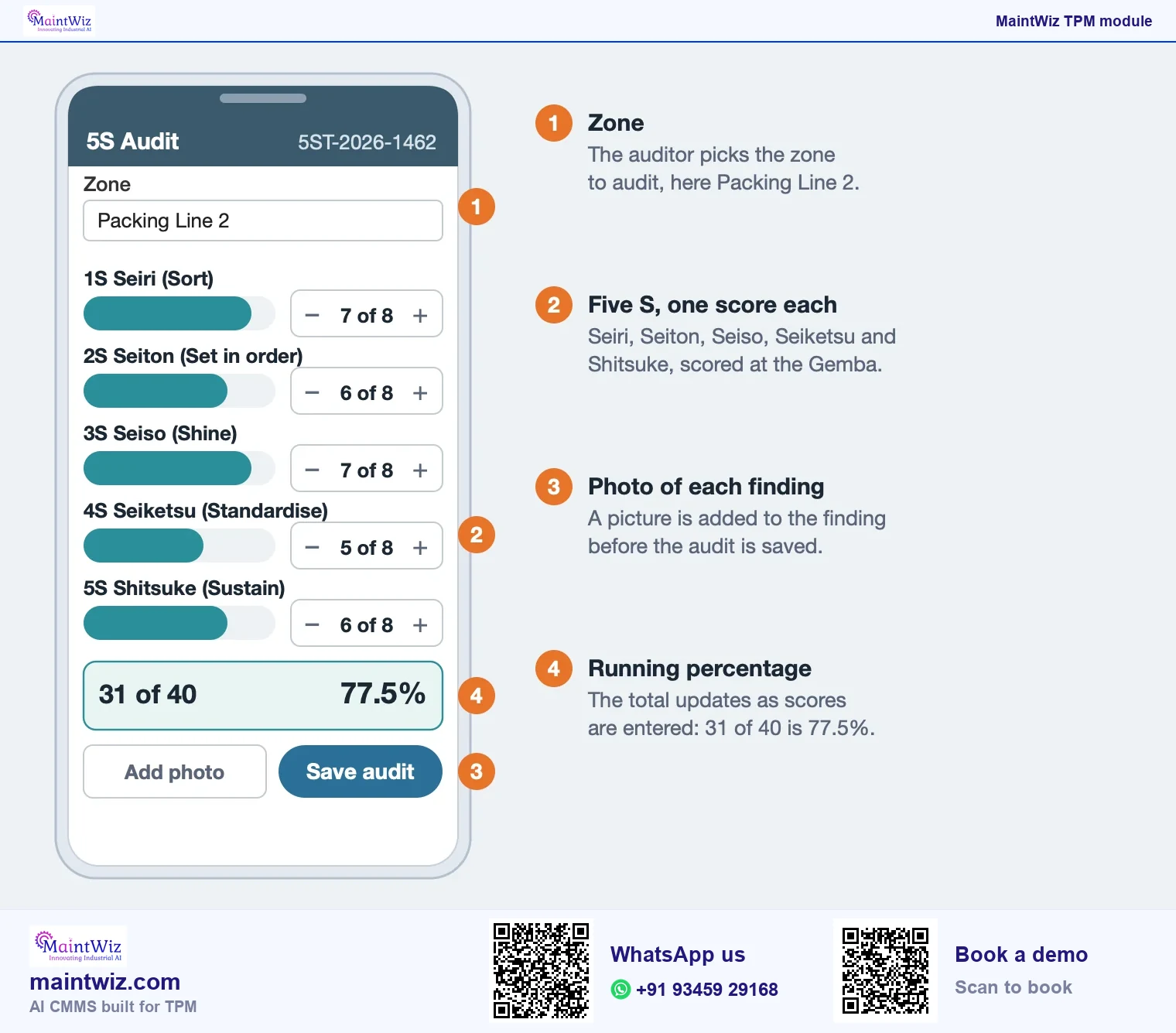
- Audit each zone once; score honestly and photograph findings.
- Review the radar and the lowest zones with owners; agree actions.
- Re-audit after two to four weeks to see whether findings were closed and scores held.
The free 5S audit checklist can run this cycle in a spreadsheet first.
What does a first audit cycle produce?
- Every zone scored check by check on your checklist; the 25-check workbook, scored 0 to 4, is a ready starting set.
- A score by S for each zone, shown on a radar so the weakest S is visible.
- The top and low 10 zones, so the first visit goes to the lowest zone.
- Findings raised in the abnormality register with an owner and a date.
- Compliance by month, so the second cycle shows whether scores held.
Data can be exported to XLS and PDF, so the review pack comes from the same records as the dashboard.
Can the module audit offices as well as production areas?
Zones are defined by the plant, so an office, a stores area or a maintenance workshop can be audited in the same way as a production line, each with a checklist that fits the area. The questions differ (desks and files in an office, bins and labels in stores) but the five S and the scoring are the same, and the dashboard ranks all zones together or by type.
Mistakes
What are the common mistakes when digitising 5S audits?
- Copying a long paper checklist into a system: the audit becomes a chore. Cut questions that never find anything.
- Letting zone owners audit themselves only, so scores drift upward.
- Scoring without photographs, so findings cannot be checked.
- Showing scores without actions: a radar that nobody acts on is decoration.
- Auditing too rarely to see change, or so often that people stop caring.
Treat the dashboard as a conversation starter for a weekly walk: visit the lowest zone with its owner and agree one change. Compare the first month's scores with the third, on the same checklist, to see whether the habit is holding.
Findings, deployment and export
An audit finding can be raised in the abnormality register with an owner and a date. MaintWiz runs as software as a service (SaaS), or on-premises on your own servers on request. Data can be exported to XLS and PDF.
Pricing is quoted for the modules and users you need. Get a quote or read how TPM software is priced.
FAQ
Frequently asked questions
What is 5S audit software?
Software for auditing zones against a 5S checklist, scoring each of the five S, ranking zones, showing trends over time and tracking the corrective actions that come out of the audits.
What does the 5S dashboard show?
Compliance by month, the top and lowest ten scoring zones, the best zone, a radar of scores by each S and the trend of the average score, so reviewers see where to visit first.
Can we use our own checklist?
Yes. Checklists, zones and scoring are set up with each plant, so a plant can start with its own questions and scales instead of a generic template, and change them as the standard matures.
How do audit findings get fixed?
Audit scores are kept by zone and over time. An audit finding can be raised in the abnormality register with an owner and a date, then followed to closure through the same status tabs as any other tag.
Can a 5S audit finding become a work order?
Yes. The finding is raised in the abnormality register with an owner and a date, and a tag converts to a work order when maintenance work is needed, so the repair stays on the same equipment record and is followed to closure on the same status tabs.
Can we start on paper?
Yes. A printable 5S audit form and a scored workbook let you start on paper or in a spreadsheet. Move to a system when several zones run, scores need comparing or follow-up slips.
Is there a 5S audit app?
Yes. Auditors score each check in the zone on a mobile device or terminal, and the screen totals the percentage as the audit is saved. Book a demo to see your zones on a phone.
How long does it take to roll out 5S audit software?
The MaintWiz roll-out takes 6 to 8 weeks, with easy Excel uploads for zones and people and guided project management by the MaintWiz implementation team.
Can audits cover offices and stores?
Yes. Zones are defined by the plant, so an office, a stores area or a maintenance workshop is audited like a production line, each with a checklist that fits the area, and the dashboard ranks all zones together or by type.
Sources
Sources
- Hirano, H. (1995). 5 pillars of the visual workplace: the sourcebook for 5S implementation. Productivity Press. https://openlibrary.org/isbn/9781563270475