
Key takeaways
- The module covers the operator loop of Jishu Hozen: find an abnormality, tag it, register it, assign it, close it and review.
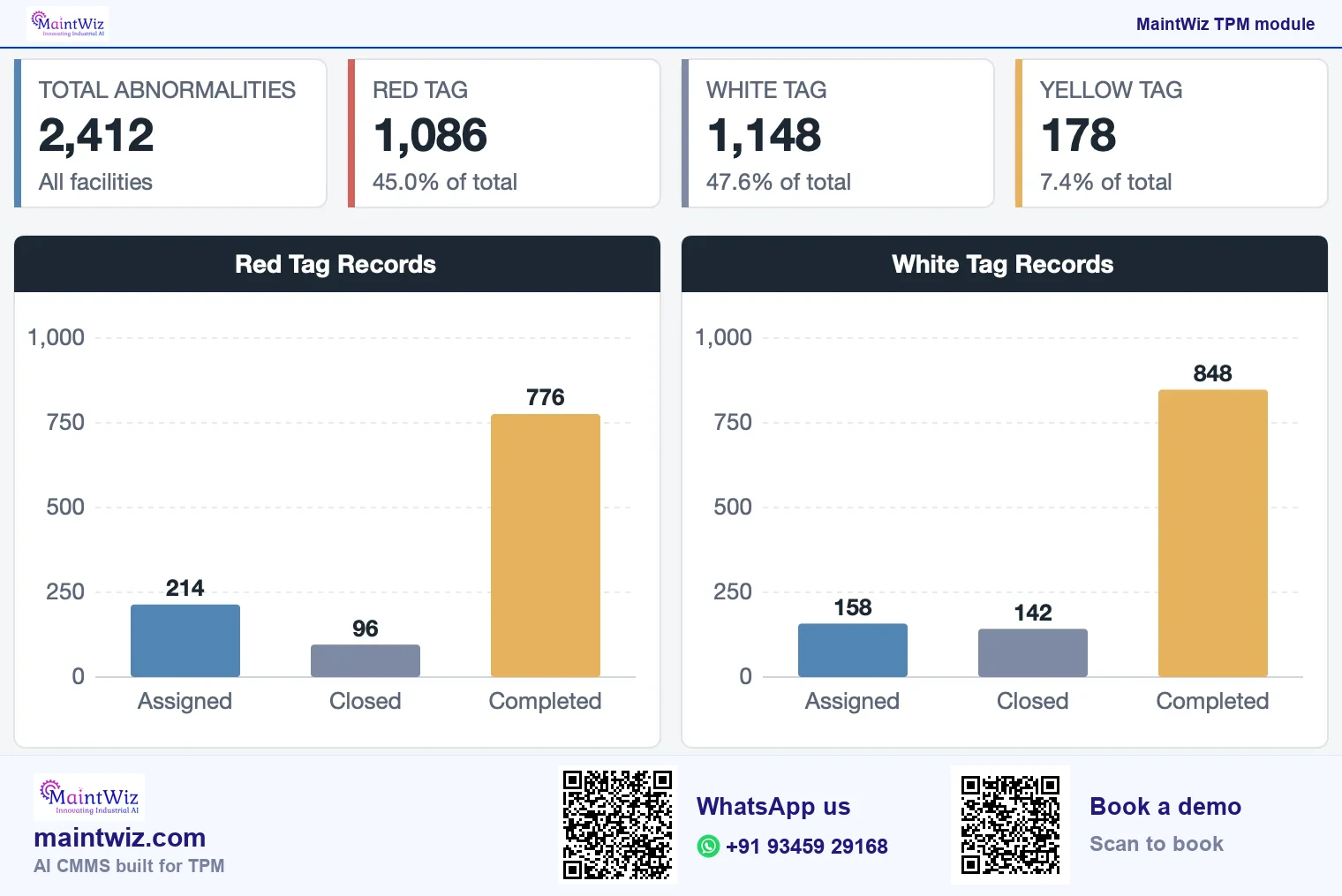
- A Jishu Hozen dashboard shows red and white tag records, cumulative and day-wise closure and sources of contamination.
- It sits alongside the abnormality register, one point lessons and planned maintenance in MaintWiz.
- MaintWiz is an AI CMMS built for TPM: all eight pillars, 5S, OEE, Kaizen and one point lessons, a clickable dashboard per pillar, mobile capture, tags that convert to work orders and ePTW for safety.
Why operators
Why are operators the first line of detection?
Autonomous maintenance (Jishu Hozen) is the TPM pillar in which operators care for their own equipment. Operators spend the shift beside the equipment. They notice a new sound, a leak or a loose guard before any scheduled inspection does. Jishu Hozen turns that noticing into a routine: operators clean and inspect against standards and report what they find. The routine fails when reports go nowhere. Software closes that gap by giving every report an owner, a date and a visible status.
Jishu Hozen: seven steps and the MaintWiz record
Where each step's evidence lives
| Step | What the team does | Record that holds the evidence |
|---|---|---|
| 1. Shoki Seiso (initial cleaning) | Tags raised during cleaning | Abnormality register |
| 2. Hassei-gen Konnan-kasho Taisaku (contamination and hard-to-access places) | Sources and hard-to-access places tracked | Step 2 dashboard |
| 3. Provisional CIL standards | Cleaning, inspection and lubrication standard | CIL standard document |
| 4. General inspection | Inspection routines run by operators | Autonomous maintenance records |
| 5. Autonomous inspection | Operators inspect to their own standard | Autonomous maintenance records |
| 6. Standardisation | Lessons and standards put on one page | One point lessons |
| 7. Autonomous management | Operators own the area and its results | Dashboards by pillar and facility |
 maintwiz.comAI CMMS built for TPM
 WhatsApp us
 +91 93459 29168
 Book a demo
Each step leaves a record in MaintWiz, so a step audit reads from evidence, not from memory (Figure 2). Here is how a plant runs the Jishu Hozen operator loop in MaintWiz (Figure 3).
Who reads the Jishu Hozen views
The same records, different questions
Operator
- Own area open items
- Overdue alerts
Supervisor
- Open and overdue tags for the area
- Contamination sources
Maintenance
- Red tags needing support
- Closure by day
Pillar owner and plant head
- Tag records by colour and month
- Closure trends
maintwiz.comAI CMMS built for TPMWhatsApp us+91 93459 29168Book a demo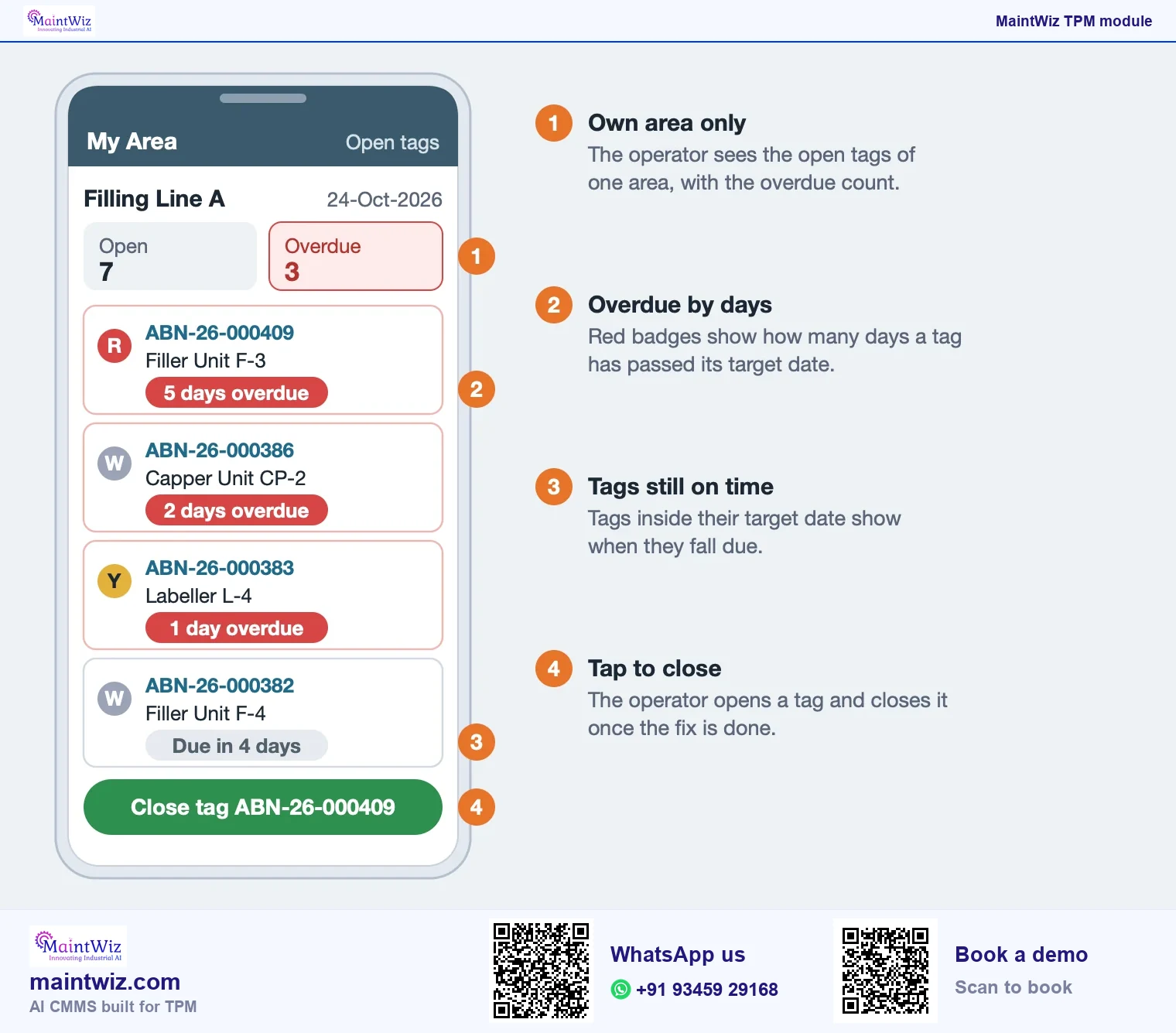
The Jishu Hozen menu in MaintWiz groups the abnormality register, the autonomous maintenance records, reports and a dashboard. In practice the loop is:
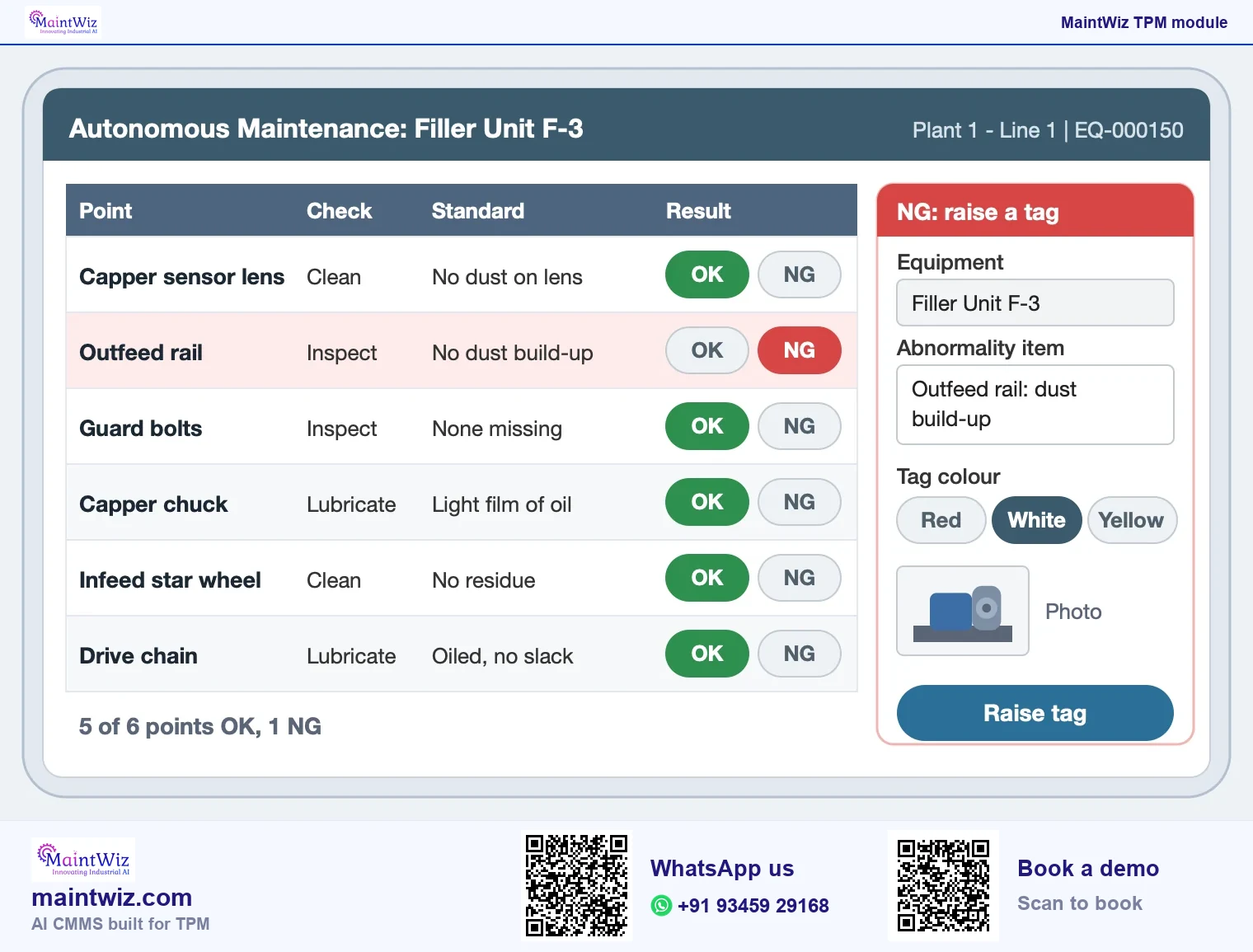
- An operator cleans and inspects the equipment and finds an abnormality.
- The abnormality is entered in the register against the equipment, with its category and a tag colour.
- It is assigned to an owner with a target date; the owner records the cause and the countermeasure.
- When the fix is done and checked, the entry is closed; open, completed and closed entries are listed separately.
- Supervisors and pillar owners review the dashboard and reports for tag records, closure and contamination sources.
JIPM, the Japan Institute of Plant Maintenance, lists autonomous maintenance among the four core pillars of TPM, the pillars it describes as directly related to reducing loss in the production process.
| Item | Detail |
|---|---|
| Japanese term | Jishu Hozen |
| English meaning | Autonomous maintenance: operators care for their own equipment |
| What it controls | Cleaning, inspection and lubrication, abnormality tags and the seven steps |
| What MaintWiz records | Abnormality register entries, autonomous maintenance records, reports and a dashboard of tag records, closure and contamination sources |
Downloads
Start on paper, run it in MaintWiz: CIL sheets, step audit and tags
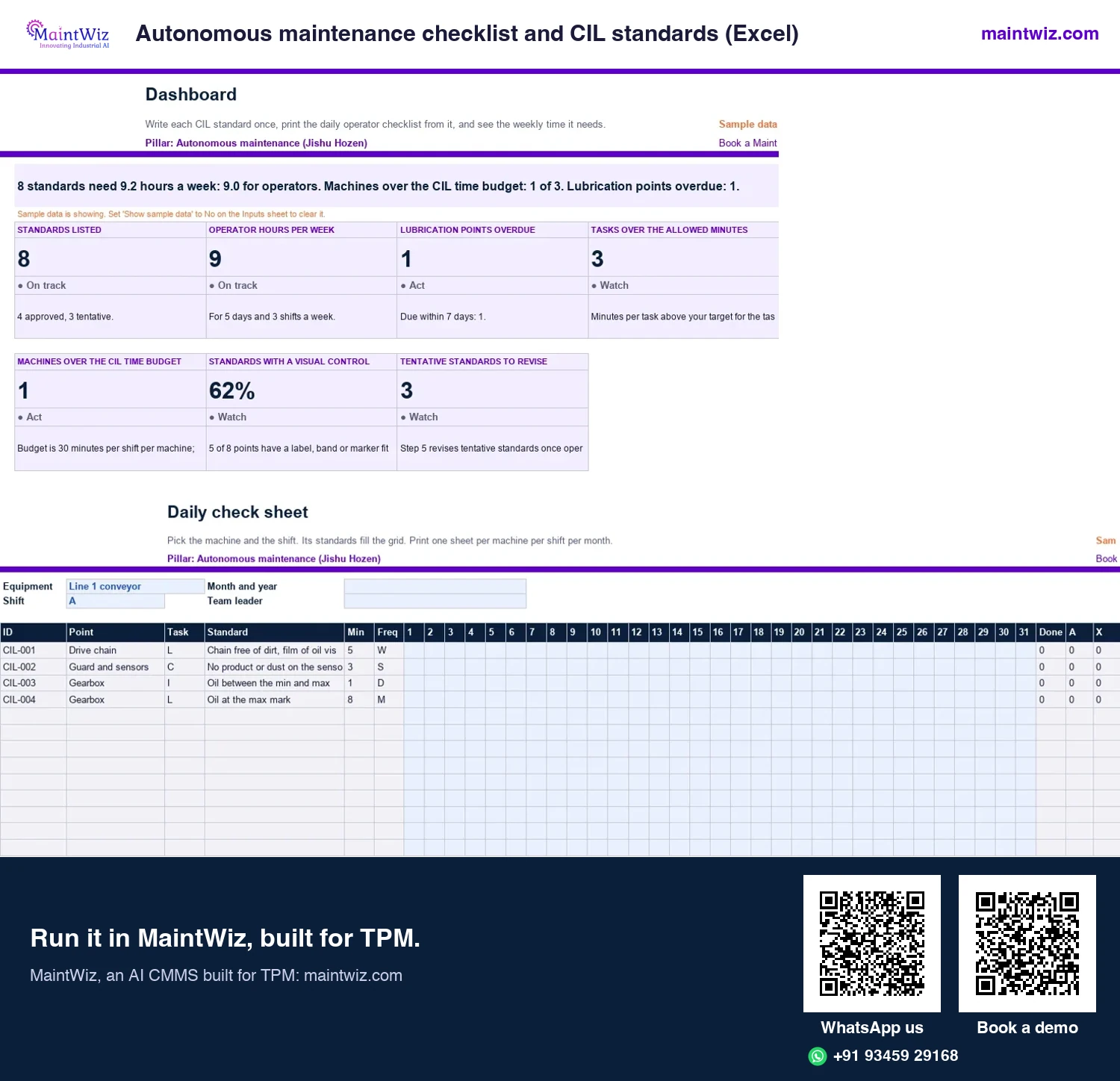
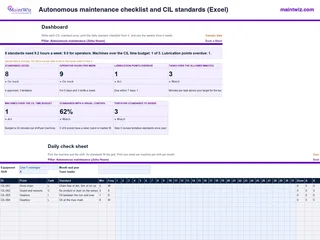 ExcelAutonomous maintenance checklist and CIL standards (Excel)
Write each cleaning, inspection and lubrication standard once, print the daily operator checklist for any machine
In MaintWiz: The Jishu Hozen menu groups autonomous maintenance records, reports and a dashboard.
- Sheets
- Dashboard, Inputs, Frequencies, Lubricants, Machines, Standards, Daily check sheet, Lube schedule, Lube route, Read me
- A4
- Version
- v1.0, 2 November 2026
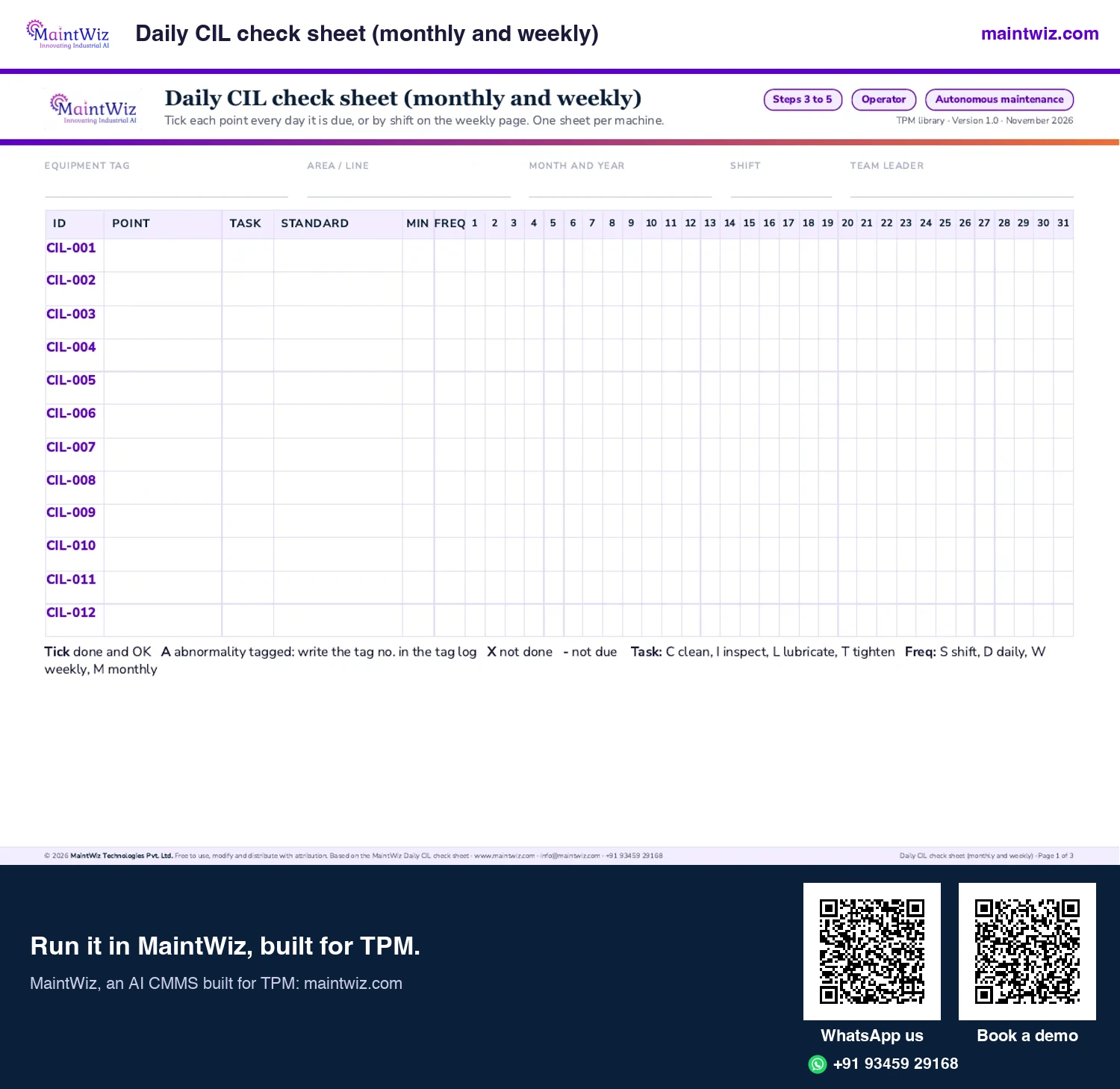
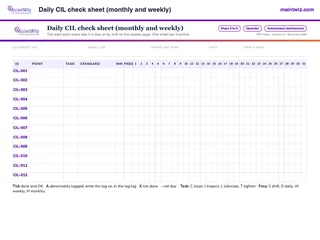 PDFDaily CIL check sheet (monthly and weekly)
Print a daily operator checklist for one machine, monthly or weekly with A, B and C shift boxes
In MaintWiz: Operators capture records on mobile and see their own area's open items.
- Pages
- 3
- A4 landscape
- Created
- 5 November 2026
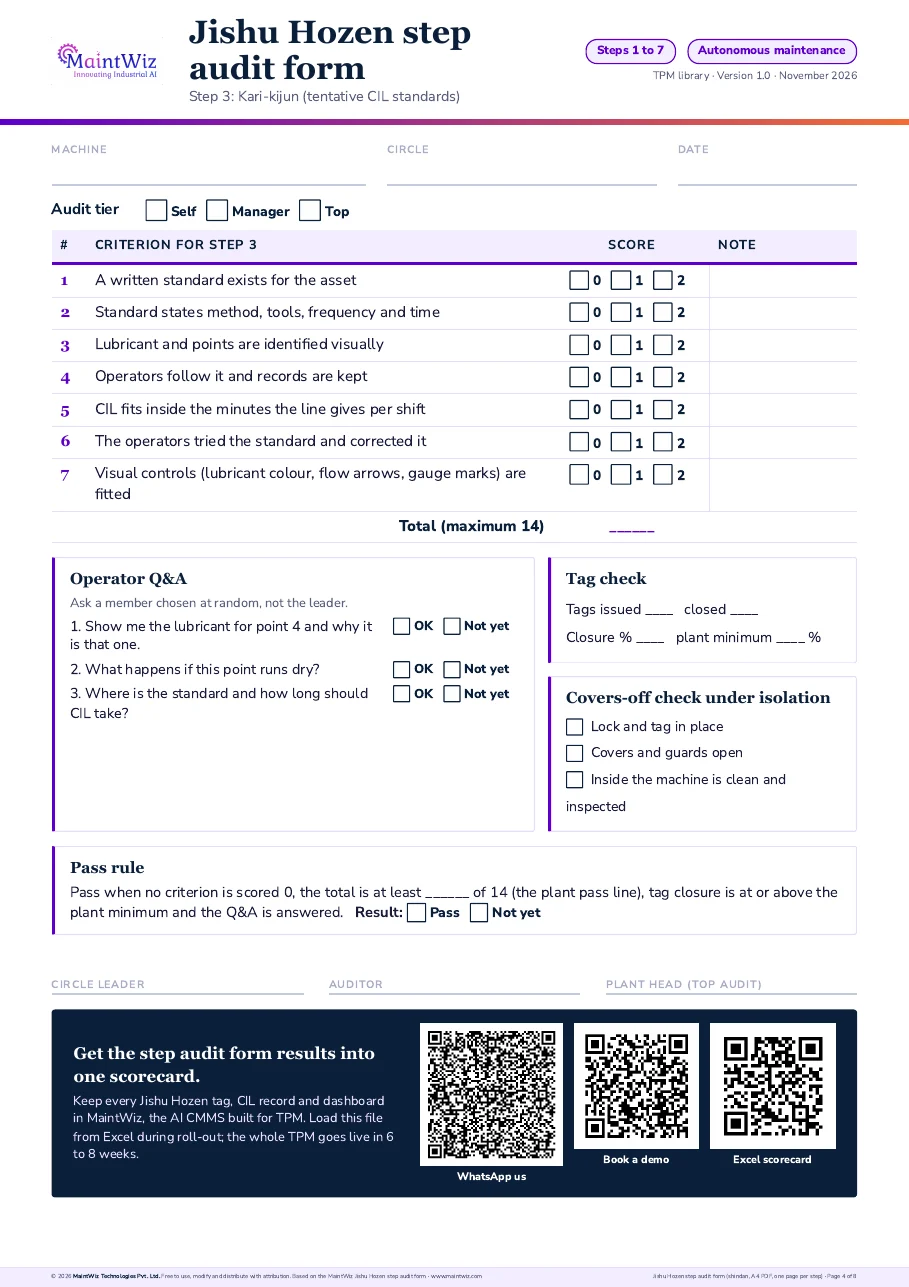
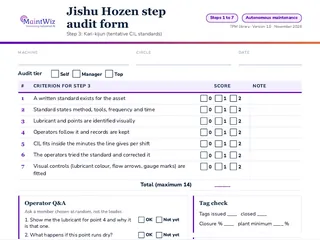 PDFJishu Hozen step audit form (shindan, PDF, one page per step)
Audit any machine with a one-page Jishu Hozen (autonomous maintenance) step audit form: scored criteria, operator questions, tag check and three-tier shindan sign-off.
Inside: One form per step, Step 1 Shoki Seiso (initial cleaning) to Step 7 Jishu Kanri (autonomous management) · Criteria scored 0, 1 or 2 with a pass rule · Three operator questions, a tag count and a covers-off check under isolation · Sign-off by circle self-audit, manager and top management
- Pages
- 8
- A4
- Created
- 5 November 2026
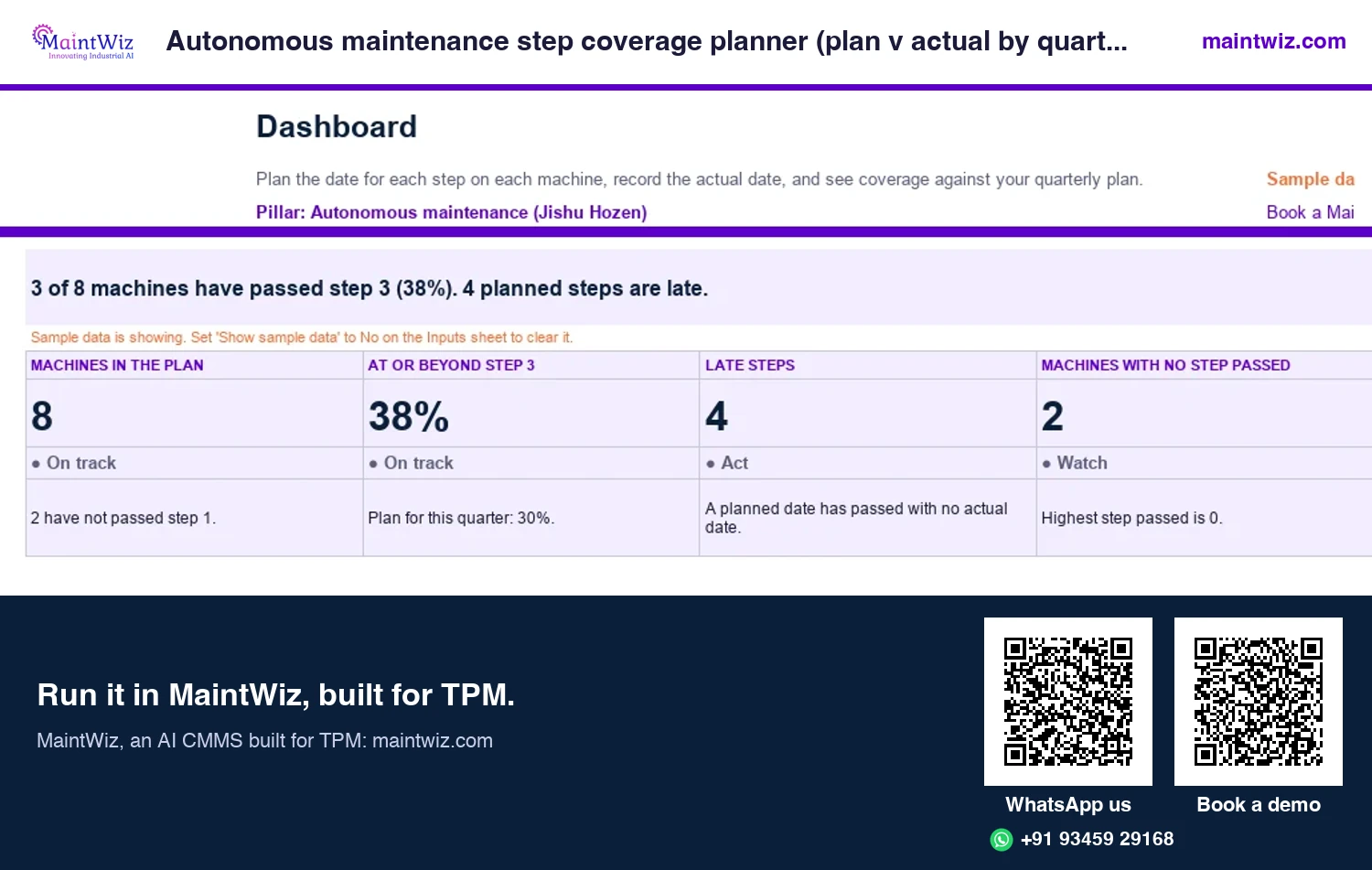
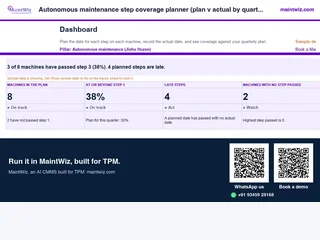 ExcelAutonomous maintenance step coverage planner (plan v actual by quarter)
See how many machines have passed each Jishu Hozen step against your quarterly plan
In MaintWiz: The Jishu Hozen dashboard shows progress by circle and facility.
- Sheets
- Dashboard, Inputs, Machines, Plan dates, Actual dates, Plan, Read me
- A4
- Version
- v1.1, 5 November 2026
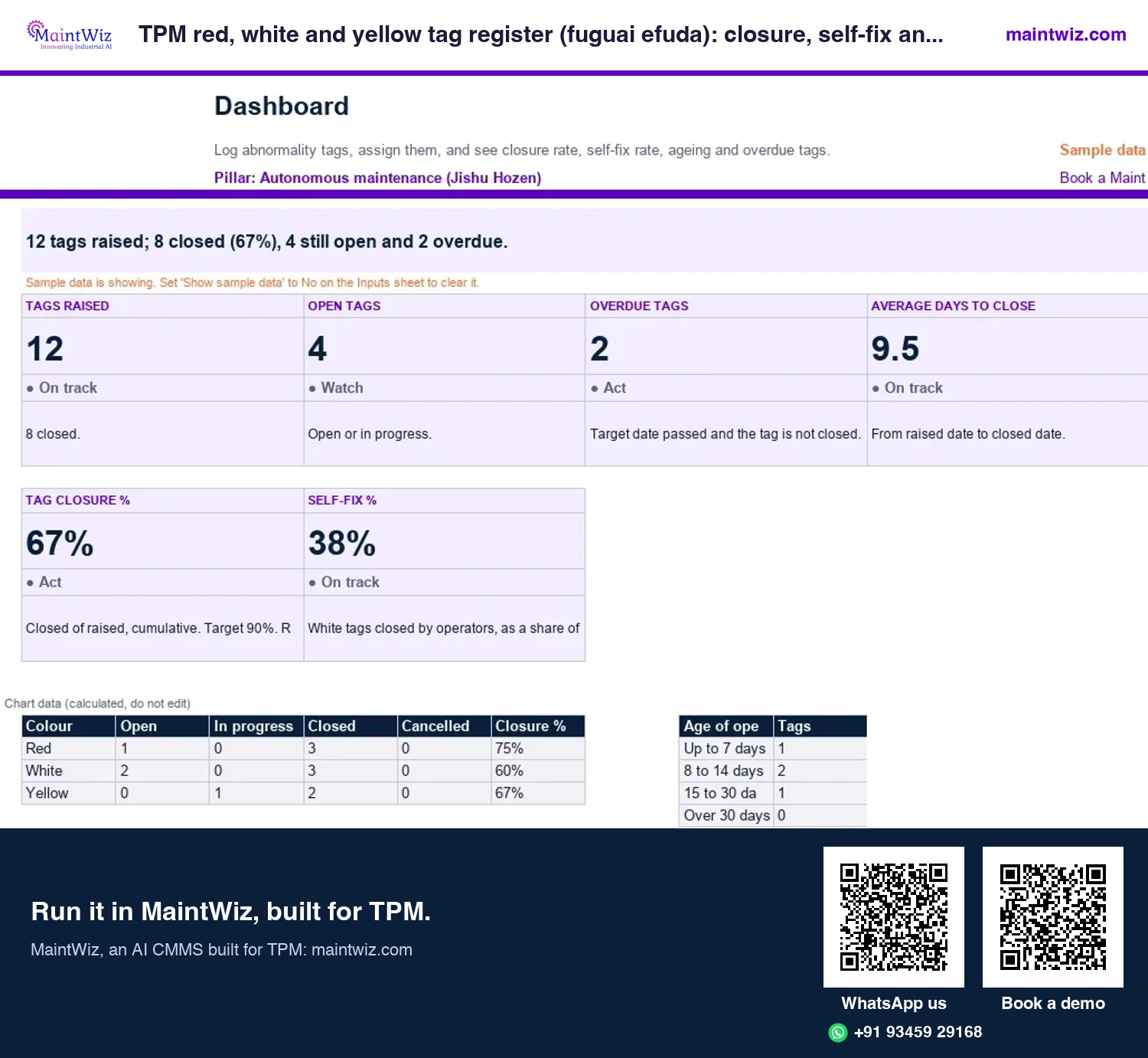
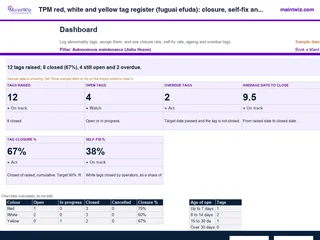 ExcelTPM red, white and yellow tag register (fuguai efuda): closure, self-fix and ageing
Log every abnormality tag, see closure rate and self-fix rate by colour, and find overdue tags before an audit does
In MaintWiz: A tag is registered against the equipment, assigned to an owner and tracked to closure; it can be converted to a work order.
- Sheets
- Dashboard, Inputs, Register, Read me
- A4
- Version
- v1.0, 2 November 2026
What users see
What do supervisors and operators see?
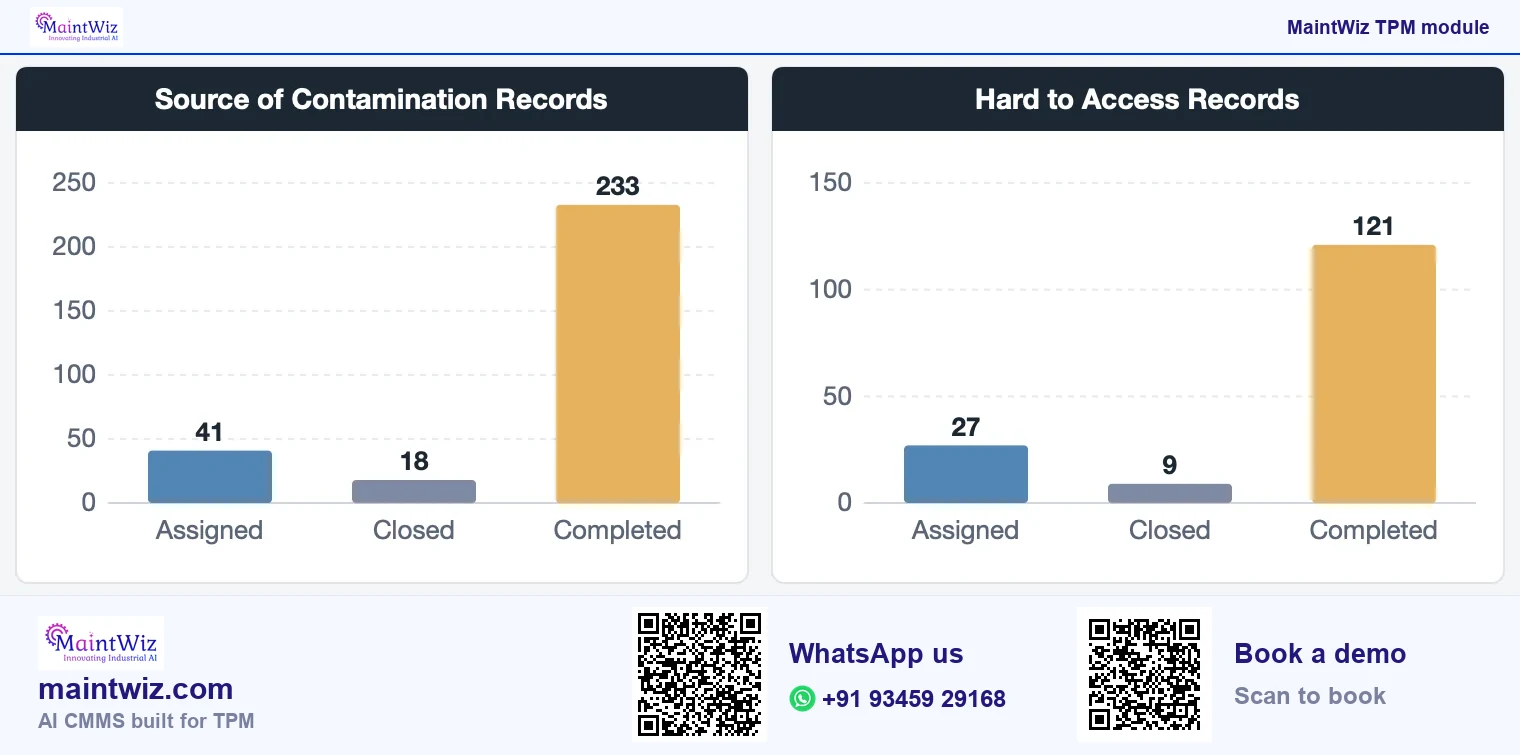
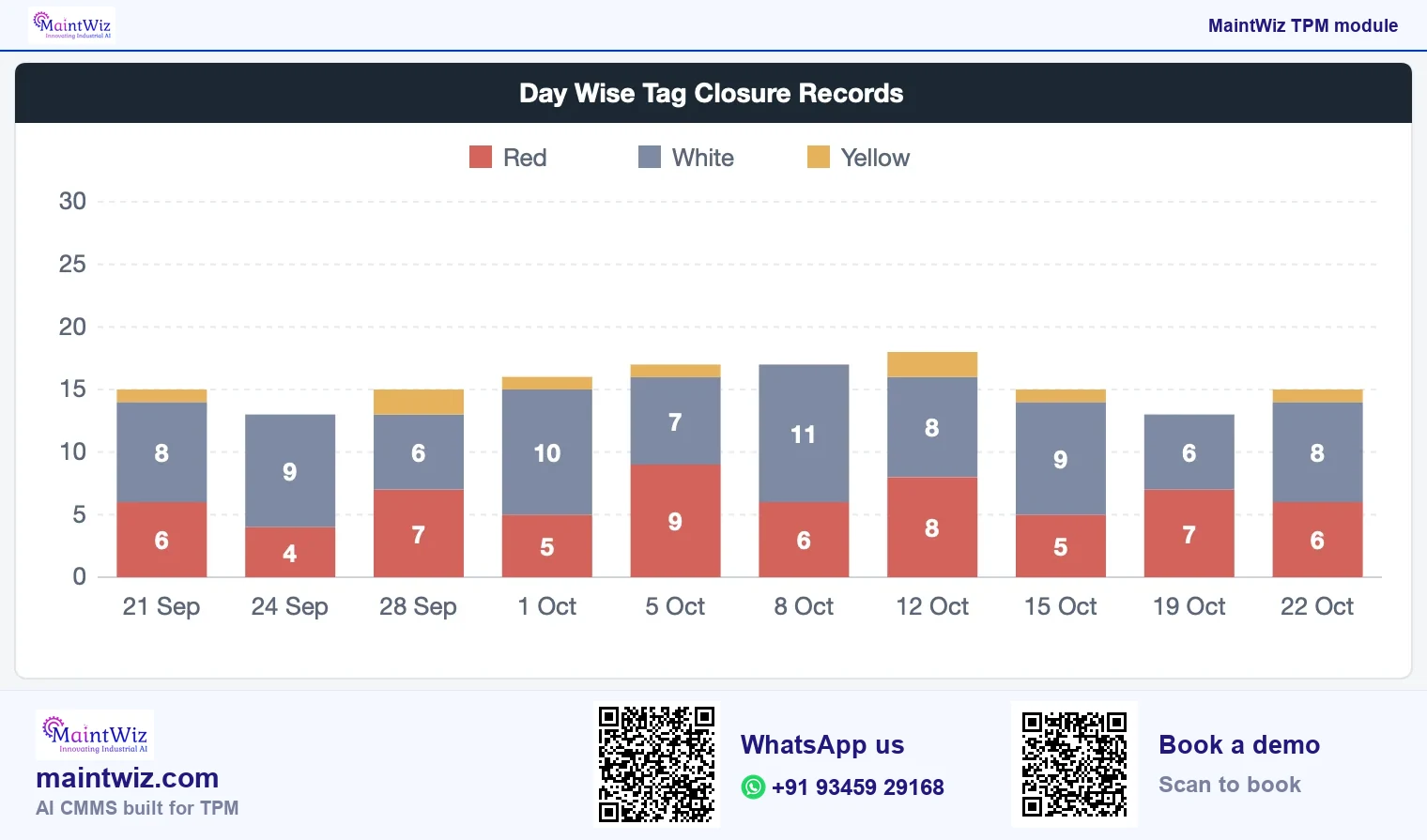
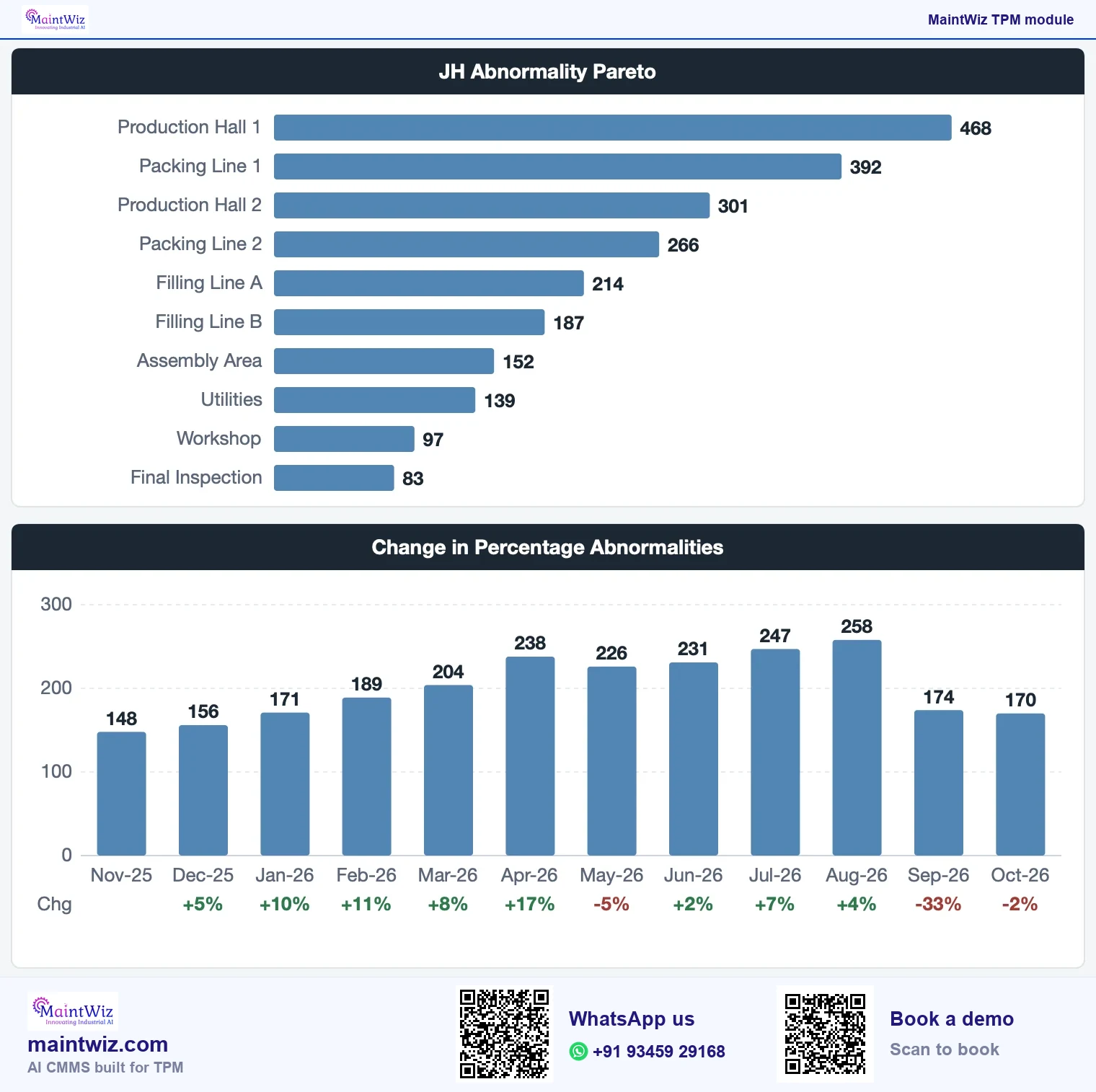
The Jishu Hozen dashboard summarises tag records by colour and month, cumulative and day-wise closure, and the sources of contamination. Supervisors use it to see what is open and where the same sources keep recurring (Figure 5).
Book a demo to see the dashboard on your data.
How are abnormalities raised from the floor?
Abnormalities are raised through the abnormality register, which holds the equipment, the nature of the issue, the tag colour, the category, the cause, the countermeasure and the target date. The register is shared with other TPM modules, so an abnormality raised by an operator during autonomous maintenance and one raised through the office TPM view are handled in the same way. Abnormality management software adds six status tabs, overdue alerts and tag-to-work-order conversion.
Paper vs system
Paper or spreadsheet versus a system for Jishu Hozen
| Paper or spreadsheet | In the system | |
|---|---|---|
| Capture | Paper tag and a line in a notebook or spreadsheet | A register entry against the equipment, with category and tag colour |
| Routing | The operator tells the supervisor or maintenance | Assigned to a named owner with a target date |
| Closure tracking | Someone checks the tags by walking the area | Status lists show open, completed and closed items and what is overdue |
| Audit trail | Initials and dates on sheets that may be lost | Who raised, who fixed, when and what was done are recorded |
| Reporting | Hand-counted for a monthly review | Dashboard of tag records, closure and contamination sources |
A spreadsheet can hold a first tag list. MaintWiz gives the same list an owner, a target date, an overdue alert and a closure dashboard from the first area, with Excel upload for equipment and people. The free Jishu Hozen step audit form and tag register give you the audit and the register to start from.
Setting it up for your plant
Menus, roles, tag colours and categories are set up with each plant, so set-up begins with an agreement on the legend, the equipment hierarchy and who closes which tag. Book a demo with your tag legend and equipment list, and see them set up.
What does it connect to?
- The abnormality register: every tag colour and category you define.
- The one point lesson module, where short training sheets for step 4 and 5 skills are kept; see one point lesson software.
- 5S audits, whose findings can become actions; see 5S audit software.
- Planned maintenance, for abnormalities that need scheduled work.
- The TPM dashboard that shows planned maintenance, Jishu Hozen and safety views together; see the TPM hub.
- OEE, where the same equipment's losses are read: see OEE software.
Where should a plant start?
- Pick one pilot area and write the tag legend.
- Enter the equipment and the people who will own tags.
- Run initial cleaning (step 1) and register every abnormality.
- Review the dashboard weekly; fix the oldest items first.
- Move to step 2 when the step audit passes; run it with the autonomous maintenance checklist and step audit.
Book a demo to see raising, assigning and closing on your equipment.
Who uses it
Who uses it, and for what?
| Role | What they do in the module |
|---|---|
| Operator | Cleans and inspects, raises abnormalities against the equipment |
| Supervisor | Reviews open items for the area, clears blockers |
| Maintenance | Takes the abnormalities that need support and records the countermeasure |
| Pillar owner | Reads the Jishu Hozen dashboard and reports, runs the review |
| Plant head | Sees tag records and closure in the TPM dashboard overview |
What the plant does while MaintWiz is set up
The whole roll-out takes 6 to 8 weeks with Excel uploads and guided project management. In parallel the plant agrees the tag legend, names tag owners and trains operators on the tag rules.
- Agree the tag legend and categories, and name the tag owners.
- Train operators on the tag rules.
- Run initial cleaning and register every abnormality.
- Review the open items with the team, fix the oldest first and run the first step audit.
Get a quote for the modules and users your plant needs.
What you will see in the demo
- An abnormality raised, assigned to an owner with a target date and closed, on your own equipment structure.
- Tag colours and categories laid out for your plant.
- The Jishu Hozen dashboard: tags by colour, cumulative and day-wise closure, sources of contamination.
- Operators raising tags on a phone and seeing their own area's open items, with overdue alerts.
- A tag converted to a work order after manual review.
- Data exported to XLS and PDF.
Book a demo and see this module on your own records.
Mobile and work orders
Mobile capture, operator views and work orders
Operators raise tags and records on mobile devices at the machine. Each operator sees their own area's open items, and overdue alerts show what has passed its target date. A tag can be converted to a work order after manual review, when the fix needs maintenance.
MaintWiz runs as software as a service (SaaS), or on-premises on your own servers on request. Data can be exported to XLS and PDF.
An abnormality raised on a phone lands in the same register as one raised at a terminal, so the supervisor's dashboard and the overdue alerts count both (Figure 8).
The Jishu Hozen record connects to six things
Jishu Hozen record tags, checks, closures
Mobile capture
phone, tablet or terminal
IoT readings
can raise work orders automatically
Overdue alerts
shown to operators
Dashboards
by pillar, facility and day
Work orders
a tag converts when maintenance is needed
SAP PM and MM
web services
maintwiz.comAI CMMS built for TPMWhatsApp us+91 93459 29168Book a demoCost and speed
What does it cost, and how fast can it run?
MaintWiz rolls out the whole of Total Productive Maintenance in 6 to 8 weeks, with Excel uploads and guided project management. It integrates with SAP through the PM and MM modules. Pricing is quoted on request and tailored to the modules and users you need: read how TPM software is priced, then book a demo on your own records.
FAQ
Frequently asked questions
What is autonomous maintenance software?
Software that supports operator-led care of equipment: registering abnormalities found during cleaning and inspection, assigning and closing them, and showing tag and closure dashboards by colour and by day.
How does MaintWiz support Jishu Hozen?
Through the Jishu Hozen modules: an abnormality register, autonomous maintenance records, reports and a dashboard of tag records, closure trends and contamination sources, all linked to the equipment list used by the other TPM modules.
How do operators learn the tag rules?
The plant briefs operators on the tag legend before step 1, and short training sheets for steps 4 and 5 are kept as one point lessons in the one point lesson module. MaintWiz then records each abnormality and tracks it to closure.
Can we load our existing tag list?
Yes. Equipment and people load through Excel uploads, and the MaintWiz implementation team guides the set-up. Open tags then go into the abnormality register, each with an owner, a target date and an overdue alert, and the Jishu Hozen dashboard tracks closure.
Which tag colours does the system use?
Red, white and yellow. Red marks an abnormality that needs maintenance support, white one the operator can fix, and yellow as your plant defines it; each tag is recorded with its colour and type in the register.
How do we see it on our own scenario?
Book a demo and bring one pilot area. We walk through raising, assigning and closing an abnormality, and then the dashboard views, using your equipment structure and tag legend rather than a prepared script.
Is there Jishu Hozen software or an autonomous maintenance app for operators?
Yes. Operators raise abnormality tags on mobile devices at the machine, see their own area's open items and get overdue alerts, and a tag converts to a work order when maintenance work is needed. Book a demo with one pilot area.
What should autonomous maintenance software do?
It should let operators raise abnormality tags, route each to an owner with a target date, record autonomous maintenance checks and show closure by colour and day. MaintWiz groups the abnormality register, records, reports and a dashboard in one menu.
How long does it take to roll out autonomous maintenance software?
The MaintWiz roll-out takes 6 to 8 weeks, with easy Excel uploads for equipment and people and guided project management by the MaintWiz implementation team, including set-up of the modules and training.
Can an abnormality raised by an operator become a work order?
Yes. A tag can be converted to a work order after manual review, when the fix needs maintenance. The work order then sits on the same equipment list as planned maintenance, so the abnormality, the work and the history stay together.